


如果啟用了單一登入(Active Directory),請使用 StorageGRID API
 建議變更
建議變更

 PDF
PDF
如果您擁有"設定並啟用單一登入(SSO)"並使用 Active Directory 作為 SSO 供應商,則必須發出一系列 API 請求,以取得對 Grid Management API 或 Tenant Management API 有效的驗證權杖。
如果啟用了單一登入,請登入 API。
如果您使用 Active Directory 作為 SSO 身分識別供應商,則適用這些說明。
-
您知道屬於 StorageGRID 使用者群組的聯合使用者的 SSO 使用者名稱和密碼。
-
如果您想存取租戶管理 API,您需要知道租戶帳戶 ID。
若要取得驗證令牌,您可以使用下列範例之一:
-
The
storagegrid-ssoauth.pyPython 指令碼位於 StorageGRID 安裝檔案目錄中,(`./rpms`適用於 RHEL, `./debs`適用於 Ubuntu 或 Debian,以及 `./vsphere`適用於 VMware)。 -
curl 請求的工作流程範例。
如果您執行 curl 工作流程的速度太慢,該工作流程可能會逾時。您可能會看到錯誤:
A valid SubjectConfirmation was not found on this Response。
範例 curl 工作流程無法防止其他使用者看到密碼。
如果遇到 URL 編碼問題,您可能會看到以下錯誤: Unsupported SAML version。
-
請選擇以下其中一種方法來取得驗證權杖:
-
使用
storagegrid-ssoauth.pyPython 指令碼。前往步驟 2。 -
使用 curl 請求。前往步驟 3。
-
-
如果您想使用該 `storagegrid-ssoauth.py`指令碼,請將指令碼傳遞給 Python 解譯器並執行該指令碼。
出現提示時,請輸入以下參數的值:
-
單一登入 (SSO) 方法。輸入 ADFS 或 adfs。
-
SSO 使用者名稱
-
StorageGRID 安裝所在的網域
-
StorageGRID 的位址
-
如果您想存取租戶管理 API,則需要租戶帳戶 ID。
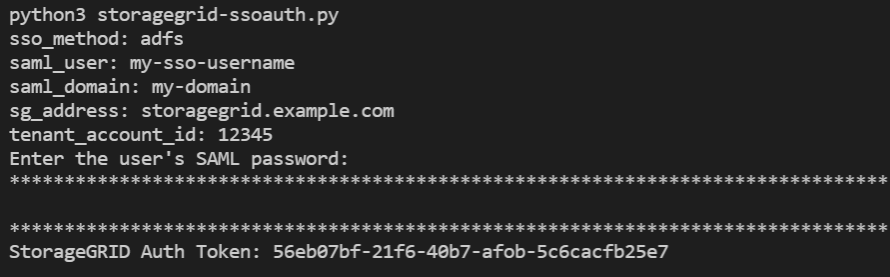
StorageGRID 授權權杖已在輸出中提供。現在,您可以像未使用 SSO 時使用 API 一樣,使用此權杖發出其他請求。
-
-
如果要使用 curl 請求,請依照下列步驟操作。
-
聲明登入所需的變數。
export SAMLUSER='my-sso-username'
export SAMLPASSWORD='my-password'
export SAMLDOMAIN='my-domain'
export TENANTACCOUNTID='12345'
export STORAGEGRID_ADDRESS='storagegrid.example.com'
export AD_FS_ADDRESS='adfs.example.com'
若要存取 Grid Management API,請使用 0 作為 TENANTACCOUNTID。 -
若要接收已簽署的驗證 URL,請向
/api/v3/authorize-saml發出 POST 要求,並從回應中移除額外的 JSON 編碼。此範例展示了針對已簽名驗證 URL 的 POST 請求
TENANTACCOUNTID。結果將傳遞給 `python -m json.tool`以移除 JSON 編碼。curl -X POST "https://$STORAGEGRID_ADDRESS/api/v3/authorize-saml" \ -H "accept: application/json" -H "Content-Type: application/json" \ --data "{\"accountId\": \"$TENANTACCOUNTID\"}" | python -m json.tool此範例的回應包含一個經過 URL 編碼的簽章 URL,但不包含額外的 JSON 編碼階層。
{ "apiVersion": "3.0", "data": "https://adfs.example.com/adfs/ls/?SAMLRequest=fZHLbsIwEEV%2FJTuv7...sSl%2BfQ33cvfwA%3D&RelayState=12345", "responseTime": "2018-11-06T16:30:23.355Z", "status": "success" } -
儲存回應中的
SAMLRequest,以便在後續命令中使用。export SAMLREQUEST='fZHLbsIwEEV%2FJTuv7...sSl%2BfQ33cvfwA%3D' -
從 AD FS 取得包含用戶端請求 ID 的完整 URL。
一種方法是使用先前回應中的 URL 請求登入表單。
curl "https://$AD_FS_ADDRESS/adfs/ls/?SAMLRequest=$SAMLREQUEST&RelayState=$TENANTACCOUNTID" | grep 'form method="post" id="loginForm"'回應包含用戶端請求 ID:
<form method="post" id="loginForm" autocomplete="off" novalidate="novalidate" onKeyPress="if (event && event.keyCode == 13) Login.submitLoginRequest();" action="/adfs/ls/?
SAMLRequest=fZHRToMwFIZfhb...UJikvo77sXPw%3D%3D&RelayState=12345&client-request-id=00000000-0000-0000-ee02-0080000000de" >
-
從回應中儲存用戶端請求 ID。
export SAMLREQUESTID='00000000-0000-0000-ee02-0080000000de' -
將您的憑證傳送至上一個回應中的表單動作。
curl -X POST "https://$AD_FS_ADDRESS/adfs/ls/?SAMLRequest=$SAMLREQUEST&RelayState=$TENANTACCOUNTID&client-request-id=$SAMLREQUESTID" \
--data "UserName=$SAMLUSER@$SAMLDOMAIN&Password=$SAMLPASSWORD&AuthMethod=FormsAuthentication" --include
AD FS 傳回 302 重新導向,並在標頭中包含額外資訊。
如果您的 SSO 系統啟用了多因素驗證 (MFA),則表單提交中還將包含第二個密碼或其他憑證。 HTTP/1.1 302 Found Content-Length: 0 Content-Type: text/html; charset=utf-8 Location: https://adfs.example.com/adfs/ls/?SAMLRequest=fZHRToMwFIZfhb...UJikvo77sXPw%3D%3D&RelayState=12345&client-request-id=00000000-0000-0000-ee02-0080000000de Set-Cookie: MSISAuth=AAEAADAvsHpXk6ApV...pmP0aEiNtJvWY=; path=/adfs; HttpOnly; Secure Date: Tue, 06 Nov 2018 16:55:05 GMT
-
從回應中儲存
MSISAuthCookie。export MSISAuth='AAEAADAvsHpXk6ApV...pmP0aEiNtJvWY=' -
使用驗證 POST 請求中的 Cookie 向指定位置發送 GET 請求。
curl "https://$AD_FS_ADDRESS/adfs/ls/?SAMLRequest=$SAMLREQUEST&RelayState=$TENANTACCOUNTID&client-request-id=$SAMLREQUESTID" \
--cookie "MSISAuth=$MSISAuth" --include
回應標頭將包含 AD FS 工作階段資訊,以供稍後登出使用,回應本文包含隱藏表單欄位中的 SAMLResponse。
HTTP/1.1 200 OK
Cache-Control: no-cache,no-store
Pragma: no-cache
Content-Length: 5665
Content-Type: text/html; charset=utf-8
Expires: -1
Server: Microsoft-HTTPAPI/2.0
P3P: ADFS doesn't have P3P policy, please contact your site's admin for more details
Set-Cookie: SamlSession=a3dpbnRlcnMtUHJpbWFyeS1BZG1pbi0xNzgmRmFsc2Umcng4NnJDZmFKVXFxVWx3bkl1MnFuUSUzZCUzZCYmJiYmXzE3MjAyZTA5LThmMDgtNDRkZC04Yzg5LTQ3NDUxYzA3ZjkzYw==; path=/adfs; HttpOnly; Secure
Set-Cookie: MSISAuthenticated=MTEvNy8yMDE4IDQ6MzI6NTkgUE0=; path=/adfs; HttpOnly; Secure
Set-Cookie: MSISLoopDetectionCookie=MjAxOC0xMS0wNzoxNjozMjo1OVpcMQ==; path=/adfs; HttpOnly; Secure
Date: Wed, 07 Nov 2018 16:32:59 GMT

<form method="POST" name="hiddenform" action="https://storagegrid.example.com:443/api/saml-response">
  <input type="hidden" name="SAMLResponse" value="PHNhbWxwOlJlc3BvbnN...1scDpSZXNwb25zZT4=" /><input type="hidden" name="RelayState" value="12345" />
-
儲存隱藏欄位中的
SAMLResponse值:export SAMLResponse='PHNhbWxwOlJlc3BvbnN...1scDpSZXNwb25zZT4=' -
使用已儲存的
SAMLResponse,向 StorageGRID 發出/api/saml-response請求以產生 StorageGRID 驗證權杖。對於
RelayState,請使用租戶帳戶 ID,或者如果您想要登入 Grid Management API,請使用 0。curl -X POST "https://$STORAGEGRID_ADDRESS:443/api/saml-response" \ -H "accept: application/json" \ --data-urlencode "SAMLResponse=$SAMLResponse" \ --data-urlencode "RelayState=$TENANTACCOUNTID" \ | python -m json.tool回應包含驗證令牌。
{ "apiVersion": "3.0", "data": "56eb07bf-21f6-40b7-af0b-5c6cacfb25e7", "responseTime": "2018-11-07T21:32:53.486Z", "status": "success" }-
將回應中的驗證權杖儲存為
MYTOKEN。export MYTOKEN="56eb07bf-21f6-40b7-af0b-5c6cacfb25e7"現在您可以使用
MYTOKEN來處理其他請求,就像未使用 SSO 時使用 API 一樣。
-
如果啟用了單一登入,請登出 API。
如果已啟用單一登入 (SSO),則必須發出一系列 API 請求才能從 Grid Management API 或 Tenant Management API 登出。如果您使用 Active Directory 作為 SSO 身分識別供應商,則這些說明適用。
如有需要,您可以透過組織的單一登出頁面登出,從而退出 StorageGRID API。或者,您也可以從 StorageGRID 觸發單一登出 (SLO),這需要有效的 StorageGRID 持有者權杖。
-
若要產生已簽署的登出請求,請將
Cookie "sso=true"傳遞給 SLO API:curl -k -X DELETE "https://$STORAGEGRID_ADDRESS/api/v3/authorize" \ -H "accept: application/json" \ -H "Authorization: Bearer $MYTOKEN" \ --cookie "sso=true" \ | python -m json.tool傳回一個登出 URL:
{ "apiVersion": "3.0", "data": "https://adfs.example.com/adfs/ls/?SAMLRequest=fZDNboMwEIRfhZ...HcQ%3D%3D", "responseTime": "2018-11-20T22:20:30.839Z", "status": "success" } -
儲存登出 URL。
export LOGOUT_REQUEST='https://adfs.example.com/adfs/ls/?SAMLRequest=fZDNboMwEIRfhZ...HcQ%3D%3D' -
向登出 URL 發送請求以觸發 SLO 並重新導向回 StorageGRID。
curl --include "$LOGOUT_REQUEST"返回 302 回應。重新導向位置不適用於僅透過 API 進行的登出。
HTTP/1.1 302 Found
Location: https://$STORAGEGRID_ADDRESS:443/api/saml-logout?SAMLResponse=fVLLasMwEPwVo7ss%...%23rsa-sha256
Set-Cookie: MSISSignoutProtocol=U2FtbA==; expires=Tue, 20 Nov 2018 22:35:03 GMT; path=/adfs; HttpOnly; Secure
-
刪除 StorageGRID 持有者權杖。
刪除 StorageGRID bearer token 的運作方式與沒有 SSO 時相同。如果未提供 `Cookie "sso=true",使用者將從 StorageGRID 登出,而不影響 SSO 狀態。
curl -X DELETE "https://$STORAGEGRID_ADDRESS/api/v3/authorize" \
-H "accept: application/json" \
-H "Authorization: Bearer $MYTOKEN" \
--include
A
204 No Content回應表示使用者現在已登出。HTTP/1.1 204 No Content