


Learn about NetApp Console

 Suggest changes

 PDFs
PDFs
NetApp Console offers a SaaS experience for full feature access or a self-hosted option for organizations with connectivity restrictions.
You can use NetApp Console in two ways: as a fully managed SaaS experience or as a self-hosted solution in your own cloud environment. With the SaaS option, you access the Console through console.netapp.com while NetApp manages all infrastructure, authentication, and updates. You get complete feature access directly from your web browser. If you choose the self-hosted option, you install a Console agent in your AWS, Azure, or Google Cloud environment. The interface runs locally, and the agent maintains limited outbound connectivity to NetApp for essential tasks like authentication and updates.
Choose the SaaS experience if your organization has standard internet connectivity. You benefit from the simplest setup, automatic updates, and full access to all NetApp storage systems, data services, and advanced features. You can add agents directly from the Console, and NetApp handles all maintenance.
Select the self-hosted option if your organization requires strict connectivity, security, or compliance controls, such as in government or regulated industries. You gain more control and network isolation, but you can only manage select NetApp storage systems and use limited data services, with some features unavailable. You install a Console agent manually and access the Console directly from the local agent interface. Install your agent through your cloud marketplace or manual installation, and the agent communicates outbound-only to NetApp, ensuring no inbound internet connections.
Overview
Each deployment mode differs in outbound connectivity, location, installation, authentication, data services, and charging methods.
- Standard mode
-
You use a SaaS service from the web-based console. Depending on the data services and features that you plan to use, a Console organization admin creates one or more Console agents to manage data within your hybrid cloud environment.
This mode uses encrypted data transmission over the public internet.
- Restricted mode
-
You install a Console agent in the cloud (in a government, sovereign, or commercial region), and it has limited outbound connectivity to the NetApp Console SaaS layer.
This mode is typically used by state and local governments and regulated companies.
- BlueXP private mode (legacy BlueXP interface only)
-
BlueXP private mode (legacy BlueXP interface) is typically used with on-premises environments that have no internet connection and with secure cloud regions, which includes AWS Secret Cloud, AWS Top Secret Cloud, and Azure IL6. NetApp continues to support these environments with the legacy BlueXP interface. PDF documentation for BlueXP private mode
The following table provides a comparison of the NetApp console.
| Standard mode | Restricted mode | |
|---|---|---|
Connection required to NetApp Console SaaS layer? |
Yes |
Outbound only |
Connection required to your cloud provider? |
Yes |
Yes, within the region |
Console agent installation |
From the Console, cloud marketplace, or manual install |
Cloud marketplace or manual install |
Console agent upgrades |
Automatic upgrades |
Automatic upgrades |
UI access |
From the Console SaaS layer |
Locally from an agent VM |
API endpoint |
The Console SaaS layer |
A Console agent |
Authentication |
Through SaaS using auth0, NSS login, or identity federation |
Through SaaS using auth0 or identity federation |
Multi-factor authentication |
Available for local users |
Not available |
Storage and data services |
All are supported |
Many are supported |
Data service licensing options |
Marketplace subscriptions and BYOL |
Marketplace subscriptions and BYOL |
Read through the following sections to learn more about these modes, including which NetApp Console features and services are supported.
Standard mode
The following image is an example of a standard mode deployment.
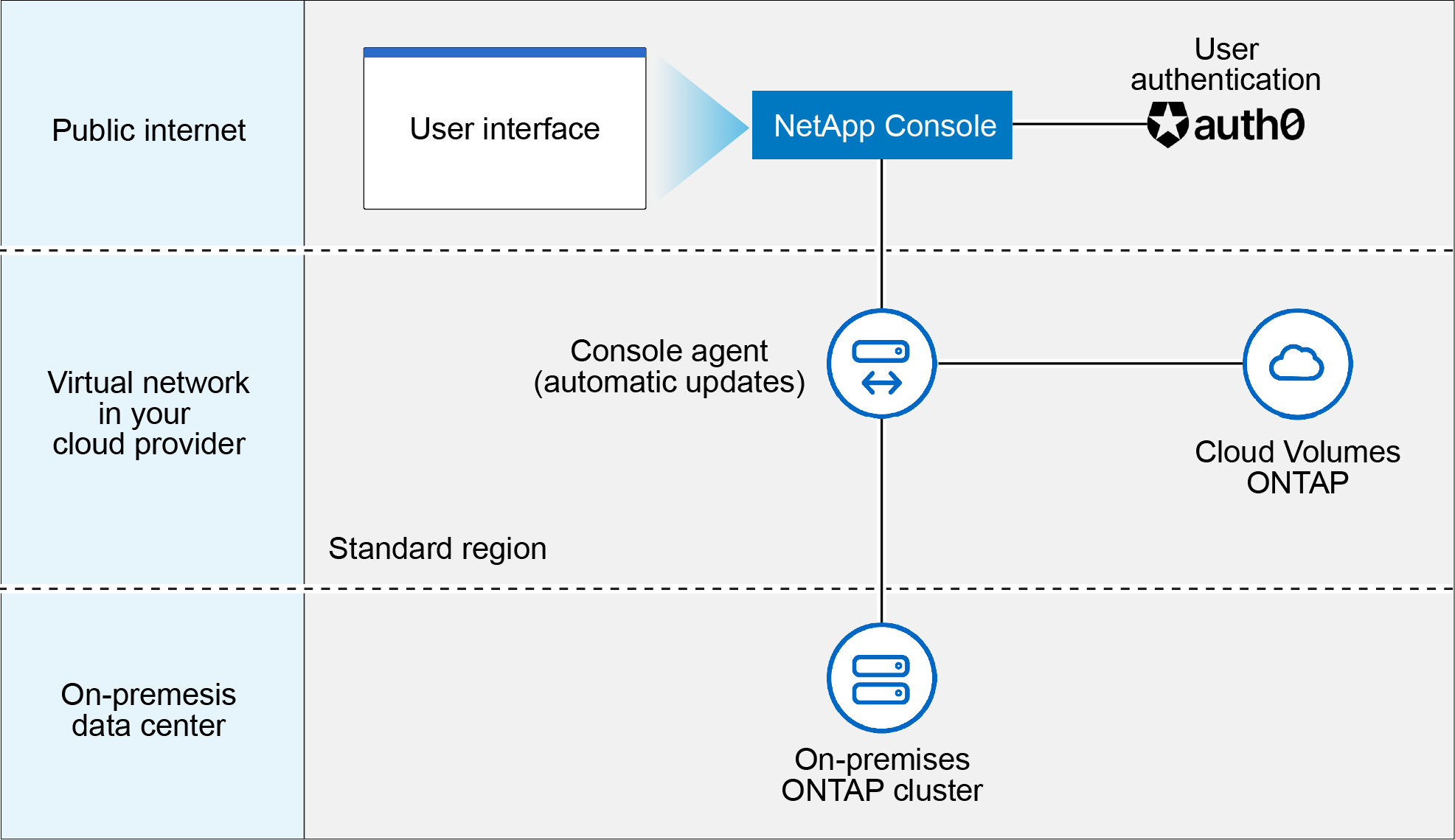
The Console works as follows in standard mode:
- Outbound communication
-
Connectivity is required from a Console agent to the Console SaaS layer, to your cloud provider's publicly available resources, and to other essential components for day-to-day operations.
- Supported location for an agent
-
In standard mode, an agent is supported in the cloud or on your premises.
- Console agent installation
-
You can install an agent using one of the following methods:
-
From the Console
-
From the AWS or Azure Marketplace
-
From the Google Cloud SDK
-
Manually using an installer on a Linux host in your data center or cloud
-
Use the provided OVA in your VCenter environment.
-
- Console agent upgrades
-
NetApp automatically upgrades your agent monthly.p.
- User interface access
-
The user interface is accessible from the web-based console that's provided through the SaaS layer.
- API endpoint
-
API calls are made to the following endpoint:
https://api.bluexp.netapp.com - Authentication
-
Authentication with auth0 or NetApp Support Site (NSS) logins. Identity federation is available.
- Supported data services
-
All NetApp data services are supported. Learn more about NetApp data services.
- Supported licensing options
-
Marketplace subscriptions and BYOL are supported with standard mode; however, the supported licensing options depends on which NetApp data service you are using. Review the documentation for each service to learn more about the available licensing options.
- How to get started with standard mode
-
Go to the NetApp Console and sign up.
Restricted mode
The following image is an example of a restricted mode deployment.
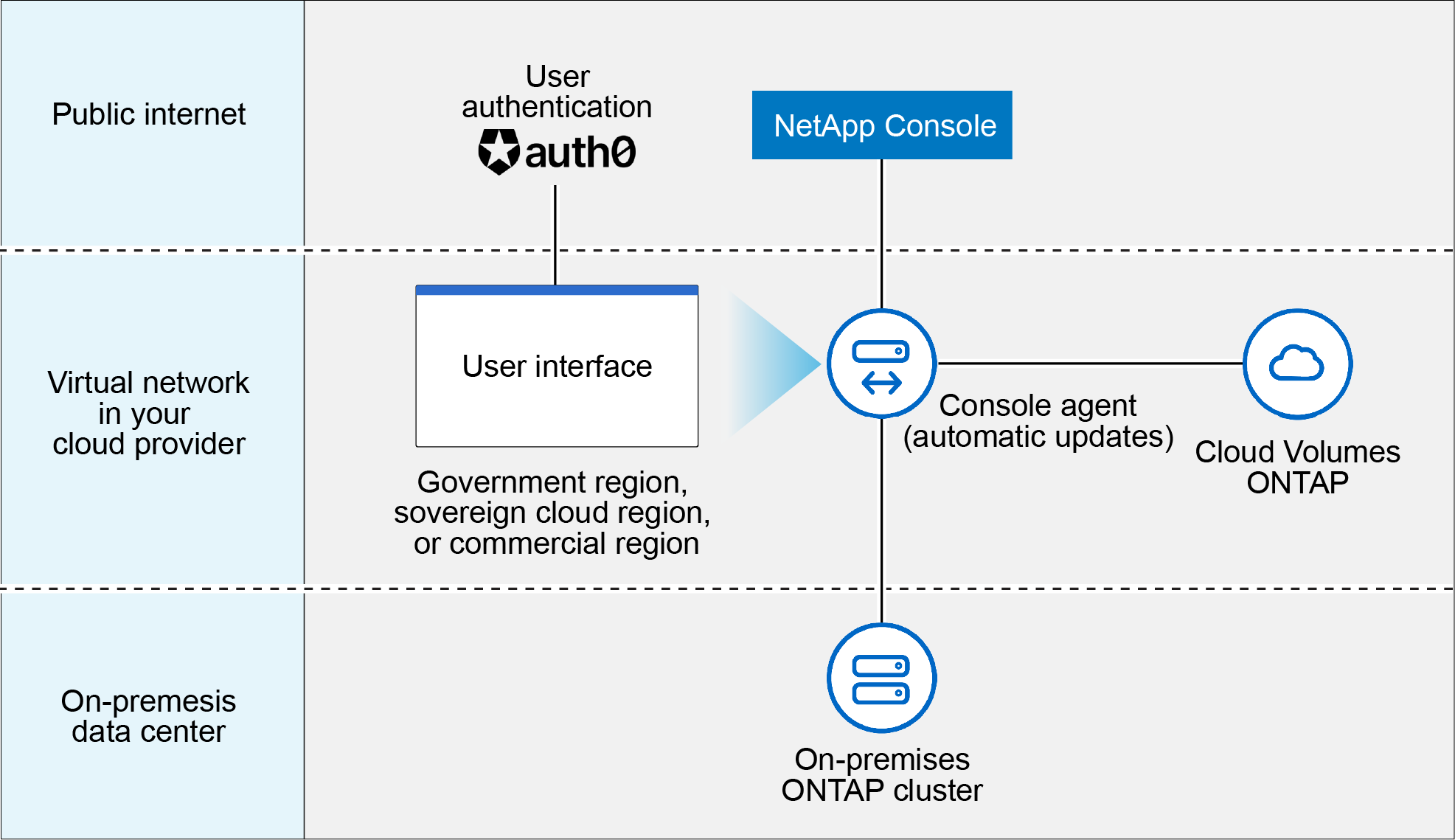
The Console works as follows in restricted mode:
- Outbound communication
-
An agent requires outbound connectivity to the Console SaaS layer for data services, software upgrades, authentication, and metadata transmission.
The Console SaaS layer does not initiate communication to an agent. Agents initiate all communication with the Console SaaS layer, pulling or pushing data as needed.
A connection is also required to cloud provider resources from within the region.
- Supported location for an agent
-
In restricted mode, an agent is supported in the cloud: in a government region, sovereign region, or commercial region.
- Console agent installation
-
You can install from the AWS or Azure Marketplace or a manual installation on your own Linux host or us a downloadable OVA in your VCenter environment.
- Console agent upgrades
-
NetApp automatically upgrades your agent software with monthly updates.
- User interface access
-
The user interface is accessible from an agent virtual machine that's deployed in your cloud region.
- API endpoint
-
API calls are made to the agent virtual machine.
- Authentication
-
Authentication is provided through auth0. Identity federation is also available.
- Supported storage management and data services
-
The following storage and data services with restricted mode:
Supported services Notes Azure NetApp Files
Full support
Backup and recovery
Supported in Government regions and commercial regions with restricted mode. Not supported in sovereign regions with restricted mode.
In restricted mode, NetApp Backup and Recovery supports back up and restore of ONTAP volume data only. View the list of supported backup destinations for ONTAP data
Back up and restore of application data and virtual machine data is not supported.NetApp Data Classification
Supported in Government regions with restricted mode. Not supported in commercial regions or in sovereign regions with restricted mode.
Cloud Volumes ONTAP
Full support
Licenses and subscriptions
You can access license and subscription information with the supported licensing options listed below for restricted mode.
On-premises ONTAP clusters
Discovery with a Console agent and discovery without a Console agent (direct discovery) are both supported.
When you discover an on-premises cluster without a Console agent, the Advanced view (System Manager) is not supported.Replication
Supported in Government regions with restricted mode. Not supported in commercial regions or in sovereign regions with restricted mode.
- Supported licensing options
-
The following licensing options are supported with restricted mode:
-
Marketplace subscriptions (hourly and annual contracts)
Note the following:
-
For Cloud Volumes ONTAP, only capacity-based licensing is supported.
-
In Azure, annual contracts are not supported with government regions.
-
-
BYOL
For Cloud Volumes ONTAP, both capacity-based licensing and node-based licensing are supported with BYOL.
-
- How to get started with restricted mode
-
You need to enable restricted mode when you create your NetApp Console organization.
If you don't have an organization yet, you are prompted to create your organization and enable restricted mode when you log in to the Console for the first time from a Console agent that you manually installed or that you created from your cloud provider's marketplace.

|
You cannot change the restricted mode setting after creating the organization. |
Service and feature comparison
The following table can help you quickly identify which services and features are supported with restricted mode.
Note that some services might be supported with limitations. For more details about how these services are supported with restricted mode, refer to the sections above.
| Product area | NetApp data service or feature | Restricted mode |
|---|---|---|
Storage |
Amazon FSx for ONTAP |
No |
Amazon S3 |
No |
|
Azure Blob |
No |
|
Azure NetApp Files |
Yes |
|
Cloud Volumes ONTAP |
Yes |
|
Google Cloud NetApp Volumes |
No |
|
Google Cloud Storage |
No |
|
On-premises ONTAP clusters |
Yes |
|
E-Series |
No |
|
StorageGRID |
No |
|
Data Services |
NetApp Backup and recovery |
Yes |
NetApp Data Classification |
Yes |
|
NetApp Copy and Sync |
No |
|
NetApp Disaster Recovery |
No |
|
NetApp Ransomware Resilience |
No |
|
NetApp Replication |
Yes |
|
NetApp Cloud Tiering |
No |
|
NetApp Volume caching |
No |
|
NetApp Workload factory |
No |
|
Features |
Alerts |
No |
Digital Advisor |
No |
|
License and subscription management |
Yes |
|
Identity and access management |
Yes |
|
Credentials |
Yes |
|
Federation |
Yes |
|
Lifecycle planning |
No |
|
Multi-factor authentication |
Yes |
|
NSS accounts |
Yes |
|
Notifications |
Yes |
|
Search |
Yes |
|
Software updates |
No |
|
Sustainability |
No |
|
Audit |
Yes |