


Configure SnapCenter central plug-in host for SAP HANA

 Suggest changes

 PDFs
PDFs
Deploy the SnapCenter HANA plug-in on a central host to support SAP HANA multiple-host systems or HANA systems on IBM Power. This procedure includes installing the plug-in on a Windows or Linux host, configuring the SAP HANA hdbsql client, and setting up user store keys for each protected HANA system.
As discussed in "Deployment options for SnapCenter plug-in for SAP HANA", the HANA plug-in can be deployed outside of the HANA database to support a central plug-in configuration which is required SAP HANA multiple host systems or SAP HANA on IBM Power environments.
The central plug-in host can be any Windows or Linux host, but typically the SnapCenter server itself is used as a central plug-in host.
The configuration of a central plug-in host consists of the following steps:
-
SnapCenter HANA plug-in deployment
-
SAP HANA hdbsql client installation and configuration
-
SAP HANA user store configuration for each HANA system which is protected by the central plug-in host
SnapCenter HANA plug-in deployment
The host requirements are listed at Host requirements for installing the SnapCenter Plug-ins Package for Linux.
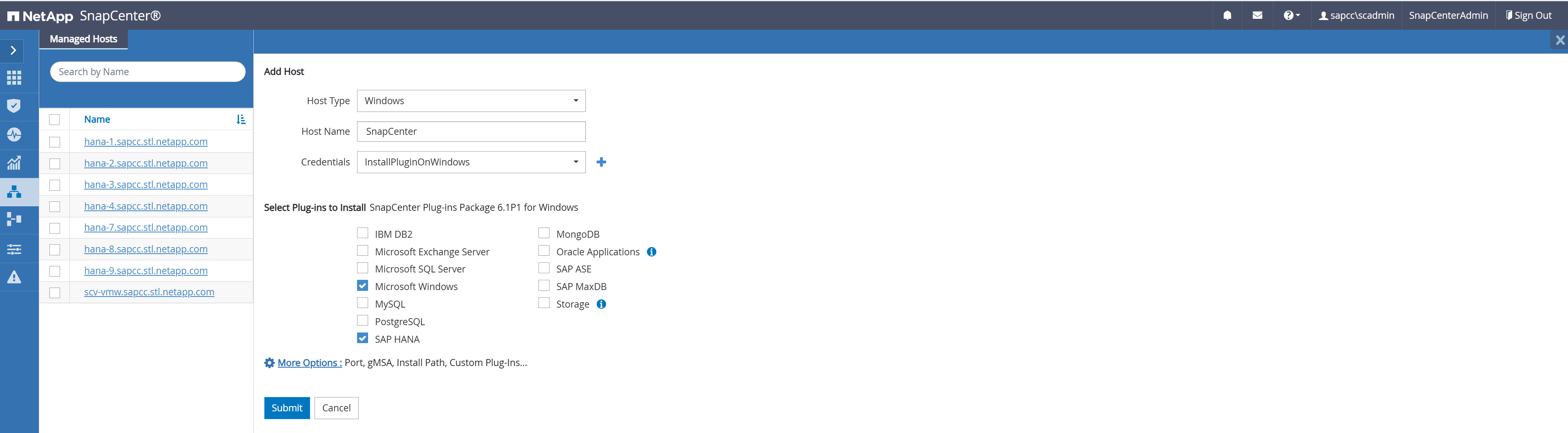
The central plug-in host on is added as a host, and the SAP HANA plug-in is installed on the host. The screenshot below shows the plug-in deployment on a SnapCenter server running on Windows.
-
Go to Hosts and click Add.
-
Provide the required host information. Click Submit.
SAP HANA hdbsql client software installation and configuration
The SAP HANA hdbsql client software must be installed on the same host on which the SAP HANA plug-in is installed. The software can be downloaded from the SAP Support Portal.
The hdbsql OS user configured during the HANA resource configuration must be able to run the hdbsql executable. The path to the hdbsql executable must be configured in the hana.properties file or in the search path parameters (%PATH%, $PATH) of the OS user.
Central plug-in host on Windows:
C:\More C:\Program Files\NetApp\SnapCenter\Snapcenter Plug-in Creator\etc\hana.properties

HANA_HDBSQL_CMD=C:\\Program Files\\sap\\hdbclient\\hdbsql.exe
Central plug-in host on Linux:
cat /opt/NetApp/snapcenter/scc/etc/hana.properties

HANA_HDBSQL_CMD=/usr/sap/hdbclient/hdbsql
SAP HANA user store configuration for a central plug-in host
For each HANA system which is managed by the central plug-in host, a SAP HANA user store key must be configured. Before the key can be configured at the central plug-in host, a database user must be created as described in "SAP HANA backup user and SAP HANA user store configuration".
If the SAP HANA plug-in and the SAP hdbsql client are installed on Windows, the local system user executes the hdbsql commands and is configured by default in the resource configuration. Because the system user is not a logon user, the SAP HANA user store configuration must be done with a different user using the -u <User> option.
hdbuserstore.exe -u SYSTEM set <key> <host>:<port> <database user> <password>
For an SAP HANA multiple-host setup, SAP HANA user store keys for all hosts must be configured. SnapCenter tries to connect to the database using each of the provided keys and can therefore operate independently of a failover of the system database (HANA name server) to a different host. An SAP HANA user store key is configured for all worker and the standby host. The HANA database user, in this example, SNAPCENTER is the user that has been configured in the system database.
hdbuserstore.exe -u SYSTEM set MS1KEYHOST1 hana-4:30013 SNAPCENTER password
hdbuserstore.exe -u SYSTEM set MS1KEYHOST2 hana-5:30013 SNAPCENTER password
hdbuserstore.exe -u SYSTEM set MS1KEYHOST3 hana-6:30013 SNAPCENTER password
C:\Program Files\sap\hdbclient>hdbuserstore.exe -u SYSTEM list
DATA FILE : C:\ProgramData\.hdb\SNAPCENTER-61\S-1-5-18\SSFS_HDB.DAT
KEY FILE : C:\ProgramData\.hdb\SNAPCENTER-61\S-1-5-18\SSFS_HDB.KEY
KEY MS1KEYHOST1
ENV : hana-4:30013
USER: SNAPCENTER
KEY MS1KEYHOST2
ENV : hana-5:30013
USER: SNAPCENTER
KEY MS1KEYHOST3
ENV : hana-6:30013
USER: SNAPCENTER
KEY SS2KEY
ENV : hana-3:30013
USER: SNAPCENTER

C:\Program Files\sap\hdbclient>
HANA manual resource configuration
A manual configured HANA system resource is created in SnapCenter by clicking the Add button in the resource view.
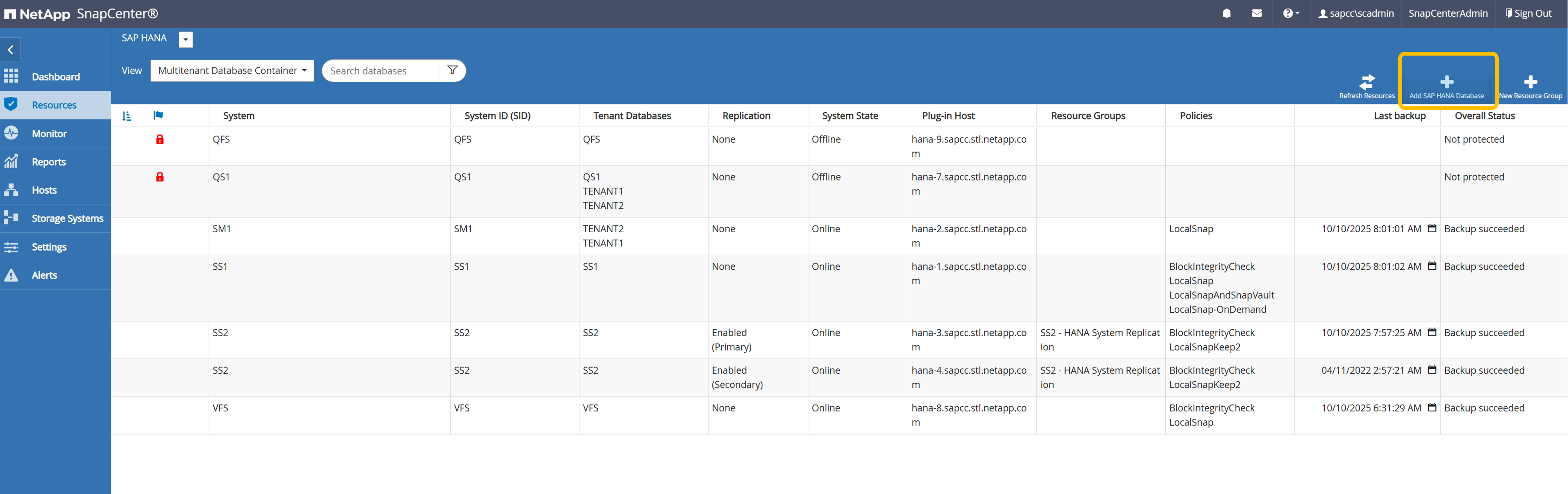
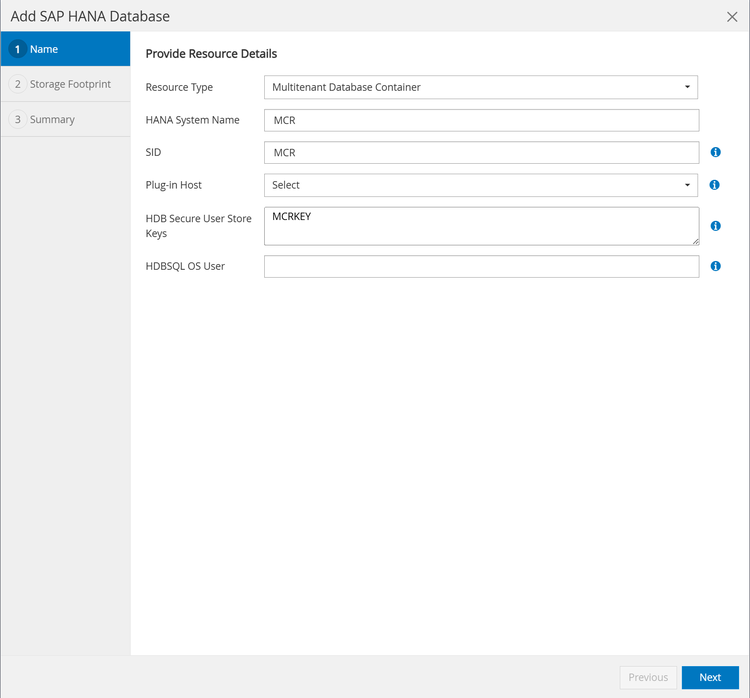
In the next screen you need to provide a couple of system parameters.
-
Plug-in Host: The central plug-in host must be selected
-
SAP HANA user store key: For a single host HANA system the key name that has been prepared at the central plug-in host must be provided. For a multiple host HANA system, a comma-separated list of all keys for the system must be provided.
-
HDBSQL OS User: If the central plug-in host runs on Windows, the user will be pre-select as the SYSTEM user. Otherwise the user which has been used for the SAP HANA user store key must be provided.
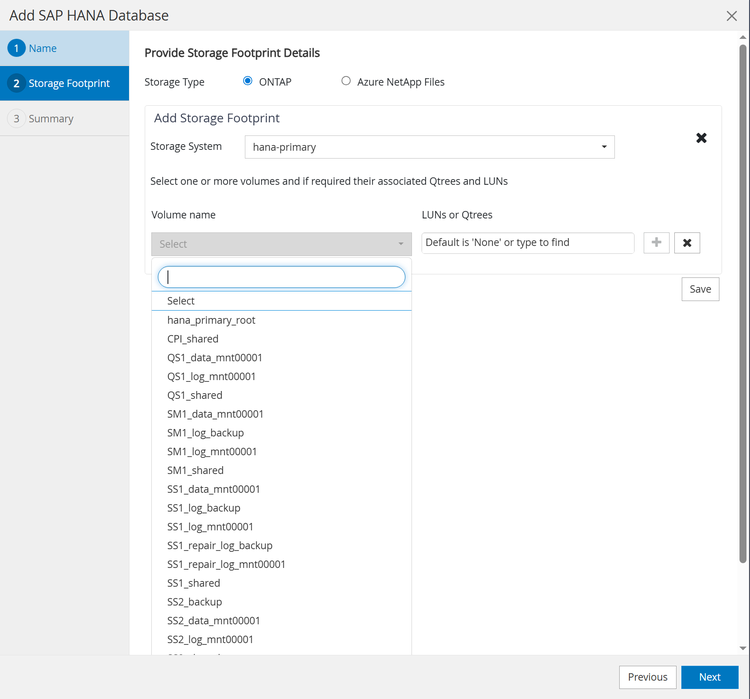
As a next step the storage footprint needs to be configured. All ONTAP or ANF volumes which belong to the HANA system must be added here.
Resource protection configuration can now be done in the same way as for auto discovered HANA systems.