


Learn about SnapCenter data protection concepts and best practices

 Suggest changes

 PDFs
PDFs
Learn about SnapCenter deployment options, data protection strategies, and backup retention management for SAP HANA environments. SnapCenter supports plug-in deployment on database hosts or central hosts, auto discovery and manual configuration, block consistency checks using file-based backups or hdbpersdiag, and comprehensive retention management across primary and secondary storage.
Deployment options for SnapCenter plug-in for SAP HANA
The following figure shows the logical view of the communication between the SnapCenter server, the SAP HANA database and the storage system. The SnapCenter server leverages the HANA and the Linux plug-ins to communicate with the HANA database and the Linux operating systems.

The recommended and default deployment option for the SnapCenter plug-ins is the installation on the HANA database host. With this deployment option, all configurations and features described in chapter SnapCenter supported configuration are valid. There are a few exceptions where the SnapCenter plug-ins can't be installed on the HANA database host but need to be configured on a central plug-in host, which could be the SnapCenter server itself. A central plug-in host is required for HANA multiple host systems or HANA systems running on the IBM Power platform. Both deployment options can also be mixed, e.g. using the SnapCenter server as a central plug-in host for a multiple host system and deploying the plug-ins on the HANA database hosts for all other single host HANA systems.
In SnapCenter a HANA resource can be either auto discovered or manually configured. A HANA system is auto discovered by default as soon as the HANA and Linux plug-ins are deployed on the database host. SnapCenter auto discovery does not support multiple HANA installations on the same host. HANA systems managed using a central plug-in host must be configured manually in SnapCenter. Also, non-data volumes are by default manual configured resources.
| Plug-in deployed at | SnapCenter resource | |
|---|---|---|
HANA database |
Database host |
Auto discovered |
HANA database |
Central plug-in host |
Manual configured |
Non-data volume |
N/A |
Manual configured |
While SnapCenter supports a central plug-in deployment for HANA systems, there are limitations in platform and feature support. The following infrastructure configurations and operations are not supported for HANA systems configured with a central plug-in host:
-
VMware with FC datastores
-
SnapMirror active sync
-
SnapCenter server high availability if used as a central plug-in host
-
HANA system auto discovery
-
Automated HANA database recovery
-
Automated SAP System Refresh
-
Single tenant restore
SnapCenter plug-in for HANA deployed on the SAP HANA database host
The SnapCenter server communicates through the HANA plug-in with the HANA databases. The HANA plug-in uses the HANA hdbsql client software to execute SQL commands to the HANA databases. The HANA hdb userstore is used to provide the user credentials, the host name, and the port information to access the HANA databases. The SnapCenter Linux plug-in is used to cover any host file system operations as well as auto discovery of file system and storage resources.
When the HANA plug-in is deployed on the HANA database host, the HANA system is auto discovered by SnapCenter and is flagged as an auto discovered resource in SnapCenter.

SnapCenter server high availability
SnapCenter can be set up in a two-node HA configuration. In such a configuration, a load balancer (for example, F5) is used to access the SnapCenter hosts. The SnapCenter repository (the MySQL database) is replicated by SnapCenter between the two hosts so that the SnapCenter data is always in-sync.
SnapCenter server HA is not supported if the HANA plug-in is installed on the SnapCenter server. More details on SnapCenter HA can be found at Configure SnapCenter Servers for High Availability.

Central plug-in host
As discussed in the chapter before, a central plug-in is required for
-
HANA multiple host systems
-
HANA systems running on IBM Power
With a central plug-in host, the HANA plug-in and the SAP HANA hdbsql client must be installed on a host outside of the HANA database hosts. This host can be any Windows or Linux host, for example the SnapCenter server.

|
When you run your SnapCenter server on Windows, you can use your Windows system as central plug-in host. When you run your SnapCenter server on Linux, you must use a different host as central plug-in host . |
For a HANA multiple host system, SAP HANA user store keys for all worker and standby hosts must be configured at the central plug-in host. SnapCenter tries to connect to the database using each of the provided keys and can therefore operate independently of a failover of the system database (HANA name server) to a different host.
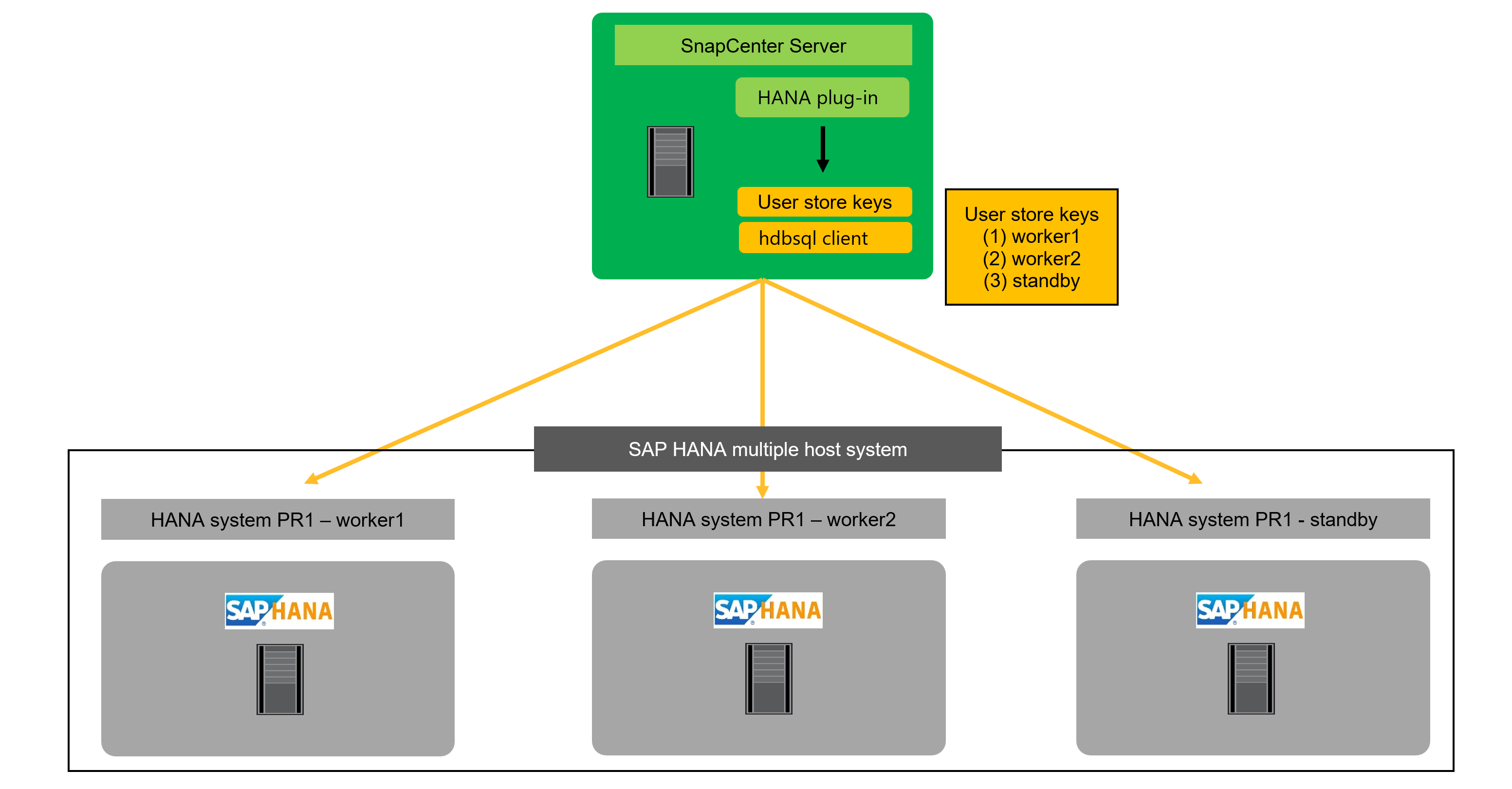
For multiple single host HANA systems managed by a central plug-in host, all individual SAP HANA user store keys of the HANA systems must be configured at the central plug-in host.

SAP HANA block consistency check
SAP recommends including regular HANA block consistency checks into the overall backup strategy. With traditional file-based backups this check is done with each backup operation. With Snapshot backups, the consistency check must be executed in addition to the Snapshot backup operations, for example once per week.
Technically there are two options to execute the block consistency check.
-
Executing a standard file-based or backint-based backup
-
Executing the HANA tool hdbpersdiag, see also Persistence Consistency Check | SAP Help Portal
The HANA hdbpersdiag tool is part of the HANA installation and allows to execute block consistency check operations against an offline HANA database. Hence it is a perfect fit to be used in combination with Snapshot backups where existing Snapshot backups can be presented to hdbpersdiag.
When comparing the two approaches, hdbpersdiag has significant advantages compared to the file-based backup for HANA block consistency checks. One dimension is the required storage capacity. With file-based backups at least the size of one backup needs to be available for each HANA system. If you have, for example, 15 HANA systems with a persistence size of 3TB you would need additional 45TB just for the consistency checks. With hdbpersdiag no additional storage capacity is required since the operation is executed against an existing Snapshot backup or a FlexClone of an existing Snapshot backup. The second dimension is the CPU load at the HANA host during the consistency check operation. A file-based backup will require CPU cycles at the HANA database host while the hdbpersdiag processing can be fully offloaded from the HANA host when used in combination with a central verification host. The table below summarizes the key characteristics.
| Required storage capacity | CPU and network load at HANA host | |
|---|---|---|
File-based backup |
Minimal 1 x data backup size for each HANA |
High |
hdbpersdiag using Snapshot directory at HANA host (NFS only) |
None |
Medium |
Central verification host used to run hdbpersdiag with FlexClone volumes |
None |
None |
NetApp recommends using hdbpersdiag to execute HANA block consistency checks. Further details on the implementation are available in chapter "Block consistency checks with SnapCenter".
Data protection strategy
Before configuring SnapCenter and the SAP HANA plug-in, the data protection strategy must be defined based on the RTO and RPO requirements of the various SAP systems.
A common approach is to define system types such as production, development, test, or sandbox systems. All SAP systems of the same system type typically have the same data protection parameters.
The parameters that must be defined are:
-
How often should a Snapshot backup be executed?
-
How long should Snapshot copy backups be kept on the primary storage system?
-
How often should a block integrity check be executed?
-
Should the primary backups be replicated to a secondary backup site?
-
How long should the backups be kept at the secondary backup storage?
The following table shows an example of data protection parameters for the system types production, development, and test. For the production system, a high backup frequency has been defined, and the backups are replicated to a secondary backup site once per day. The test systems have lower requirements and no replication of the backups.
| Parameters | Production systems | Development systems | Test systems |
|---|---|---|---|
Backup frequency |
Every 6 hours |
Every 6 hours |
Every 12 hours |
Primary retention |
3 days |
3 days |
6 days |
Block integrity check |
Once per week |
Once per week |
No |
Replication to secondary backup site |
Once per day |
Once per day |
No |
Secondary backup retention |
2 weeks |
2 weeks |
No |
The following table shows the policies and the schedules that would need to be configured for the above data protection parameters.
| Policy | Backup type | Schedule frequency | Primary retention | SnapVault replication | Secondary retention |
|---|---|---|---|---|---|
LocalSnap |
Snapshot based |
Every 6 hours |
Count=12 |
No |
NA |
LocalSnapAndSnapVault |
Snapshot based |
Once per day |
Count=2 |
Yes |
Count=14 |
SnapAndCallHdbpersdiag |
Snapshot based |
Once per week |
Count=2 |
No |
NA |
|
|
For ONTAP system or FSx for ONTAP a data protection relationship must be configured in ONTAP for the SnapVault replication, before SnapCenter can execute SnapVault update operations. The secondary retention is defined within the ONTAP protection policy. |
|
|
For ANF backup, no additional configuration is required outside of SnapCenter. The ANF backup secondary retention is managed by SnapCenter. |
|
|
For this example configuration, hdbpersdiag is used for the block integrity check operation. More details can be found in chapter "Block consistency checks with SnapCenter". |
The figure below summarizes the schedules and backup retentions. If SnapCenter is used to manage log backup retention, all log backups which are older than the oldest Snapshot backup will be deleted. In other words, log backups are kept as long as required to enable recovery to current in time for every available backup.

Backup of encryption root keys
When HANA persistence encryption is used it is critical to create backups of the root keys in addition to the standard data backups. Root key backups are required to recover the HANA database in case the data volume and the HANA installation file system are lost. For more information see SAP HANA Administration Guide.
|
|
Keep in mind, that if a root key is changed, the new root key can't be used to recover old HANA database backups which have been created before. You always need the root key that has been active at the creation time of the backup. |
Backup operations
SnapCenter supports Snapshot backup operations of HANA MDC systems with a single or with multiple tenants. SnapCenter also supports two different restore operations of a HANA MDC system. You can either restore the complete system, the System DB and all tenants, or you can restore just one tenant. There are some pre-requisites to enable SnapCenter to execute these operations.
In an MDC System, the tenant configuration is not necessarily static. Tenants can be added, or tenants can be deleted. SnapCenter cannot rely on the configuration that is discovered when the HANA database is added to SnapCenter. To enable a single tenant restore operation, SnapCenter must know which tenants are included in each Snapshot backup. In addition, it must know which files and directories belong to each tenant included in the Snapshot backup.
Therefore, with each backup operation, SnapCenter identifies the tenant information. This includes the tenant names and the corresponding file and directory information. This data must be stored in the Snapshot backup metadata to be able to support a single tenant restore operation.
Another step of the application auto discovery is the detection of HANA System Replication (HSR) primary or secondary node. If a HANA system is configured with HSR, SnapCenter must identify the primary node with each backup operation so that the backup SQL commands are executes at the HSR primary node. See also SAP HANA System Replication - Backup and Recovery with SnapCenter.
SnapCenter also detects the HANA data volume configuration and maps it to file system and storage resources. With this approach SnapCenter can handle HANA volume configuration changes, e.g. multiple partitions or storage configuration changes like migrations of volumes.
The next step is the Snapshot backup operation itself. This step includes the SQL command to trigger the HANA database snapshot, the storage Snapshot backup, and the SQL command to close the HANA snapshot operation. By using the close command, the HANA database updates the backup catalog of the system DB and each tenant.
|
|
SAP does not support Snapshot backup operations for MDC systems when one or more tenants are stopped. |
For the retention management of data backups and the HANA backup catalog management, SnapCenter must execute the catalog delete operations for the system database and all tenant databases that were identified in the first step. In the same way for the log backups, the SnapCenter workflow must operate on each tenant that was part of the backup operation.
The following figure shows an overview of the backup workflow.

Backup retention management
The data backup retention management and log backup housekeeping can be divided into five main areas, including retention management of:
-
Local backups at the primary storage
-
File-based backups
-
Backups at the secondary storage (SnapVault or ANF backup)
-
Data backups in the SAP HANA backup catalog
-
Log backups in the SAP HANA backup catalog and on the file system
The following figure provides an overview of the different workflows and the dependencies of each operation. The following sections describe the different operations in detail.

Retention management of local backups at the primary storage
SnapCenter handles the housekeeping of SAP HANA database backups and non-data volume backups by deleting Snapshot copies on the primary storage and in the SnapCenter repository according to a retention defined in the SnapCenter backup policy. Retention management is included with each backup workflow in SnapCenter. Local backups at the primary storage can also be deleted manually in SnapCenter.
Retention management of file-based backups
SnapCenter handles the housekeeping of file-based backups by deleting the backups on the file system according to a retention defined in the SnapCenter backup policy. Retention management logic is executed with each backup workflow in SnapCenter.
Retention management of backups at the secondary storage (SnapVault)
The retention management of backups at the secondary storage (SnapVault) is handled by ONTAP based on the retention defined in the ONTAP protection relationship. To synchronize these changes on the secondary storage in the SnapCenter repository, SnapCenter uses a scheduled cleanup job. This cleanup job synchronizes all secondary storage backups with the SnapCenter repository for all SnapCenter plug-ins and all resources.
The cleanup job is scheduled once per week by default. This weekly schedule results in a delay with deleting backups in SnapCenter and SAP HANA Studio when compared with the backups that have already been deleted at the secondary storage. To avoid this inconsistency, customers can change the schedule to a higher frequency, for example, once per day. For details about how to adapt the schedule of the cleanup job or how to trigger a manual refresh, refer to the chapter "Cleanup of secondary backups".
Retention management of backups at the secondary storage (ANF backup)
The retention of ANF backups is configured and handled by SnapCenter. SnapCenter handles the housekeeping of ANF backup backups by deleting the backups according to a retention defined in the SnapCenter backup policy. Retention management is included with each backup workflow in SnapCenter.
Retention management of data backups within the SAP HANA backup catalog
When SnapCenter has deleted any backup, local Snapshot or file based or if SnapCenter has identified a backup deletion at the secondary storage, this data backup is also deleted in the SAP HANA backup catalog. Before deleting the SAP HANA catalog entry for a local Snapshot backup at the primary storage, SnapCenter checks if the backup still exists at the secondary storage.
Retention management of log backups
The SAP HANA database automatically creates log backups. These operations create backup files for each individual SAP HANA service in a backup directory configured in SAP HANA. Log backups older than the latest data backup are no longer required for forward recovery and can therefore be deleted. SnapCenter handles the housekeeping of log file backups on the file system level as well as in the SAP HANA backup catalog by executing the following steps:
-
SnapCenter reads the SAP HANA backup catalog to get the backup ID of the oldest successful data backup.
-
SnapCenter deletes all log backups in the SAP HANA catalog and the file system that are older than this backup ID.
|
|
SnapCenter only handles housekeeping for backups that have been created by SnapCenter. If additional file-based backups are created outside of SnapCenter, you must make sure that the file-based backups are deleted from the backup catalog. If such a data backup is not deleted manually from the backup catalog, it can become the oldest data backup, and older log backups are not deleted until this file-based backup is deleted. |
|
|
Even though retention is defined for on-demand backups in the policy configuration, the housekeeping is only done when another on-demand backup is executed. Therefore, on-demand backups typically must be deleted manually in SnapCenter to make sure that these backups are also deleted in the SAP HANA backup catalog and that log backup housekeeping is not based on an old on-demand backup. |
|
|
Log backup retention management is enabled by default. If required, it can be disabled as described in the section Deactivate automated log backup housekeeping. |