


Configure initial SnapCenter settings for SAP HANA

 Suggest changes

 PDFs
PDFs
Configure initial SnapCenter settings for SAP HANA environments by setting up credentials for Azure service principals, adding storage systems, and creating policies for Snapshot backups, block integrity checks, and secondary replication.
The SnapCenter initial configuration includes the following steps:
-
Credentials configuration
-
For HANA systems configured with Azure NetApp Files (ANF), a service principal must be prepared and then configured in SnapCenter.
-
Host credentials must be provided to allow the automated installation of the HANA plug-in on the HANA database hosts.
-
-
Storage system configuration
-
For HANA systems configured with ANF, the required NetApp accounts can be selected and added to the SnapCenter configuration.
-
For ONTAP or FSx for ONTAP storage systems, either SVMs or the complete storage cluster can be added to SnapCenter.
-
-
Policies configuration
-
Policies for Snapshot based backups as well as block integrity check operations can be configured for ANF as well as for ONTAP and FSx for ONTAP storage systems.
-
Policies for tamperproof Snapshots and secondary backups with SnapVault or SnapMirror can only be configured for ONTAP and FSx for ONTAP storage systems.
-
For HANA systems configured with ANF, a policy can include ANF backup.
-

|
The same Snapshot backup policies can be used for HANA databases as well as for non-data volumes, e.g. the HANA shared volume. |
The figure below summarizes the configuration sections.

The following chapters describe the initial configuration steps.
Credentials configuration
Credentials for HANA plug-in deployment
Credentials are configured in the Settings section and by selecting the Credential tab. Credentials can be added by clicking the + icon.

NetApp recommends to configure a user on all HANA database hosts (e.g. scuser) and configure sudo privileges as described in Prerequisites for adding hosts and installing SnapCenter Plug-in for SAP HANA Database.

Credentials for Azure NetApp Files
An Azure service principal must be prepared, which enables SnapCenter to execute the required operations for the ANF volumes. The example below shows the minimal required permissions, which must be included.
    "assignableScopes": [
        "/subscriptions/xxx"
    ],
    "createdBy": "xxx",
    "createdOn": "2025-05-07T07:12:14.451483+00:00",
    "description": "Restricted Access for SnapCenter ",
    "id": "/subscriptions/xxx/providers/Microsoft.Authorization/roleDefinitions/xxx",
    "name": "xxx",
    "permissions": [
        {
            "actions": [
            "Microsoft.NetApp/register/action",
            "Microsoft.NetApp/unregister/action",
            "Microsoft.NetApp/netAppAccounts/read",
            "Microsoft.NetApp/netAppAccounts/getKeyVaultStatus/action",
            "Microsoft.NetApp/netAppAccounts/migrateEncryption/action",
            "Microsoft.NetApp/netAppAccounts/transitionToCmk/action",
            "Microsoft.NetApp/netAppAccounts/capacityPools/read",
            "Microsoft.NetApp/netAppAccounts/capacityPools/volumes/read",
            "Microsoft.NetApp/netAppAccounts/capacityPools/volumes/write",
            "Microsoft.NetApp/netAppAccounts/capacityPools/volumes/delete",
            "Microsoft.NetApp/netAppAccounts/capacityPools/volumes/revert/action",
            "Microsoft.NetApp/netAppAccounts/capacityPools/volumes/poolChange/action",
            "Microsoft.NetApp/netAppAccounts/capacityPools/volumes/finalizeRelocation/action",
            "Microsoft.NetApp/netAppAccounts/capacityPools/volumes/revertRelocation/action",
            "Microsoft.NetApp/netAppAccounts/capacityPools/volumes/breakFileLocks/action",
            "Microsoft.NetApp/netAppAccounts/capacityPools/volumes/getGroupIdListForLdapUser/action",
            "Microsoft.NetApp/netAppAccounts/capacityPools/volumes/backups/write",
            "Microsoft.NetApp/netAppAccounts/capacityPools/volumes/backups/restoreFiles/action",
            "Microsoft.NetApp/netAppAccounts/capacityPools/volumes/snapshots/read",
            "Microsoft.NetApp/netAppAccounts/capacityPools/volumes/snapshots/write",
            "Microsoft.NetApp/netAppAccounts/capacityPools/volumes/snapshots/delete",
            "Microsoft.NetApp/netAppAccounts/capacityPools/volumes/snapshots/restoreFiles/action",
            "Microsoft.NetApp/netAppAccounts/capacityPools/volumes/subvolumes/read",
            "Microsoft.NetApp/netAppAccounts/capacityPools/volumes/subvolumes/write",
            "Microsoft.NetApp/netAppAccounts/capacityPools/volumes/subvolumes/getMetadata/action",
            "Microsoft.NetApp/netAppAccounts/capacityPools/volumes/volumeQuotaRules/read",
            "Microsoft.NetApp/netAppAccounts/capacityPools/volumes/latestRestoreStatus/current/read",
            "Microsoft.NetApp/netAppAccounts/capacityPools/volumes/mountTargets/read",
            "Microsoft.NetApp/netAppAccounts/capacityPools/volumes/restoreStatus/read",
            "Microsoft.NetApp/netAppAccounts/snapshotPolicies/read",
            "Microsoft.NetApp/netAppAccounts/snapshotPolicies/write",
            "Microsoft.NetApp/netAppAccounts/snapshotPolicies/listVolumes/read",
            "Microsoft.NetApp/netAppAccounts/snapshotPolicies/volumes/read",
            "Microsoft.NetApp/netAppAccounts/volumeGroups/read",
            "Microsoft.NetApp/netAppAccounts/volumeGroups/write",
            "Microsoft.NetApp/locations/checknameavailability/action",
            "Microsoft.NetApp/locations/checkfilepathavailability/action",
            "Microsoft.NetApp/locations/operationresults/read",
            "Microsoft.NetApp/Operations/read",
            "Microsoft.Resources/resources/read",
            "Microsoft.Resources/subscriptions/resourceGroups/read",
            "Microsoft.Resources/subscriptions/resourcegroups/resources/read",
            "Microsoft.Network/virtualNetworks/read",
            "Microsoft.Network/virtualNetworks/subnets/read",
            "Microsoft.Network/virtualNetworks/write",
            "Microsoft.Network/virtualNetworks/subnets/write",
            "Microsoft.NetApp/netAppAccounts/backupVaults/read",
            "Microsoft.NetApp/netAppAccounts/backupVaults/write",
            "Microsoft.NetApp/netAppAccounts/backupVaults/backups/read",
            "Microsoft.NetApp/netAppAccounts/backupVaults/backups/write",
            "Microsoft.NetApp/netAppAccounts/backupVaults/backups/delete",
            "Microsoft.NetApp/netAppAccounts/backupVaults/backups/restoreFiles/action"
            ],
            "condition": null,
            "conditionVersion": null,
            "dataActions": [],
            "notActions": [],
            "notDataActions": []
        }
    ],
    "roleName": "SnapCenter-Restricted-Access",
    "roleType": "CustomRole",
    "type": "Microsoft.Authorization/roleDefinitions",
    "updatedBy": "xxx",
    "updatedOn": "2025-05-07T07:12:14.451483+00:00"
}
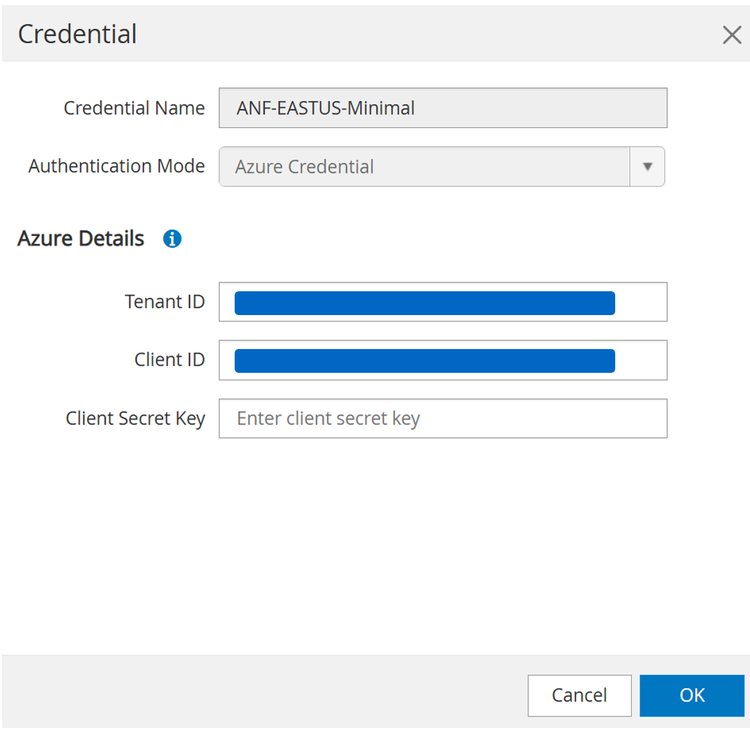
Credentials are configured in the Settings section and by selecting the Credential tab. Credentials are configured by clicking the + icon.

In the following screen, a credential name must be provided and the Authentication Mode Azure Credentials must be selected. Then tenant ID, client ID and client secret key must be configured.
Storage system configuration
ONTAP systems and FSx for ONTAP
ONTAP system or FSx for ONTAP can be added to SnapCenter either by providing cluster credentials or credentials for each required SVM. When cluster credentials are provided, all SVMs of the cluster are added to SnapCenter.
In our lab setup, we added the storage clusters to SnapCenter. ONTAP clusters are configured in the Storage systems section by selecting the ONTAP storage tab and the ONTAP Cluster type. A new cluster is added by clicking the + icon.

In the following screen you need to provide the credentials for a cluster user.
|
|
The cluster user admin should not be used. Instead a new user should be created with the required privileges as described in Create ONTAP cluster roles with minimum privileges. Required privileges for ASA system can be found at Create ONTAP cluster roles for ASA r2 systems. |

SVMs are configured in the Storage systems section by selecting the ONTAP storage tab and the ONTAP SVMS type. A new SVM is added by clicking the + icon.
In the following screen you need to provide the credentials for a cluster user.
|
|
The SVM user vsadmin should not be used. Instead a new user should be created with the required privileges as described in Create SVM roles with minimum privileges. Required privileges for ASA system can be found at Create SVM roles for ASA r2 systems. |
|
|
The DNS name for the SVM must match with the SVM name configured at the ONTAP system. |

Azure NetApp Files
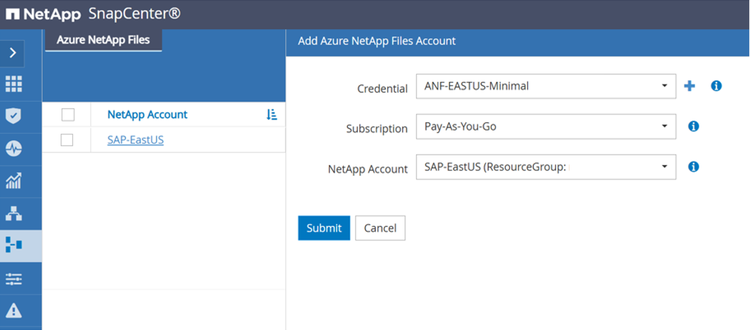
After the ANF credentials have been configured, ANF NetApp Account(s) can be added to SnapCenter. NetApp Accounts are configured in the Storage systems section and by selecting the Azure NetApp Files tab. A new NetApp Account is added by clicking the + icon.

After selecting the ANF credential and the subscription, a NetApp account can be added to SnapCenter.
Storage configuration when using SnapMirror active sync
Specific storage configuration steps are described at Storage configuration with SnapMirror active sync.
Policies configuration
As discussed in the section Data protection strategy policies are usually configured independently of the resource and can be used for multiple SAP HANA systems.
A typical minimum configuration consists of the following policies:
-
Policy for hourly backups without replication
-
Policy for daily backups with SnapVault or ANF backup replication
-
Policy for weekly block integrity check operation
-
using a file-based backup
-
using the HANA tool hdbpersdiag
-
The following sections describe the configuration of these three policies.
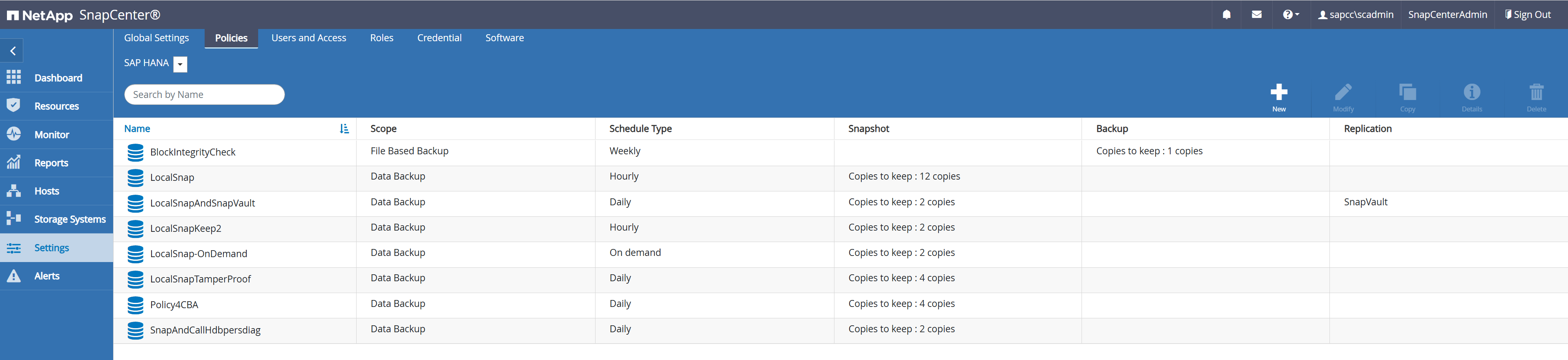
Policies are configured in the Settings section and by selecting the Policies tab. A new policy is configured by clicking the + icon. The two screenshots below show the list of policies for HANA systems running with Azure NetApp Files and a second one for HANA systems running with ONTAP storage systems or FSx for ONTAP.

Snapshot backups with ONTAP systems and FSx for ONTAP
Snapshot backup policies for ONTAP system or FSx for ONTAP can combine a local Snapshot with replication or Snapshot locking (tamperproof Snapshot) operations. This example shows a policy with replication to a secondary storage using SnapVault.
Provide a policy name and an optional description.

Select ONTAP storage type and Snapshot policy scope.

For this policy a daily schedule type has been configured. A daily Snapshot will be created, and the Snapshot deltas will be replicated to the secondary storage using SnapVault.
|
|
The schedule itself is configured with the individual HANA resource protection configuration. |
The retention which is configured in the policy is only valid for the primary Snapshots. The retention at the SnapVault target is configured with the ONTAP replication relationship for the individual volume(s) of the HANA database as described in chapter "SAP HANA Snapshot backup operations". The Snapshot label which is configured in the policy must match with the label configured with the ONTAP replication relationship.
Snapshot locking (tamperproof Snapshots) can be enabled by clicking the check boxes and defining the locking period. This feature requires a SnapLock license at the storage system and the compliance clock being configured.
A policy for local Snapshots only would be configured with an hourly schedule and by disabling the Update SnapVault check box.

The summary screen shows the configured parameters.

Snapshot backups with Azure NetApp Files
Snapshot backup policies for Azure NetApp Files can combine a local Snapshot with ANF backup, which replicates the Snapshot data to Azure blob. This example shows a policy used for replication with ANF backup.
Provide a policy name and an optional description.
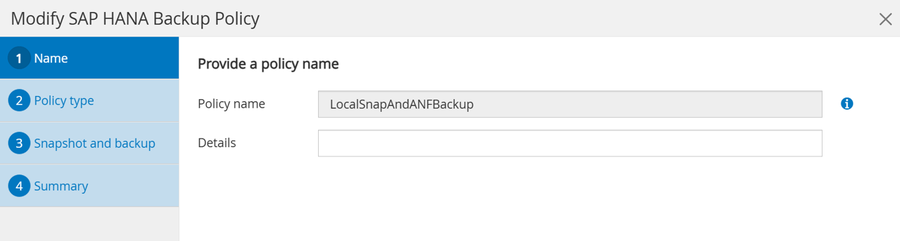
Select Azure NetApp Files storage type and Snapshot policy scope.

For this policy a daily schedule type has been configured. A daily Snapshot will be created, and the Snapshot deltas will be replicated to the backup vault using ANF backup.
|
|
The schedule itself is configured with the individual HANA resource protection configuration. |
The Snapshot retention which is configured in the policy is valid for the primary Snapshots at the ANF volume. The retention for the ANF backup is configured with the backup retention settings.
A policy for local Snapshots only would be configured with an hourly schedule and by disabling the Enable backup check box.
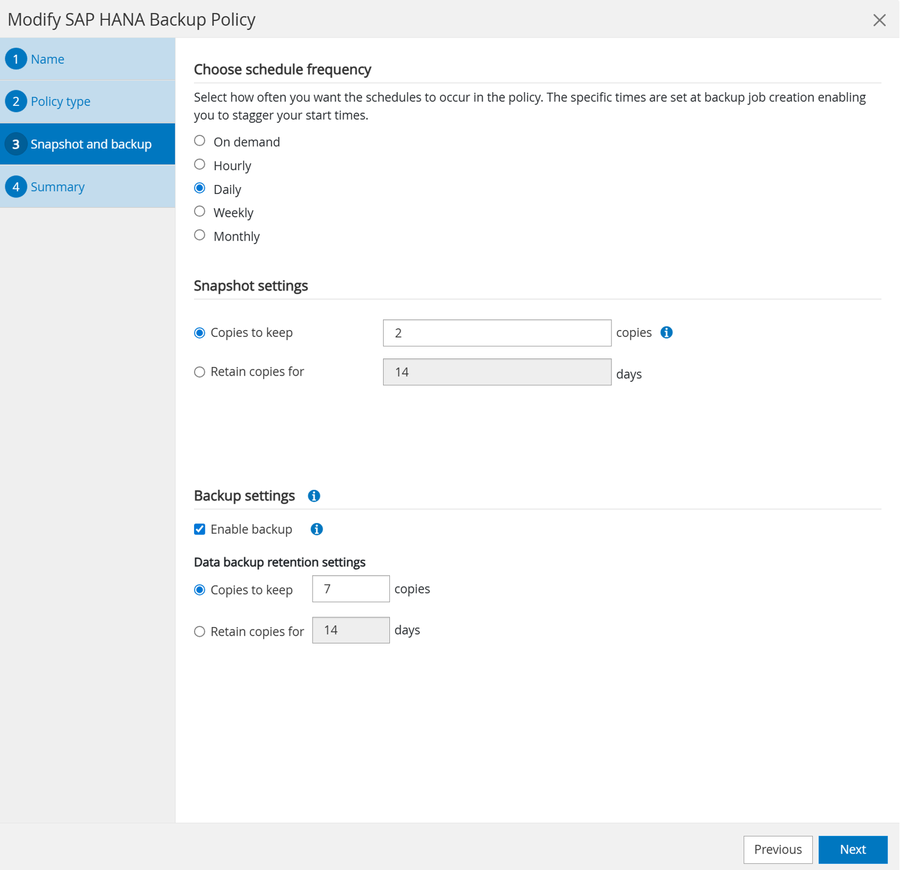
The summary screen shows the configured parameters.
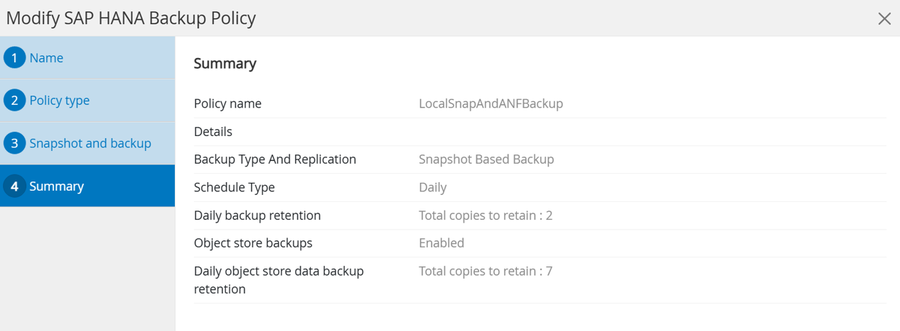
Block integrity check operations for all platforms
HANA tool hdbpersdiag
Details are described in chapter "Block consistency checks with SnapCenter".
File-based backup
Provide a policy name and an optional description.
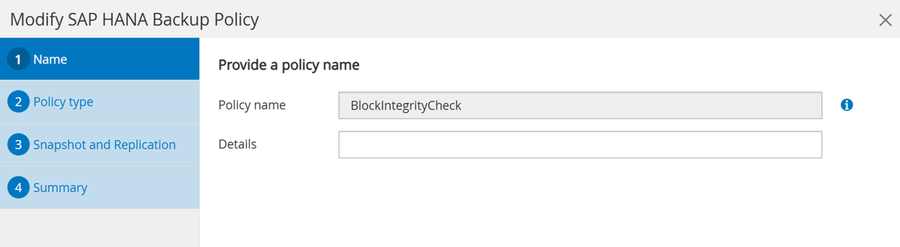
Select ONTAP or Azure NetApp Files storage type, depending on your setup and select File-based policy scope.

As discussed, it is recommended to execute the block integrity check once per week. Therefore, a weekly schedule is selected.
|
|
The schedule itself is configured with the individual HANA resource protection configuration. |
|
|
The file system where the file-based backup is written to must provide enough capacity for one backup more than defined in the retention settings, because SnapCenter deletes the old backup after the new one has been created. In this example space for two backups is required with a retention of one. The minimal configurable retention is zero. |
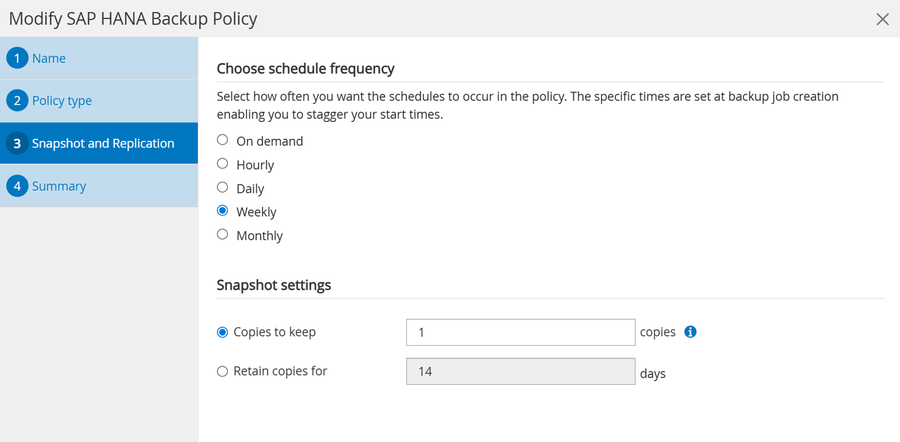
The summary screen shows the configured parameters.

Policy configuration when using SnapMirror active sync
Specific policy configuration steps are described in the document Policy configuration SnapMirror active sync.