


Replace ONTAP Mediator self-signed certificates with trusted third-party certificates


 Suggest changes

 PDFs
PDFs
If your environment supports it, replace self-signed certificates with trusted certificates issued by a certificate authority.

|
|
-
Perform this task on the Linux host where you installed ONTAP Mediator.
-
You can perform this task if the generated self-signed certificates need to be replaced by certificates obtained from a trusted subordinate certificate authority (CA). To accomplish this, you should have access to a trusted public-key infrastructure (PKI) authority.
-
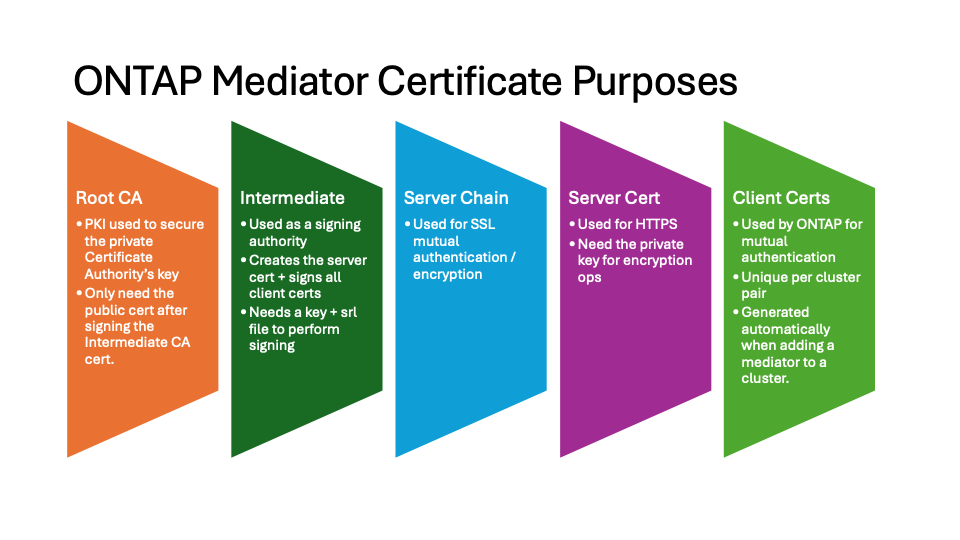
The following image shows the purposes of each ONTAP Mediator certificate.
-
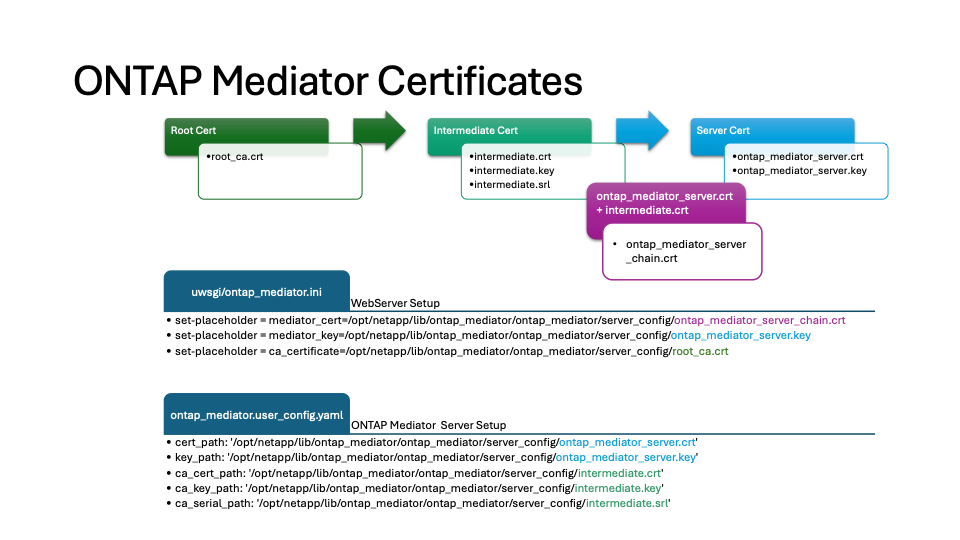
The following image shows configuration for the web server setup and ONTAP Mediator setup.
Step 1: Obtain a certificate from a third-party issuing a CA certificate
You can obtain a certificate from a PKI authority using the following procedure.
The following example demonstrates replacing the self-signed certificate actors with the third-party certificate actors located at /opt/netapp/lib/ontap_mediator/ontap_mediator/server_config/.

|
The example illustrates the necessary criteria for the certificates required for ONTAP Mediator. You can obtain the certificates from a PKI authority in a way that might be different to this procedure. Adjust the procedure according to your business need. |
-
Create a private key
intermediate.keyand a configuration fileopenssl_ca.cnfthat will be consumed by the PKI authority to generate a certificate.-
Generate the private key
intermediate.key:Exampleopenssl genrsa -aes256 -out intermediate.key 4096 -
The configuration file
openssl_ca.cnf(located at/opt/netapp/lib/ontap_mediator/ontap_mediator/server_config/openssl_ca.cnf) defines the properties that the generated certificate must have.
-
-
Use the private key and configuration file to create a certificate signing request
intermediate.csr:Example:openssl req -key <private_key_name>.key -new -out <certificate_csr_name>.csr -config <config_file_name>.cnf[root@mediator_host server_config]# openssl req -key intermediate.key -new -config openssl_ca.cnf -out intermediate.csr Enter pass phrase for intermediate.key: [root@mediator_host server_config]# cat intermediate.csr -----BEGIN CERTIFICATE REQUEST----- <certificate_value> -----END CERTIFICATE REQUEST-----
-
Send the certificate signing request
intermediate.csrto a PKI authority for their signature.The PKI authority verifies the request and signs the
.csr, generating the certificateintermediate.crt. Additionally, you need to obtain theroot_ca.crtcertificate that signed theintermediate.crtcertificate from the PKI authority.
For SnapMirror active sync clusters and MetroCluster IP configurations using ONTAP Mediator configured with HTTPS, you must add the intermediate.crtandroot_ca.crtcertificates to an ONTAP cluster. See Configure ONTAP Mediator and clusters for SnapMirror active sync and Configure the ONTAP Mediator for a MetroCluster IP configuration.
-
Create a private key
ca.keyand a configuration fileopenssl_ca.cnfthat will be consumed by the PKI authority to generate a certificate.-
Generate the private key
ca.key:Example:openssl genrsa -aes256 -out ca.key 4096 -
The configuration file
openssl_ca.cnf(located at/opt/netapp/lib/ontap_mediator/ontap_mediator/server_config/openssl_ca.cnf) defines the properties that the generated certificate must have.
-
-
Use the private key and configuration file to create a certificate signing request
ca.csr:Example:openssl req -key <private_key_name>.key -new -out <certificate_csr_name>.csr -config <config_file_name>.cnf[root@mediator_host server_config]# openssl req -key ca.key -new -config openssl_ca.cnf -out ca.csr Enter pass phrase for ca.key: [root@mediator_host server_config]# cat ca.csr -----BEGIN CERTIFICATE REQUEST----- <certificate_value> -----END CERTIFICATE REQUEST-----
-
Send the certificate signing request
ca.csrto a PKI authority for their signature.The PKI authority verifies the request and signs the
.csr, generating the certificateca.crt. Additionally, you need to obtain theroot_ca.crtcertificate that signed theca.crtcertificate from the PKI authority.
For SnapMirror active sync clusters, you must add the ca.crtandroot_ca.crtcertificates to an ONTAP cluster. See Configure ONTAP Mediator and clusters for SnapMirror active sync.
Step 2: Generate a server certificate by signing with a third-party CA certification
A server certificate must be signed by the private key intermediate.key and the third-party certificate intermediate.crt. Additionally, the configuration file /opt/netapp/lib/ontap_mediator/ontap_mediator/server_config/openssl_server.cnf contains certain attributes that specify the properties required for server certificates issued by OpenSSL.
The following commands can generate a server certificate.
-
To generate a server certificate signing request (CSR), run the following command from the
/opt/netapp/lib/ontap_mediator/ontap_mediator/server_configfolder:openssl req -config openssl_server.cnf -extensions v3_req -nodes -newkey rsa:4096 -sha512 -keyout ontap_mediator_server.key -out ontap_mediator_server.csr -
To generate a server certificate from the CSR, run the following command from the
/opt/netapp/lib/ontap_mediator/ontap_mediator/server_configfolder:
These files were obtained from a PKI authority. If you are using a different certificate name, replace intermediate.crtandintermediate.keywith the relevant file names.openssl x509 -extfile openssl_server.cnf -extensions v3_req -CA intermediate.crt -CAkey intermediate.key -CAcreateserial -sha512 -days 1095 -req -in ontap_mediator_server.csr -out ontap_mediator_server.crt-
The
-CAcreateserialoption is used to generate theintermediate.srlfiles.
-
A server certificate must be signed by the private key ca.key and the third-party certificate ca.crt. Additionally, the configuration file /opt/netapp/lib/ontap_mediator/ontap_mediator/server_config/openssl_server.cnf contains certain attributes that specify the properties required for server certificates issued by OpenSSL.
The following commands can generate a server certificate.
-
To generate a server certificate signing request (CSR), run the following command from the
/opt/netapp/lib/ontap_mediator/ontap_mediator/server_configfolder:openssl req -config openssl_server.cnf -extensions v3_req -nodes -newkey rsa:4096 -sha512 -keyout ontap_mediator_server.key -out ontap_mediator_server.csr -
To generate a server certificate from the CSR, run the following command from the
/opt/netapp/lib/ontap_mediator/ontap_mediator/server_configfolder:
These files were obtained from a PKI authority. If you are using a different certificate name, replace ca.crtandca.keywith the relevant file names.openssl x509 -extfile openssl_server.cnf -extensions v3_req -CA ca.crt -CAkey ca.key -CAcreateserial -sha512 -days 1095 -req -in ontap_mediator_server.csr -out ontap_mediator_server.crt-
The
-CAcreateserialoption is used to generate theca.srlfiles.
-
Step 3: Replace new third-party CA certificate and server certificate in ONTAP Mediator configuration
The certificate configuration is supplied to ONTAP Mediator in the configuration file located at /opt/netapp/lib/ontap_mediator/ontap_mediator/server_config/ontap_mediator.config.yaml. The file includes the following attributes:
cert_path: '/opt/netapp/lib/ontap_mediator/ontap_mediator/server_config/ontap_mediator_server.crt'
key_path: '/opt/netapp/lib/ontap_mediator/ontap_mediator/server_config/ontap_mediator_server.key'
ca_cert_path: '/opt/netapp/lib/ontap_mediator/ontap_mediator/server_config/intermediate.crt'
ca_key_path: '/opt/netapp/lib/ontap_mediator/ontap_mediator/server_config/intermediate.key'
ca_serial_path: '/opt/netapp/lib/ontap_mediator/ontap_mediator/server_config/intermediate.srl'
-
cert_pathandkey_pathare server certificate variables. -
ca_cert_path,ca_key_path, andca_serial_pathare CA certificate variables.
-
Replace all
intermediate.*files with the third-party certificates. -
Create a certificate chain from the
intermediate.crtandontap_mediator_server.crtcertificates:cat ontap_mediator_server.crt intermediate.crt > ontap_mediator_server_chain.crt -
Update the
/opt/netapp/lib/ontap_mediator/uvicorn/config.jsonfile.Update the values of
ssl_keyfile,ssl_certfile, andssl_ca_certs:ssl_keyfile:/opt/netapp/lib/ontap_mediator/ontap_mediator/server_config/ontap_mediator_server.keyssl_certfile:/opt/netapp/lib/ontap_mediator/ontap_mediator/server_config/ontap_mediator_server_chain.crtssl_ca_certs:/opt/netapp/lib/ontap_mediator/ontap_mediator/server_config/root_ca.crt-
The
ssl_keyfilevalue is the key path in theontap_mediator_server.crtfile, which isontap_mediator_server.key. -
The
ssl_certfilevalue is the path of theontap_mediator_server_chain.crtfile. -
The
ssl_ca_certsvalue is the path of theroot_ca.crtfile.
-
-
Verify that the following attributes of the newly generated certificates are set correctly:
-
Linux Group Owner:
netapp:netapp -
Linux permissions:
600
-
-
Restart ONTAP Mediator:
systemctl restart ontap_mediator
The certificate configuration is supplied to ONTAP Mediator in the configuration file located at /opt/netapp/lib/ontap_mediator/ontap_mediator/server_config/ontap_mediator.config.yaml. The file includes the following attributes:
cert_path: '/opt/netapp/lib/ontap_mediator/ontap_mediator/server_config/ontap_mediator_server.crt'
key_path: '/opt/netapp/lib/ontap_mediator/ontap_mediator/server_config/ontap_mediator_server.key'
ca_cert_path: '/opt/netapp/lib/ontap_mediator/ontap_mediator/server_config/intermediate.crt'
ca_key_path: '/opt/netapp/lib/ontap_mediator/ontap_mediator/server_config/intermediate.key'
ca_serial_path: '/opt/netapp/lib/ontap_mediator/ontap_mediator/server_config/intermediate.srl'
-
cert_pathandkey_pathare server certificate variables. -
ca_cert_path,ca_key_path, andca_serial_pathare CA certificate variables.
-
Replace all
intermediate.*files with the third-party certificates. -
Create a certificate chain from the
intermediate.crtandontap_mediator_server.crtcertificates:cat ontap_mediator_server.crt intermediate.crt > ontap_mediator_server_chain.crt -
Update the
/opt/netapp/lib/ontap_mediator/uwsgi/ontap_mediator.inifile.Update the values of
mediator_cert,mediator_key, andca_certificate:set-placeholder = mediator_cert = /opt/netapp/lib/ontap_mediator/ontap_mediator/server_config/ontap_mediator_server_chain.crtset-placeholder = mediator_key = /opt/netapp/lib/ontap_mediator/ontap_mediator/server_config/ontap_mediator_server.keyset-placeholder = ca_certificate = /opt/netapp/lib/ontap_mediator/ontap_mediator/server_config/root_ca.crt-
The
mediator_certvalue is the path of theontap_mediator_server_chain.crtfile. -
The
mediator_key valueis the key path in theontap_mediator_server.crtfile, which isontap_mediator_server.key. -
The
ca_certificatevalue is the path of theroot_ca.crtfile.
-
-
Verify that the following attributes of the newly generated certificates are set correctly:
-
Linux Group Owner:
netapp:netapp -
Linux permissions:
600
-
-
Restart ONTAP Mediator:
systemctl restart ontap_mediator
The certificate configuration is supplied to ONTAP Mediator in the configuration file located at /opt/netapp/lib/ontap_mediator/ontap_mediator/server_config/ontap_mediator.config.yaml. The file includes the following attributes:
cert_path: '/opt/netapp/lib/ontap_mediator/ontap_mediator/server_config/ontap_mediator_server.crt'
key_path: '/opt/netapp/lib/ontap_mediator/ontap_mediator/server_config/ontap_mediator_server.key'
ca_cert_path: '/opt/netapp/lib/ontap_mediator/ontap_mediator/server_config/ca.crt'
ca_key_path: '/opt/netapp/lib/ontap_mediator/ontap_mediator/server_config/ca.key'
ca_serial_path: '/opt/netapp/lib/ontap_mediator/ontap_mediator/server_config/ca.srl'
-
cert_pathandkey_pathare server certificate variables. -
ca_cert_path,ca_key_path, andca_serial_pathare CA certificate variables.
-
Replace all
ca.*files with the third-party certificates. -
Create a certificate chain from the
ca.crtandontap_mediator_server.crtcertificates:cat ontap_mediator_server.crt ca.crt > ontap_mediator_server_chain.crt -
Update the
/opt/netapp/lib/ontap_mediator/uwsgi/ontap_mediator.inifile.Update the values of
mediator_cert,mediator_key, andca_certificate:set-placeholder = mediator_cert = /opt/netapp/lib/ontap_mediator/ontap_mediator/server_config/ontap_mediator_server_chain.crtset-placeholder = mediator_key = /opt/netapp/lib/ontap_mediator/ontap_mediator/server_config/ontap_mediator_server.keyset-placeholder = ca_certificate = /opt/netapp/lib/ontap_mediator/ontap_mediator/server_config/root_ca.crt-
The
mediator_certvalue is the path of theontap_mediator_server_chain.crtfile. -
The
mediator_key valueis the key path in theontap_mediator_server.crtfile, which isontap_mediator_server.key. -
The
ca_certificatevalue is the path of theroot_ca.crtfile.
-
-
Verify that the following attributes of the newly generated certificates are set correctly:
-
Linux Group Owner:
netapp:netapp -
Linux permissions:
600
-
-
Restart ONTAP Mediator:
systemctl restart ontap_mediator
Step 4: Optionally, use a different path or name for your third-party certificates
You can use third-party certificates with a different name other than intermediate.* or store the third-party certificates in a different location.
-
Configure the
/opt/netapp/lib/ontap_mediator/ontap_mediator/server_config/ontap_mediator.user_config.yamlfile to override the default variable values in theontap_mediator.config.yamlfile.If you obtained
intermediate.crtfrom a PKI authority and you store its private keyintermediate.keyat the location/opt/netapp/lib/ontap_mediator/ontap_mediator/server_config, theontap_mediator.user_config.yamlfile should look like the following example:
If you used intermediate.crtto sign theontap_mediator_server.crtcertificate, theintermediate.srlfile is generated. See Step 2: Generate a server certificate by signing with a third-party CA certification for more information.[root@mediator_host server_config]# cat ontap_mediator.user_config.yaml # This config file can be used to override the default settings in ontap_mediator.config.yaml # To override a setting, copy the property key from ontap_mediator.config.yaml to this file and # set the property to the desired value. e.g., # # The default value for 'default_mailboxes_per_target' is 4 in ontap_mediator.config.yaml # # To override this value with 6 mailboxes per target, add the following key/value pair # below this comment: # # 'default_mailboxes_per_target': 6 # cert_path: '/opt/netapp/lib/ontap_mediator/ontap_mediator/server_config/ontap_mediator_server.crt' key_path: '/opt/netapp/lib/ontap_mediator/ontap_mediator/server_config/ontap_mediator_server.key' ca_cert_path: '/opt/netapp/lib/ontap_mediator/ontap_mediator/server_config/intermediate.crt' ca_key_path: '/opt/netapp/lib/ontap_mediator/ontap_mediator/server_config/intermediate.key' ca_serial_path: '/opt/netapp/lib/ontap_mediator/ontap_mediator/server_config/intermediate.srl'
-
If you are using a certificate structure where the
root_ca.crtcertificate provides anintermediate.crtcertificate that signs theontap_mediator_server.crtcertificate, create a certificate chain from theintermediate.crtandontap_mediator_server.crtcertificates:
You should have obtained the intermediate.crtandontap_mediator_server.crtcertificates from a PKI authority earlier in the procedure.cat ontap_mediator_server.crt intermediate.crt > ontap_mediator_server_chain.crt -
Update the
/opt/netapp/lib/ontap_mediator/uvicorn/config.jsonfile.Update the values of
ssl_keyfile,ssl_certfile, andssl_ca_certs:ssl_keyfile:/opt/netapp/lib/ontap_mediator/ontap_mediator/server_config/ontap_mediator_server.keyssl_certfile:/opt/netapp/lib/ontap_mediator/ontap_mediator/server_config/ontap_mediator_server_chain.crtssl_ca_certs:/opt/netapp/lib/ontap_mediator/ontap_mediator/server_config/root_ca.crt-
The
ssl_keyfilevalue is the key path in theontap_mediator_server.crtfile, which isontap_mediator_server.key. -
The
ssl_certfilevalue is the path of theontap_mediator_server_chain.crtfile. -
The
ssl_ca_certsvalue is the path of theroot_ca.crtfile.
For SnapMirror active sync clusters and MetroCluster IP configurations using ONTAP Mediator configured with HTTPS, you must add the intermediate.crtandroot_ca.crtcertificates to an ONTAP cluster. See Configure ONTAP Mediator and clusters for SnapMirror active sync and Configure the ONTAP Mediator for a MetroCluster IP configuration.
-
-
Verify that the following attributes of the newly generated certificates are set correctly:
-
Linux Group Owner:
netapp:netapp -
Linux permissions:
600
-
-
-
Restart ONTAP Mediator when the certificates are updated in the configuration file:
systemctl restart ontap_mediator
You can use third-party certificates with a different name other than intermediate.* or store the third-party certificates in a different location.
-
Configure the
/opt/netapp/lib/ontap_mediator/ontap_mediator/server_config/ontap_mediator.user_config.yamlfile to override the default variable values in theontap_mediator.config.yamlfile.If you obtained
intermediate.crtfrom a PKI authority and you store its private keyintermediate.keyat the location/opt/netapp/lib/ontap_mediator/ontap_mediator/server_config, theontap_mediator.user_config.yamlfile should look like the following example:
If you used intermediate.crtto sign theontap_mediator_server.crtcertificate, theintermediate.srlfile is generated. See Step 2: Generate a server certificate by signing with a third-party CA certification for more information.[root@mediator_host server_config]# cat ontap_mediator.user_config.yaml # This config file can be used to override the default settings in ontap_mediator.config.yaml # To override a setting, copy the property key from ontap_mediator.config.yaml to this file and # set the property to the desired value. e.g., # # The default value for 'default_mailboxes_per_target' is 4 in ontap_mediator.config.yaml # # To override this value with 6 mailboxes per target, add the following key/value pair # below this comment: # # 'default_mailboxes_per_target': 6 # cert_path: '/opt/netapp/lib/ontap_mediator/ontap_mediator/server_config/ontap_mediator_server.crt' key_path: '/opt/netapp/lib/ontap_mediator/ontap_mediator/server_config/ontap_mediator_server.key' ca_cert_path: '/opt/netapp/lib/ontap_mediator/ontap_mediator/server_config/intermediate.crt' ca_key_path: '/opt/netapp/lib/ontap_mediator/ontap_mediator/server_config/intermediate.key' ca_serial_path: '/opt/netapp/lib/ontap_mediator/ontap_mediator/server_config/intermediate.srl'
-
If you are using a certificate structure where the
root_ca.crtcertificate provides anintermediate.crtcertificate that signs theontap_mediator_server.crtcertificate, create a certificate chain from theintermediate.crtandontap_mediator_server.crtcertificates:
You should have obtained the intermediate.crtandontap_mediator_server.crtcertificates from a PKI authority earlier in the procedure.cat ontap_mediator_server.crt intermediate.crt > ontap_mediator_server_chain.crt -
Update the
/opt/netapp/lib/ontap_mediator/uwsgi/ontap_mediator.inifile.Update the values of
mediator_cert,mediator_key, andca_certificate:set-placeholder = mediator_cert = /opt/netapp/lib/ontap_mediator/ontap_mediator/server_config/ontap_mediator_server_chain.crtset-placeholder = mediator_key = /opt/netapp/lib/ontap_mediator/ontap_mediator/server_config/ontap_mediator_server.keyset-placeholder = ca_certificate = /opt/netapp/lib/ontap_mediator/ontap_mediator/server_config/root_ca.crt-
The
mediator_certvalue is the path of theontap_mediator_server_chain.crtfile. -
The
mediator_keyvalue is the key path in theontap_mediator_server.crtfile, which isontap_mediator_server.key. -
The
ca_certificatevalue is the path of theroot_ca.crtfile.
For SnapMirror Business Continuity (SM-BC) clusters, you must add the intermediate.crtandroot_ca.crtcertificates to an ONTAP cluster. See Configure ONTAP Mediator and clusters for SnapMirror active sync.
-
-
Verify that the following attributes of the newly generated certificates are set correctly:
-
Linux Group Owner:
netapp:netapp -
Linux permissions:
600
-
-
-
Restart ONTAP Mediator when the certificates are updated in the configuration file:
systemctl restart ontap_mediator
You can use third-party certificates with a different name other than ca.* or store the third-party certificates in a different location.
-
Configure the
/opt/netapp/lib/ontap_mediator/ontap_mediator/server_config/ontap_mediator.user_config.yamlfile to override the default variable values in theontap_mediator.config.yamlfile.If you obtained
ca.crtfrom a PKI authority and you store its private keyca.keyat the location/opt/netapp/lib/ontap_mediator/ontap_mediator/server_config, theontap_mediator.user_config.yamlfile should look like the following example:
If you used ca.crtto sign theontap_mediator_server.crtcertificate, theca.srlfile is generated. See Step 2: Generate a server certificate by signing with a third-party CA certification for more information.[root@mediator_host server_config]# cat ontap_mediator.user_config.yaml # This config file can be used to override the default settings in ontap_mediator.config.yaml # To override a setting, copy the property key from ontap_mediator.config.yaml to this file and # set the property to the desired value. e.g., # # The default value for 'default_mailboxes_per_target' is 4 in ontap_mediator.config.yaml # # To override this value with 6 mailboxes per target, add the following key/value pair # below this comment: # # 'default_mailboxes_per_target': 6 # cert_path: '/opt/netapp/lib/ontap_mediator/ontap_mediator/server_config/ontap_mediator_server.crt' key_path: '/opt/netapp/lib/ontap_mediator/ontap_mediator/server_config/ontap_mediator_server.key' ca_cert_path: '/opt/netapp/lib/ontap_mediator/ontap_mediator/server_config/ca.crt' ca_key_path: '/opt/netapp/lib/ontap_mediator/ontap_mediator/server_config/ca.key' ca_serial_path: '/opt/netapp/lib/ontap_mediator/ontap_mediator/server_config/ca.srl'
-
If you are using a certificate structure where the
root_ca.crtcertificate provides anca.crtcertificate that signs theontap_mediator_server.crtcertificate, create a certificate chain from theca.crtandontap_mediator_server.crtcertificates:
You should have obtained the ca.crtandontap_mediator_server.crtcertificates from a PKI authority earlier in the procedure.cat ontap_mediator_server.crt ca.crt > ontap_mediator_server_chain.crt -
Update the
/opt/netapp/lib/ontap_mediator/uwsgi/ontap_mediator.inifile.Update the values of
mediator_cert,mediator_key, andca_certificate:set-placeholder = mediator_cert = /opt/netapp/lib/ontap_mediator/ontap_mediator/server_config/ontap_mediator_server_chain.crtset-placeholder = mediator_key = /opt/netapp/lib/ontap_mediator/ontap_mediator/server_config/ontap_mediator_server.keyset-placeholder = ca_certificate = /opt/netapp/lib/ontap_mediator/ontap_mediator/server_config/root_ca.crt-
The
mediator_certvalue is the path of theontap_mediator_server_chain.crtfile. -
The
mediator_keyvalue is the key path in theontap_mediator_server.crtfile, which isontap_mediator_server.key. -
The
ca_certificatevalue is the path of theroot_ca.crtfile.
For SnapMirror Business Continuity (SM-BC) clusters, you must add the ca.crtandroot_ca.crtcertificates to an ONTAP cluster. See Configure ONTAP Mediator and clusters for SnapMirror active sync.
-
-
Verify that the following attributes of the newly generated certificates are set correctly:
-
Linux Group Owner:
netapp:netapp -
Linux permissions:
600
-
-
-
Restart ONTAP Mediator when the certificates are updated in the configuration file:
systemctl restart ontap_mediator