


High-file-count NAS workload best practices

 Suggest changes

 PDFs
PDFs
High-file-count workload design must account for total public inodes, entries in the largest directory, metadata operation rate, and lifecycle tasks. Gather those inputs as described in Planning approach, then use these recommendations. Do not treat file count as a single limit or rely on data capacity alone.
Profile the namespace before sizing storage
Collect or estimate:
-
Current and peak total files, directories, streams, and ACL objects
-
Annual or project-phase growth
-
Peak files created and deleted per second
-
Peak entries in one directory
-
Filename-length distribution and character sets
-
Use of SMB DOS 8.3 or alternate NFS names
-
Read, write, lookup, attribute, enumeration, rename, and delete rates
-
Snapshot schedule and retention
-
Backup, replication, migration, analytics, and security scan frequency
Use high-water values rather than daily averages. Build pipelines, analytics jobs, migrations, and temporary scratch workflows often create their largest namespace for a short period and then clean it up, but the inode and directory files can retain high-water marks after cleanup.
Size maxfiles and maxdir-size independently
Maintain two separate forecasts:
-
Volume inode forecast: all public file-system objects expected in the FlexVol or in each FlexGroup constituent.
-
Largest-directory forecast: on-disk directory-file bytes for the directory with the most or largest names.
Do not derive one value from the other.
A sharded namespace (files split across many directories) can exhaust maxfiles without creating a large directory. A single flat directory can reach the maxdir-size limit while the volume has millions of free inodes.
Do not size maxfiles from visible file count alone on NTFS or heavily ACL'd namespaces.
Include directories, ACL inodes, named streams, and other public objects in your projections. Where ACLs have a heavy presence, use up to twice the projected file and directory count as a conservative starting estimate for files, then validate with representative data because ACL sharing can reduce actual use.
-
For high-file-count volumes, set
filesto the currentfiles-maximum-possiblewhen volume size and protocol constraints allow it. That ceiling does not preallocate space; it letsfiles-usedgrow into the allowance instead of requiring repeated raises. -
Raise
maxdir-sizeonly for a demonstrated single-directory need, typically in approximately 2% steps. See Controlling maxfiles and What happens when maxdir-size is exceeded?.
Prefer a sharded directory structure
There are three common namespace layouts.
-
Flat: one or a few directories contain many files at the same level.
-
Wide: many top-level directories divide the files.
-
Deep: fewer top-level directories lead to multiple levels of subdirectories.
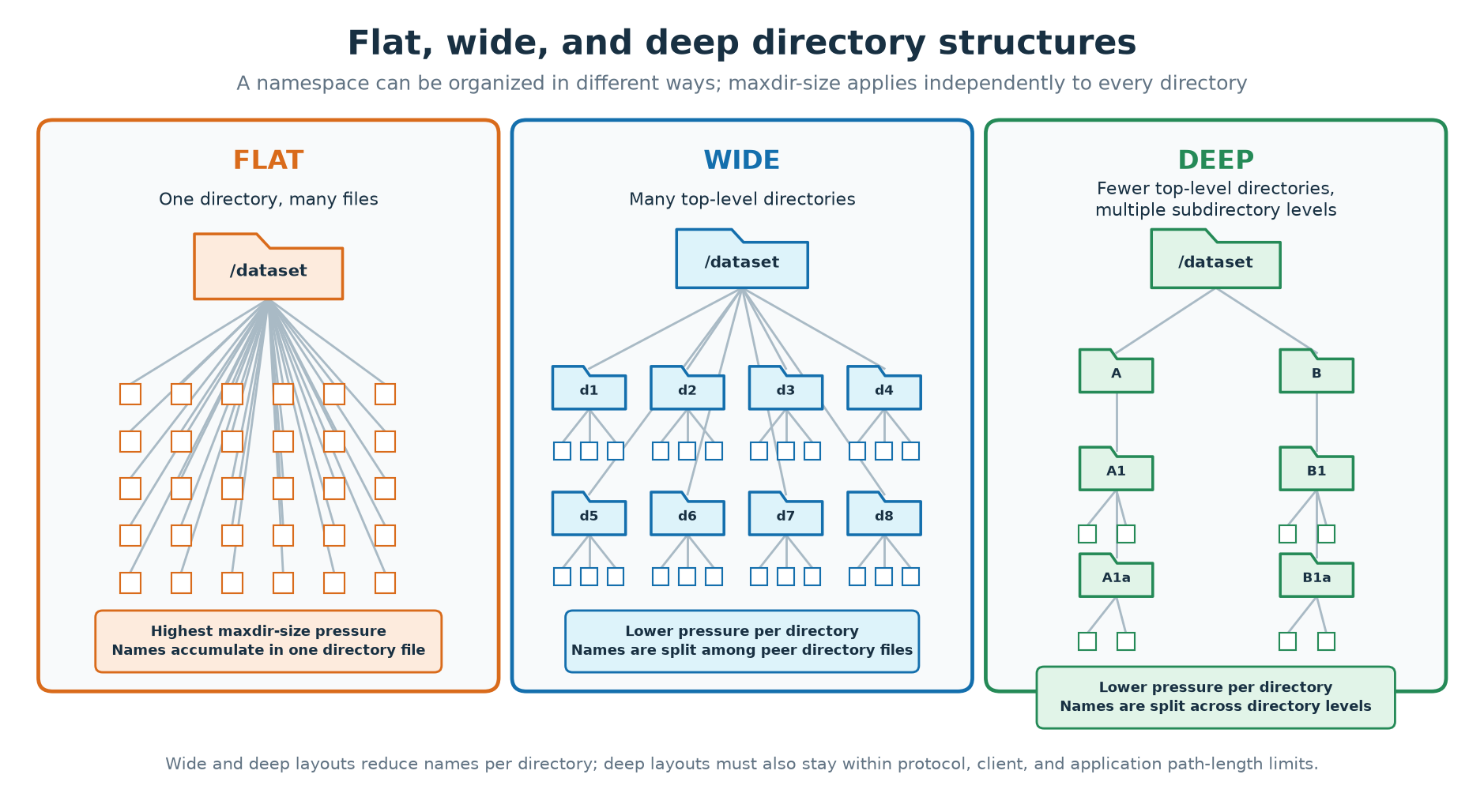
When possible, avoid placing millions of names at one flat directory level if the application can use a wide or deep hierarchy. Flat layouts concentrate memory and CPU work and can increase latency during mass GETATTR, READDIR, lookup, and delete operations. In a FlexGroup volume, a large flat directory can also produce more remote entries, causing its directory file to approach maxdir-size sooner than the same visible name count in a FlexVol.
FlexGroup volumes generally work best with many smaller directories rather than one large flat directory. Directories below about 2 MiB stay on the simple scan path. Beginning with ONTAP 9.2, larger directories are indexed automatically, which helps targeted lookups. Indexing does not make a very large directory equivalent to a sharded hierarchy: enumeration, wildcard scans, and single-directory create serialization still apply. ONTAP can place FlexGroup child directories remotely while favoring file locality to the parent directory, which reduces remote latency for those files.
Distributing files across a hierarchy means using more directories with fewer files in each directory.
Common sharding keys include:
-
A hash prefix
-
Customer, project, or tenant
-
Date or time window
-
Dataset, job, or workflow stage
-
Object type or lifecycle state
Choose enough shards to keep directory operations manageable, but do not create so many nearly empty directories that directory count itself becomes excessive. A deterministic scheme makes placement predictable and allows clients to locate files without scanning every shard.
Wide and deep layouts can both work. Keep complete path lengths within the limits of the NAS protocol, client operating system, and application. If a flat layout is unavoidable, monitor the largest directory file's current size and maxdir-size headroom as described in View maxdir-size and current directory size, and validate whether a controlled increase is appropriate.
Select the appropriate volume architecture
FlexVol
Use a FlexVol when one volume's capacity (less than 1 TB), inode scale (less than 2 billion), and performance domain satisfy the workload (lower ingest, fewer clients). FlexVol volumes should also be considered for workloads that may require creation of many volumes/file systems in the cluster that may risk hitting total volume counts (such as with Kubernetes PVCs) or for VMware datastores.
FlexGroup
Use FlexGroup when the workload benefits from greater total capacity (>300TB), file-count scale (>2 billion), and parallelism across constituents and nodes.
Plan for:
-
Per-constituent inode limits and distribution
-
NFS 64-bit file identifiers when the FlexGroup can exceed about two billion files (see NFS 64-bit file identifiers and FlexGroup file counts)
-
Aggregate and constituent capacity balance (Note: For NetApp AFX, this is not required)
-
Workload placement behavior
-
FlexGroup-specific directory-entry representation
-
Data protection compatibility
-
Application behavior when files are distributed
A FlexGroup does not automatically parallelize operations on one logical directory. Sharding across directories remains valuable to performance balance.
Leave operating margin
Do not plan steady-state operation at 100% of used inodes or of the largest directory file. Keep margin for unexpected growth, temporary objects, Snapshot-retained metadata, ACLs and streams, migration overlap, backup work, FlexGroup placement imbalance, and software changes that alter filenames.
Setting files to the current maximum is a ceiling, not permission to run until the last inode is gone. Alert on files-used well before that ceiling. For maxdir-size, the approximately 2% increase guidance in What happens when maxdir-size is exceeded? is how to raise the cap, not a universal operating margin.
Account for metadata capacity
Budget inode-file, directory-file, index, Snapshot, and aggregate metadata separately. Use 288 bytes per allocated public inode as the base inode-file estimate; see Capacity impact. Raising files does not allocate that space immediately. Treat peak allocated inode-file capacity as persistent.
Use volume show-space to inspect inode and metadata capacity rather than converting every CLI counter as though it were a byte value.
Use realistic filename scenarios
Test at least:
-
Short ASCII-only names
-
The workload's median and high-percentile filename lengths
-
Non-ASCII or supplementary Unicode characters when used
-
SMB workloads that generate DOS 8.3 aliases
-
Multiprotocol access that can require alternate names
-
FlexGroup placement representative of production
Path length and basename length are not interchangeable. A long path spread across several directories affects protocol limits and inode count, while each directory stores only its immediate component.
Test metadata operations, not only throughput
Sequential bandwidth tests do not predict high-file-count behavior. Include:
-
File and directory create
-
Existing-name and missing-name lookup
-
stator attribute operations -
Open and close
-
Rename within and across directories
-
Unlink and recursive deletion
-
Full and partial directory enumeration
-
Wildcard searches
-
Cold-cache and warm-cache runs
-
Mixed NFS and SMB access when applicable
Measure latency distributions, CPU, cache behavior, network load, and completion time. Repeat tests during Snapshot, replication, analytics, backup, and security scanning if those operations coexist in production.
Validate lifecycle operations
Test more than initial ingest:
-
Expansion to the projected peak count
-
Large delete and asynchronous delete
-
Backup and restore
-
SnapMirror initialization, update, failover, and resync
-
Clone or Snapshot-heavy workflows
-
Volume move or storage failover
-
ONTAP upgrade and, when required, revert checks
-
Migration from FlexVol to FlexGroup or between protocol environments
Directory indexes might need to be built or transferred at the destination. Enable public index transfer only when avoiding rebuilds materially improves recovery; it does not improve local lookup. See When to enable public directory index transfers.
Monitor inode limits and allocation
Track files-used against files and inodefile-public-capacity as described in Monitor maxfiles, EMS events, and ONTAP enhancements. Alert before files-used reaches files. For FlexGroup volumes, investigate constituent-level events even when the overall total appears to have room.
Monitor large directories
Measure directory-file size and resolve EMS file IDs as described in View maxdir-size and current directory size. Inventory known flat or churn-heavy directories before they generate warnings.
Respond to warnings before failures
For inode warnings:
-
Check
files-used,files,files-maximum-possible, volume size, and capacity. -
Determine whether growth is expected or anomalous.
-
Increase
files, grow the volume, or remove unnecessary objects as appropriate. -
For FlexGroup, check the affected constituent and placement balance.
For directory-size warnings:
-
Resolve the directory inode to a path.
-
Measure the current directory-file size and analyze filename behavior.
-
Stop unbounded flat-directory growth.
-
Shard or migrate names into new directories when possible.
-
Increase
maxdir-sizeonly when the application cannot be restructured and performance risk is understood.
Do not wait for callhome.no.inodes or wafl.dir.size.max; at that point client creates are already failing.
Manage delete behavior
Deleting files frees public inodes for reuse but does not shrink the public inode file. Similarly, deleting names from a directory makes directory slots reusable but does not normally reduce the directory-file high-water size.
Large deletes can be metadata-intensive and can temporarily increase private zombie inodes. Rate-limit client-side recursive deletes (rm -rf) when they compete with production traffic.
Beginning with ONTAP 9.8, volume file async-delete removes a directory from the cluster instead of over NFS or SMB, which avoids client and network contention. It applies to FlexVol and FlexGroup volumes. ONTAP scans the path, deletes subdirectory contents first, and runs parallel delete tasks (default 5,000 concurrent tasks; configurable from 50 to 100,000). In TR-4571 testing, that was about 10× faster than a single-threaded rm -rf on a 24,000-entry tree.
volume file async-delete start -vserver <svm> -volume <volume> -path /relative/dir
volume file async-delete show
Constraints: the volume must be online and mounted, the path must be a directory (not a single file), and only one async-delete job can run at a time.
If a large sparse directory remains a problem, copy remaining entries into a new directory. Lowering maxdir-size does not compact it. See Sparse directories and hole punching.
Plan node and HA headroom
High-file-count operations consume CPU, memory, cache, and storage I/O even when data throughput is low. Maintain headroom for:
-
Metadata bursts
-
Cold-cache lookup and enumeration
-
Scanners and data protection
-
Storage failover or takeover
-
FlexGroup remote operations
-
Other volumes sharing the node
Balance workloads using observed metadata demand, not only capacity or throughput. A node can become metadata-bound while network and disk bandwidth appear available.
Spread client connections across data LIFs and nodes
High-file-count NAS is often metadata-bound. An NFS or SMB mount typically uses one TCP connection to one data LIF, and that LIF lives on one node. If many clients, scanners, or backup jobs mount the same address, that node spends CPU on protocol processing even when the rest of the cluster is idle. A FlexGroup can redirect file operations over the cluster network, but that does not remove the load on the node that owns the client connection.
-
Create multiple data LIFs (data network interfaces) in the SVM, with more than one LIF on each node that serves the workload so clients have several paths into every node.
-
Confirm every node that should participate has at least one data LIF in that SVM.
-
Balance mounts across those LIFs and nodes. When you mount by IP, pick addresses evenly. When clients mount by name, present multiple LIF addresses behind one FQDN and use DNS load balancing.
-
Do not pin the entire workload to a single LIF or a single node.
A single client that supports NFS nconnect or SMB multichannel can open additional connections on one mount. That helps that client; it does not replace spreading many clients across LIFs and nodes.
Use current ONTAP releases
Later ONTAP releases include directory indexing, inode-management improvements, sparse-directory optimizations, directory-index transfer, and other high-file-count enhancements. Upgrade decisions must still consider platform support, data protection compatibility, and application qualification.
Do not enable a feature solely because it is related to high file count:
-
Raise
maxdir-sizeonly for a demonstrated single-directory requirement. -
Set
filesto the current maximum when that is appropriate; see Controlling maxfiles. -
Enable directory-index transfer only when replication or restore should preserve indexes.
-
Enable File System Analytics only when its insight justifies its scanning work.
-
Treat
-has-dir-index-publicand-has-optimized-sparse-directoriesas status, not enable switches.
Beginning with ONTAP 9.17.1, File System Analytics can be enabled by default on new volumes in a newly created NAS SVM. Check -analytics-state rather than assuming it is disabled, and account for its namespace scan when qualifying a high-file-count workload.
Document assumptions and thresholds
Record:
-
Workload and filename assumptions
-
Peak file and directory counts
-
Selected margins
-
Volume and constituent layout
-
Data LIF and client-mount layout
-
filesandmaxdir-sizevalues -
Alert thresholds and response owners
-
Expected ingest and delete rates
-
Recovery and migration objectives
-
ONTAP release and platform dependencies
Revisit the model when application versions, filename formats, retention, protocols, or data protection workflows change.