


重新挂载并重新格式化 StorageGRID 设备存储卷(手动步骤)
 建议更改
建议更改

 PDF
PDF
您必须手动运行两个脚本来重新装载保留的存储卷,然后重新格式化任何发生故障的存储卷。第一个脚本重新装载正确格式化为 StorageGRID 存储卷的卷。第二个脚本重新格式化所有未装载的卷,如果需要,重建 Cassandra 数据库,然后启动服务。
-
您已经为任何已知需要更换的故障存储卷更换了硬件。
运行 `sn-remount-volumes`脚本可能有助于识别其他发生故障的存储卷。
-
您已检查存储节点停用是否正在进行中,或者您已暂停节点停用过程。(在 Grid Manager 中,选择*维护* > 任务 > 停用。)
-
您已检查是否正在进行扩展。(在 Grid Manager 中,选择*维护* > 任务 > 扩展。)

|
如果多个存储节点脱机,请与技术支持联系。不要运行 `sn-recovery-postinstall.sh`脚本。 |
要完成此过程,请执行以下高级任务:
-
登录到已恢复的存储节点。
-
运行 `sn-remount-volumes`脚本以重新挂载正确格式化的存储卷。运行此脚本时,它会执行以下操作:
-
装载和卸载每个存储卷以重播 XFS 日志。
-
执行 XFS 文件一致性检查。
-
如果文件系统一致,则确定存储卷是否为正确格式化的 StorageGRID 存储卷。
-
如果存储卷已正确格式化,则会重新装载存储卷。卷上的任何现有数据保持不变。
-
-
查看脚本输出并解决任何问题。
-
运行 `sn-recovery-postinstall.sh`脚本。运行此脚本时,它会执行以下操作。
在运行 sn-recovery-postinstall.sh(步骤 4)以重新格式化发生故障的存储卷并还原对象元数据之前,请勿在恢复期间重新启动存储节点。在 `sn-recovery-postinstall.sh`完成之前重新启动存储节点会导致尝试启动的服务发生错误,并导致 StorageGRID 设备节点退出维护模式。-
重新格式化 `sn-remount-volumes`脚本无法挂载或发现格式不正确的任何存储卷。

如果重新格式化存储卷,则该卷上的所有数据都将丢失。您必须执行其他过程以从网格中的其他位置还原对象数据,前提是 ILM 规则已配置为存储多个对象副本。 -
如果需要,在节点上重建 Cassandra 数据库。
-
在存储节点上启动服务。
-
-
登录到已恢复的存储节点:
-
输入以下命令:
ssh admin@grid_node_IP -
输入 `Passwords.txt`文件中列出的密码。
-
输入以下命令切换到 root:
su - -
输入 `Passwords.txt`文件中列出的密码。
以 root 身份登录时,提示符将从
$`更改为 `#。 -
-
运行第一个脚本以重新挂载任何正确格式化的存储卷。
如果所有存储卷都是新的,需要格式化,或者如果所有存储卷都出现故障,则可以跳过此步骤并运行第二个脚本以重新格式化所有未挂载的存储卷。 -
运行脚本:
sn-remount-volumes此脚本可能需要数小时才能在包含数据的存储卷上运行。
-
脚本运行时,请查看输出并回答任何提示。
您可以根据需要使用 tail -f`命令监视脚本日志文件的内容(/var/local/log/sn-remount-volumes.log`)。日志文件包含比命令行输出更详细的信息。root@SG:~ # sn-remount-volumes The configured LDR noid is 12632740 ====== Device /dev/sdb ====== Mount and unmount device /dev/sdb and checking file system consistency: The device is consistent. Check rangedb structure on device /dev/sdb: Mount device /dev/sdb to /tmp/sdb-654321 with rangedb mount options This device has all rangedb directories. Found LDR node id 12632740, volume number 0 in the volID file Attempting to remount /dev/sdb Device /dev/sdb remounted successfully ====== Device /dev/sdc ====== Mount and unmount device /dev/sdc and checking file system consistency: Error: File system consistency check retry failed on device /dev/sdc. You can see the diagnosis information in the /var/local/log/sn-remount-volumes.log. This volume could be new or damaged. If you run sn-recovery-postinstall.sh, this volume and any data on this volume will be deleted. If you only had two copies of object data, you will temporarily have only a single copy. StorageGRID will attempt to restore data redundancy by making additional replicated copies or EC fragments, according to the rules in the active ILM policies. Don't continue to the next step if you believe that the data remaining on this volume can't be rebuilt from elsewhere in the grid (for example, if your ILM policy uses a rule that makes only one copy or if volumes have failed on multiple nodes). Instead, contact support to determine how to recover your data. ====== Device /dev/sdd ====== Mount and unmount device /dev/sdd and checking file system consistency: Failed to mount device /dev/sdd This device could be an uninitialized disk or has corrupted superblock. File system check might take a long time. Do you want to continue? (y or n) [y/N]? y Error: File system consistency check retry failed on device /dev/sdd. You can see the diagnosis information in the /var/local/log/sn-remount-volumes.log. This volume could be new or damaged. If you run sn-recovery-postinstall.sh, this volume and any data on this volume will be deleted. If you only had two copies of object data, you will temporarily have only a single copy. StorageGRID will attempt to restore data redundancy by making additional replicated copies or EC fragments, according to the rules in the active ILM policies. Don't continue to the next step if you believe that the data remaining on this volume can't be rebuilt from elsewhere in the grid (for example, if your ILM policy uses a rule that makes only one copy or if volumes have failed on multiple nodes). Instead, contact support to determine how to recover your data. ====== Device /dev/sde ====== Mount and unmount device /dev/sde and checking file system consistency: The device is consistent. Check rangedb structure on device /dev/sde: Mount device /dev/sde to /tmp/sde-654321 with rangedb mount options This device has all rangedb directories. Found LDR node id 12000078, volume number 9 in the volID file Error: This volume does not belong to this node. Fix the attached volume and re-run this script.
在示例输出中,一个存储卷已成功重新装入,三个存储卷出错。
-
/dev/sdb通过了 XFS 文件系统一致性检查,并且具有有效的卷结构,因此已成功重新装载。由脚本重新装载的设备上的数据将予以保留。 -
/dev/sdc未通过 XFS 文件系统一致性检查,因为存储卷是新的或已损坏。 -
/dev/sdd无法挂载,因为磁盘未初始化或磁盘的超级块已损坏。当脚本无法挂载存储卷时,它会询问您是否要运行文件系统一致性检查。-
如果存储卷已连接到新磁盘,请对提示回答 N。您不需要检查新磁盘上的文件系统。
-
如果存储卷连接到现有磁盘,请对提示回答 Y。您可以使用文件系统检查的结果来确定损坏的来源。结果保存在 `/var/local/log/sn-remount-volumes.log`日志文件中。
-
-
/dev/sde通过了 XFS 文件系统一致性检查,并且具有有效的卷结构;但是,volID文件中的 LDR 节点 ID 与此存储节点的 ID(顶部显示的configured LDR noid)不匹配。此消息表示此卷属于另一个存储节点。
-
-
-
查看脚本输出并解决任何问题。
如果存储卷未通过 XFS 文件系统一致性检查或无法挂载,请仔细查看输出中的错误消息。您必须了解在这些卷上运行 `sn-recovery-postinstall.sh`脚本的含义。 -
检查以确保结果包含您预期的所有卷的条目。如果未列出任何卷,请重新运行脚本。
-
查看所有已挂载设备的消息。确保没有指示存储卷不属于此存储节点的错误。
在该示例中,/dev/sde 的输出包含以下错误消息:
Error: This volume does not belong to this node. Fix the attached volume and re-run this script.
如果报告存储卷属于另一个存储节点,请联系技术支持。如果运行 `sn-recovery-postinstall.sh`脚本,存储卷将被重新格式化,这可能会导致数据丢失。 -
如果无法挂载任何存储设备,请记下设备名称,并修复或更换设备。
您必须修复或更换无法挂载的任何存储设备。 您将使用设备名称查找卷 ID,这是运行 `repair-data`脚本将对象数据还原至卷时所需的输入(下一个过程)。
-
修复或更换所有无法挂载的设备后,再次运行 `sn-remount-volumes`脚本,以确认所有可重新挂载的存储卷均已重新挂载。
如果无法装入存储卷或存储卷格式不正确,则继续下一步,此卷和此卷上的所有数据都将被删除。如果您有两个对象数据副本,则在完成下一个过程(恢复对象数据)之前,您将只有一个副本。
如果您认为无法从网格中的其他位置重建故障存储卷上剩余的数据,请勿运行 `sn-recovery-postinstall.sh`脚本(例如,如果您的 ILM 策略使用仅生成一个副本的规则,或者多个节点上的卷发生故障)。请联系技术支持以确定如何恢复您的数据。 -
-
运行
sn-recovery-postinstall.sh`脚本: `sn-recovery-postinstall.sh此脚本重新格式化无法挂载或发现格式不正确的任何存储卷;如果需要,在节点上重建 Cassandra 数据库;并在存储节点上启动服务。
请注意以下几点:
-
脚本可能需要数小时才能运行。
-
一般来说,在脚本运行期间,请勿干预 SSH 会话。
-
SSH 会话处于活动状态时,请勿按 Ctrl+C。
-
如果发生网络中断并终止 SSH 会话,脚本将在后台运行,但您可以从恢复页面查看进度。
-
如果存储节点使用 RSM 服务,则在重新启动节点服务时,脚本可能会停滞 5 分钟。每当 RSM 服务首次启动时,预计会有 5 分钟的延迟。
RSM 服务存在于包含 ADC 服务的存储节点上。
一些 StorageGRID 恢复程序使用 Reaper 来处理 Cassandra 修复。一旦相关或所需服务启动,修复就会自动进行。您可能会注意到脚本输出中提到"reaper"或"Cassandra repair"。如果您看到指示修复失败的错误消息,请运行错误消息中指示的命令。 -
-
运行 `sn-recovery-postinstall.sh`脚本时,请监视 Grid Manager 中的恢复页面。
"恢复"页面上的"进度条"和"阶段"列提供了 `sn-recovery-postinstall.sh`脚本的高级状态。
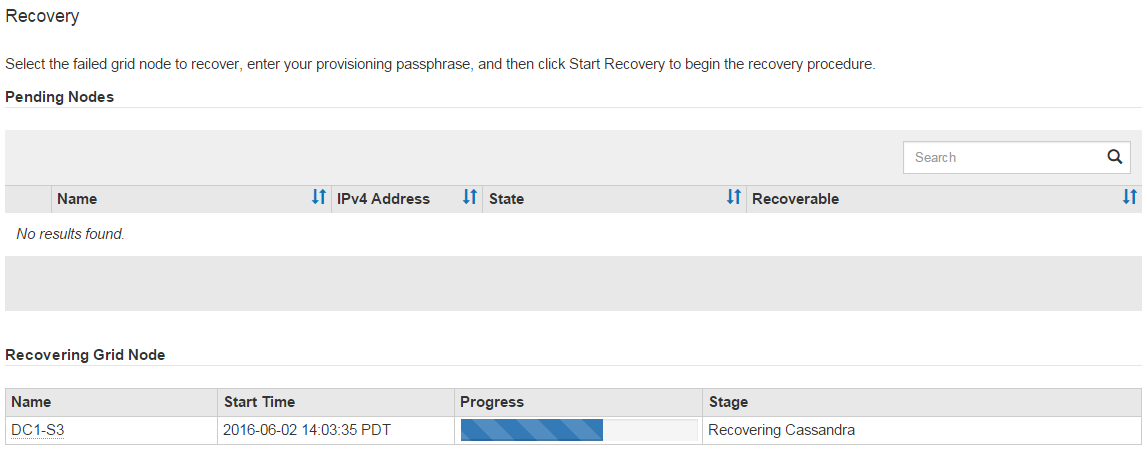
-
在
sn-recovery-postinstall.sh脚本启动节点上的服务后,您可以将对象数据还原到由脚本格式化的任何存储卷。该脚本询问您是否要使用 Grid Manager 卷还原过程。
-
在大多数情况下,您应该"使用 Grid Manager 还原对象数据"。答案 `y`以使用 Grid Manager。
-
在极少数情况下,例如在技术支持人员的指示下,或者当您知道替换节点可用于对象存储的卷少于原始节点时,则必须"手动还原对象数据"使用
repair-data`脚本。如果其中一种情况适用,请回答 `n。
如果您对使用 Grid Manager 卷还原过程(手动还原对象数据)的回答为
n:-
您无法使用 Grid Manager 还原对象数据。
-
您可以使用 Grid Manager 监控手动还原作业的进度。
完成选择后,脚本将完成运行,并显示恢复对象数据的后续步骤。查看这些步骤后,按任意键返回命令行。
-
-