


重新掛載並重新格式化 StorageGRID 儲存磁碟區(手動步驟)
 建議變更
建議變更

 PDF
PDF
您必須手動執行兩個指令碼來重新掛載已保留的儲存設備 Volume,並重新格式化任何故障的儲存設備 Volume。第一個指令碼重新掛載已正確格式化為 StorageGRID 儲存設備 Volume 的 Volume。第二個指令碼重新格式化任何未掛載的 Volume,並在需要時重建 Cassandra,然後啟動服務。
-
對於所有已知需要更換的故障儲存 Volume,您已完成硬體更換。
執行
sn-remount-volumes指令碼可能有助於您識別其他故障的儲存設備 Volume。 -
您已確認儲存節點退役作業未在進行中,或已暫停節點退役程序。(在 Grid Manager 中,選擇 Maintenance > Tasks > Decommission。)
-
您已確認擴充並未在進行中。(在 Grid Manager 中,選取 維護 > 工作 > 擴充。)
-
您有"已審查 Storage Node 系統磁碟機恢復的警告"。

如果有一個以上的儲存節點離線,請聯絡技術支援。請勿執行 `sn-recovery-postinstall.sh`指令碼。
要完成此流程,您需要執行以下高階任務:
-
登入已恢復的儲存節點。
-
執行
sn-remount-volumes指令碼以重新掛載格式化正確的儲存 Volume。此指令碼執行時,會執行以下操作:-
掛載和取下每個儲存設備 Volume,以重播 XFS 日誌。
-
執行 XFS 檔案一致性檢查。
-
如果檔案系統一致,則確定儲存 Volume 是否為格式正確的 StorageGRID 儲存 Volume。
-
如果儲存設備 Volume 格式正確,則重新掛載儲存設備 Volume。Volume 上的所有現有資料均保持不變。
-
-
審查指令碼輸出並解決任何問題。
-
執行
sn-recovery-postinstall.sh指令碼。此指令碼執行時,會執行以下操作。
在執行 sn-recovery-postinstall.sh以重新格式化失敗的儲存設備 Volume 並還原物件中繼資料之前,請勿在恢復期間將 Storage 節點重新開機。在sn-recovery-postinstall.sh完成之前將 Storage 節點重新開機,會導致嘗試啟動的服務發生錯誤,並導致 StorageGRID 應用裝置節點結束維護模式。請參閱 安裝後指令碼 的步驟。-
重新格式化
sn-remount-volumes指令碼無法裝載或發現格式化不正確的任何儲存設備 Volume。
如果將儲存 Volume 重新格式化,該 Volume 上的任何資料都將遺失。您必須執行額外的程序,從網格中的其他位置還原物件資料,前提是 ILM 規則已設定為儲存一個以上的物件複本。 -
如果需要,請在節點上重新建置 Cassandra 資料庫。
-
啟動儲存節點上的服務。
-
-
登入已恢復的儲存節點:
-
請輸入以下命令:
ssh admin@grid_node_IP -
請輸入 `Passwords.txt`檔案中列出的密碼。
-
輸入以下命令以切換至根目錄:
su - -
請輸入 `Passwords.txt`檔案中列出的密碼。
當您以根目錄身分登入時,提示符號會從
$`變為 `#。 -
-
執行第一個指令碼以重新掛載任何格式正確的儲存設備 Volume。
如果所有儲存設備 Volume 都是新的且需要格式化,或者所有儲存設備 Volume 都已損壞,則可以跳過此步驟並執行第二個指令碼來重新格式化所有未掛載的儲存設備 Volume。 -
執行指令碼:
sn-remount-volumes此指令碼在包含資料的儲存設備 Volume 上執行可能需要數小時。
-
執行指令碼時,審查輸出結果並回答任何提示。
視需要,您可以使用 tail -f命令來監控指令碼的日誌檔內容 (/var/local/log/sn-remount-volumes.log)。此日誌檔包含比命令列輸出更詳細的資訊。root@SG:~ # sn-remount-volumes The configured LDR noid is 12632740 ====== Device /dev/sdb ====== Mount and unmount device /dev/sdb and checking file system consistency: The device is consistent. Check rangedb structure on device /dev/sdb: Mount device /dev/sdb to /tmp/sdb-654321 with rangedb mount options This device has all rangedb directories. Found LDR node id 12632740, volume number 0 in the volID file Attempting to remount /dev/sdb Device /dev/sdb remounted successfully ====== Device /dev/sdc ====== Mount and unmount device /dev/sdc and checking file system consistency: Error: File system consistency check retry failed on device /dev/sdc. You can see the diagnosis information in the /var/local/log/sn-remount-volumes.log. This volume could be new or damaged. If you run sn-recovery-postinstall.sh, this volume and any data on this volume will be deleted. If you only had two copies of object data, you will temporarily have only a single copy. StorageGRID will attempt to restore data redundancy by making additional replicated copies or EC fragments, according to the rules in the active ILM policies. Don't continue to the next step if you believe that the data remaining on this volume can't be rebuilt from elsewhere in the grid (for example, if your ILM policy uses a rule that makes only one copy or if volumes have failed on multiple nodes). Instead, contact support to determine how to recover your data. ====== Device /dev/sdd ====== Mount and unmount device /dev/sdd and checking file system consistency: Failed to mount device /dev/sdd This device could be an uninitialized disk or has corrupted superblock. File system check might take a long time. Do you want to continue? (y or n) [y/N]? y Error: File system consistency check retry failed on device /dev/sdd. You can see the diagnosis information in the /var/local/log/sn-remount-volumes.log. This volume could be new or damaged. If you run sn-recovery-postinstall.sh, this volume and any data on this volume will be deleted. If you only had two copies of object data, you will temporarily have only a single copy. StorageGRID will attempt to restore data redundancy by making additional replicated copies or EC fragments, according to the rules in the active ILM policies. Don't continue to the next step if you believe that the data remaining on this volume can't be rebuilt from elsewhere in the grid (for example, if your ILM policy uses a rule that makes only one copy or if volumes have failed on multiple nodes). Instead, contact support to determine how to recover your data. ====== Device /dev/sde ====== Mount and unmount device /dev/sde and checking file system consistency: The device is consistent. Check rangedb structure on device /dev/sde: Mount device /dev/sde to /tmp/sde-654321 with rangedb mount options This device has all rangedb directories. Found LDR node id 12000078, volume number 9 in the volID file Error: This volume does not belong to this node. Fix the attached volume and re-run this script.
在範例輸出中,一個儲存 Volume 已成功重新掛載,三個儲存 Volume 出現錯誤。
-
/dev/sdb通過了 XFS 檔案系統一致性檢查,且具有有效的 Volume 結構,因此已成功重新掛載。由指令碼重新掛載的裝置上的資料會予以保留。 -
/dev/sdc未通過 XFS 檔案系統一致性檢查,因為儲存 Volume 為新或已毀損。 -
`/dev/sdd`由於磁碟未初始化或磁碟超級區塊已毀損,因此無法裝載。當指令碼無法裝載儲存設備 Volume 時,它會詢問您是否要執行檔案系統一致性檢查。
-
如果儲存設備 Volume 連接到新磁碟,請對提示回答 N。您不需要檢查新磁碟上的檔案系統。
-
如果儲存設備 Volume 連接至現有的磁碟,請在提示中回答 Y。您可以使用檔案系統檢查的結果來判斷毀損的來源。結果會儲存在 `/var/local/log/sn-remount-volumes.log`日誌檔中。
-
-
/dev/sde已通過 XFS 檔案系統一致性檢查,且 Volume 結構有效;但是,volID 檔案中的 LDR 節點 ID 與此儲存節點的 ID (頂端顯示的configured LDR noid)不符。此訊息表示此 Volume 屬於另一個儲存節點。
-
-
-
審查指令碼輸出並解決任何問題。
如果儲存設備 Volume 未能通過 XFS 檔案系統一致性檢查或無法裝載,請仔細審查輸出中的錯誤訊息。您必須了解在這些 Volume 上執行 `sn-recovery-postinstall.sh`指令碼的後果。 -
檢查以確保結果中包含您預期之所有 Volume 的項目。如果有任何 Volume 未列出,請重新執行指令碼。
-
審查所有已裝載裝置的訊息。請確保沒有任何錯誤指出儲存設備 Volume 不屬於此儲存設備節點。
在本例中, `/dev/sde`的輸出結果包含以下錯誤訊息:
Error: This volume does not belong to this node. Fix the attached volume and re-run this script.
如果儲存 Volume 被回報為屬於另一個 Storage Node ,請聯絡技術支援。如果您執行 sn-recovery-postinstall.sh指令碼,儲存 Volume 將會被重新格式化,這可能會導致資料遺失。 -
如果任何儲存設備無法裝載,請記下設備名稱,並修理或更換該設備。
您必須修理或更換任何無法掛載的儲存設備。 您將使用裝置名稱來尋找 Volume ID,這是執行 `repair-data`指令碼將物件資料還原至 Volume 時所需的輸入(下一個程序)。
-
修復或更換所有無法裝載的裝置後,再次執行
sn-remount-volumes指令碼,確認所有可以重新掛載的儲存 Volume 均已重新掛載。
如果儲存設備 Volume 無法裝載或格式不正確,且您繼續執行下一步,則該 Volume 及其上的所有資料都將被刪除。如果您之前有兩個物件資料複本,則在完成下一個程序(還原物件資料)之前,您將只剩下單一複本。
如果您認為故障儲存設備 Volume 上剩餘的資料無法從網格中的其他位置重新建置(例如,如果您的 ILM 原則使用僅建立單一複本的規則,或磁碟區在多個節點上發生故障),請勿執行 `sn-recovery-postinstall.sh`指令碼。請改為聯絡技術支援,以確定如何恢復您的資料。 -
-
執行
sn-recovery-postinstall.sh`指令碼: `sn-recovery-postinstall.sh此指令碼會重新格式化任何無法裝載或格式不正確的儲存 Volume;如有需要,在節點上重新建置 Cassandra 資料庫;並啟動儲存節點上的服務。
請注意以下事項:
-
指令碼可能需要幾個小時才能執行完畢。
-
通常情況下,指令碼執行時,您應該讓 SSH 工作階段保持不變。
-
SSH 工作階段處於作用中時,請勿按 Ctrl+C 鍵。
-
如果發生網路中斷並終止 SSH 工作階段,指令碼將在背景執行,但您可以從「恢復」頁面檢視進度。
-
如果 Storage 節點使用 RSM 服務,當節點服務重新啟動時,指令碼可能會出現停滯 5 分鐘的情況。每當 RSM 服務首次開機時,預期都會出現此 5 分鐘的延遲。
RSM 服務存在於包含 ADC 服務的儲存節點上。
某些 StorageGRID 恢復程序使用 Reaper 來處理 Cassandra 的修復。一旦相關或必要的服務啟動,修復就會自動進行。您可能會注意到指令碼輸出中提及「reaper」或「Cassandra repair」。如果您看到指示修復失敗的錯誤訊息,請執行錯誤訊息中指示的命令。 -
-
當
sn-recovery-postinstall.sh指令碼執行時,請監控 Grid Manager 中的 Recovery 頁面。恢復頁面上的進度列和階段欄提供
sn-recovery-postinstall.sh指令碼的高階狀態。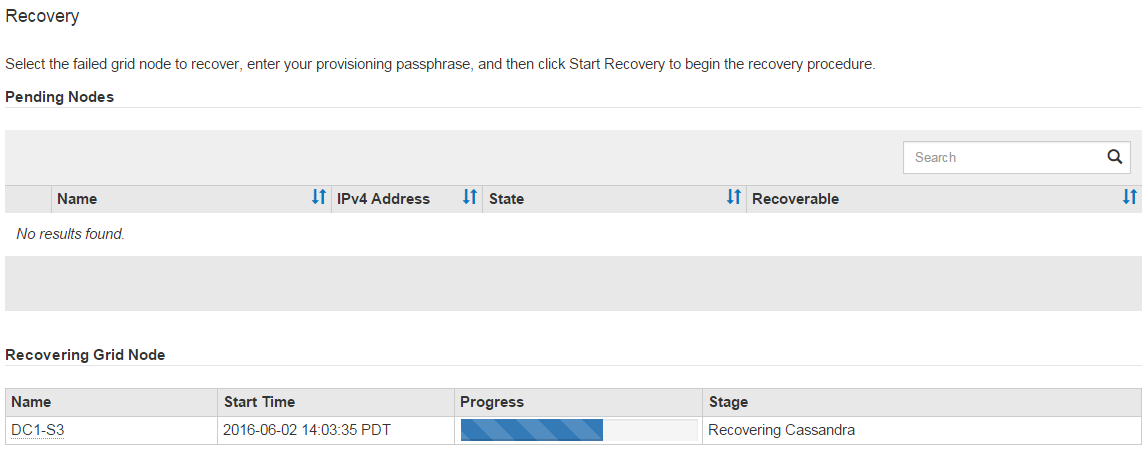
-
在
sn-recovery-postinstall.sh指令碼啟動節點上的服務之後,您可以將物件資料還原至該指令碼所格式化的任何儲存設備 Volume。指令碼會詢問您是否要使用 Grid Manager Volume 還原程序。
-
大多數情況下,您應該"使用 Grid Manager 還原物件資料"。Answer `y`以使用 Grid Manager。
-
在極少數情況下,例如技術支援指示,或當您知道替換節點可用於物件儲存的 Volume 比原始節點少時,您必須"手動還原物件資料"使用
repair-data`指令碼。如符合上述任何一種情況,請回答 `n。
如果您對使用 Grid Manager Volume 還原流程(手動還原物件資料)的回答為
n:-
您無法使用 Grid Manager 還原物件資料。
-
您可以使用 Grid Manager 監控手動還原作業的進度。
選擇完成後,指令碼執行完畢,並顯示恢復物件資料的後續步驟。查看這些步驟後,按任意鍵返回命令列。
-
-