


Learn about Proxmox VE business continuity with SnapMirror active sync

 Suggest changes

 PDFs
PDFs
Enterprises that run business-critical virtual machines (VMs) on Proxmox Virtual Environment (VE), and service providers that host customer VMs on Proxmox VE, need those VMs to keep running when a storage system or an entire data center goes offline. ONTAP SnapMirror active sync synchronously replicates the shared storage of a Proxmox VE cluster stretched across two sites and automatically fails over storage to the surviving site. You get a zero recovery point objective (RPO), automated recovery without scripts or runbooks, and the same shared storage at both sites, so Proxmox VE high availability (HA) can restart VMs without any storage reconfiguration. For NFS shared storage, the solution uses SnapMirror active sync for NAS.
Customer challenges
Building storage and site resilience for Proxmox VE with native tools alone is difficult:
-
Data loss after a site failure. Proxmox VE storage replication and Proxmox Backup Server are asynchronous. Changes made since the last replication or backup are lost when the primary site fails.
-
Manual, slow recovery. Recovering at a secondary site usually means promoting replicas, mounting storage under a different address, updating
/etc/pve/storage.cfg, and restarting VMs. Each manual step adds downtime and the risk of error during an outage. -
Stretched storage that competes with VMs for host resources. Hyperconverged stretched storage, such as Ceph in stretch mode, runs on the Proxmox VE nodes and keeps two replicas of every object at each site. Replication, recovery, and rebalancing traffic consume CPU, memory, and network resources on the same nodes that run VMs.
-
Two quorum decisions that must agree. Any two-site design needs a witness in a third failure domain, for the Proxmox VE cluster and for the storage. If the cluster and the storage choose different surviving sites after an inter-site link failure, VMs restart on nodes that can't reach the active storage.
-
A storage address that must work at both sites. After a storage failover, Proxmox VE nodes must reach the shared storage at the same address. That address must be reachable at both sites, which usually means a layer 2 VLAN stretched between the sites.
Service provider challenges
Service providers that build cloud services on Proxmox VE face the same challenges, with tenant service level agreements (SLAs) on top:
-
The storage system is a shared point of failure. Proxmox VE HA protects tenant VMs from a host failure, but not from a failure of the storage system that hosts their disks. One storage outage affects every tenant on that system.
-
No way to sell higher availability. Without synchronous replication and automatic storage failover, a provider can't offer a premium availability tier with zero data loss and stronger uptime commitments.
-
Tenant isolation during recovery. Recovery, maintenance, and disaster recovery tests must affect only the tenants involved, not the whole platform.
Enterprise challenges
Enterprises that move mission-critical workloads from other hypervisors to Proxmox VE expect the same site resilience they had before, such as zero data loss for databases and line-of-business applications and recovery without a manual runbook. Meeting that expectation with Proxmox VE native tools alone takes significant design, scripting, and operational effort.
Solution overview
The solution combines a Proxmox VE stretch cluster with SnapMirror active sync on NetApp AFF systems at two sites:
-
Zero RPO. ONTAP replicates every write to the shared storage synchronously from the primary cluster at site A to the secondary cluster at site B.
-
Same shared storage at both sites. After a failover, the secondary cluster presents the same storage to Proxmox VE, so the storage definitions in
/etc/pve/storage.cfgstay valid. -
Automatic failover. A mediator acts as a witness outside the two sites. You can install ONTAP Mediator at a third site, or use ONTAP Cloud Mediator, a service hosted in the NetApp Console. When the primary storage or site fails, ONTAP fails over to site B without manual intervention.
-
Granular control. You choose which workloads to protect, and you can fail over workloads individually, for example to move one tenant or application for site maintenance.
-
Use of the secondary copy. You can clone the secondary copy for development, testing, or disaster recovery testing without affecting replication.
How the solution addresses the challenges
| Challenge | How the solution helps | What you still plan for |
|---|---|---|
Data loss and manual recovery |
Synchronous replication gives zero RPO. ONTAP fails over automatically, and the secondary SVM presents the same NFS address, so |
Proxmox VE HA still restarts VMs from a failed site. |
Stretched storage on the hosts |
Replication runs on the AFF controllers, not on the Proxmox VE nodes, so host CPU, memory, and network stay available for VMs. ONTAP keeps one copy at each site, and storage efficiency applies to both copies. |
Like any synchronous replication, the solution needs a full second copy at site B, and replication adds load to both AFF clusters. Size both clusters for the replication workload. |
Two quorum decisions |
ONTAP Mediator, or ONTAP Cloud Mediator as a service in the NetApp Console, is a lightweight witness outside the data path. This solution shows how to align the corosync QDevice with the primary cluster so that both choose the same site. |
A third location is still required for the QDevice. It's also required for ONTAP Mediator, but not for ONTAP Cloud Mediator. See Mediator options. |
A storage address at both sites |
The secondary SVM takes over the same NFS LIF address, so no remount or storage reconfiguration is needed. |
The NFS subnet must be reachable at both sites, typically with a stretched layer 2 VLAN. See Layer 3 networks with VIP LIFs and BGP for the qualification status of VIP LIFs. |
The following diagram shows the solution architecture with NFS shared storage.
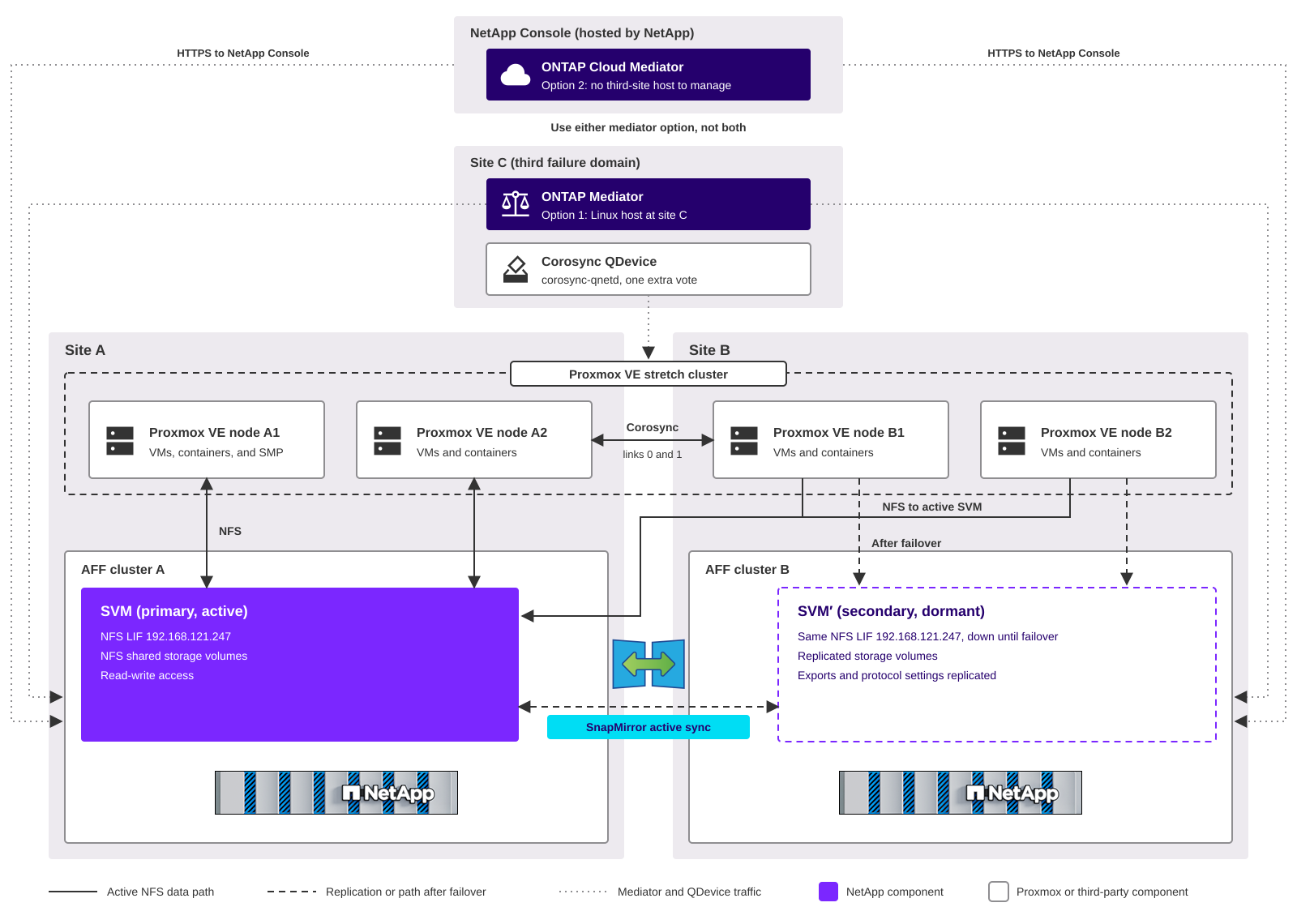
- Site A and site B
-
Each site has an AFF two-node cluster and half of the Proxmox VE nodes. The primary cluster at site A serves the shared storage to all Proxmox VE nodes. Nodes at site B reach the primary cluster across the inter-site network. With NFS storage, the secondary SVM at site B stays dormant until a failover occurs.
- Site C
-
A third failure domain hosts the corosync QDevice daemon (
corosync-qnetd) and, if you choose option 1, ONTAP Mediator. The QDevice provides an extra vote so that the Proxmox VE cluster keeps quorum when one site fails. - NetApp Console
-
If you choose option 2, ONTAP Cloud Mediator runs as a service in the NetApp Console, which NetApp hosts and manages. Both AFF clusters connect to it over HTTPS, so you don't install or maintain a mediator host.
- Mediator
-
ONTAP Mediator or ONTAP Cloud Mediator helps ONTAP decide which cluster serves data. Use one of them, not both. For a comparison, see Mediator options.
- Proxmox VE stretch cluster
-
All Proxmox VE nodes belong to one cluster and share the same storage definitions. Proxmox VE HA restarts VMs from a failed site on the surviving nodes. Storage Manager for Proxmox (SMP) runs as an HA VM on the cluster to provision shared storage and to back up, restore, and clone VMs.
Mediator options
SnapMirror active sync uses a mediator as a passive witness. During a network partition or the failure of one cluster, ONTAP uses the mediator to decide which copy continues to serve I/O. The mediator isn't in the data path and doesn't start failovers itself. You can use one of the following options, but not both at the same time.
| Consideration | Option 1: ONTAP Mediator | Option 2: ONTAP Cloud Mediator |
|---|---|---|
Where it runs |
A Linux host that you install and manage in a third failure domain, such as site C, with independent power and network infrastructure. |
A cloud service in the NetApp Console. NetApp hosts and manages it, so you don't need a mediator host at a third site. |
ONTAP version |
ONTAP 9.19.1 or later for SnapMirror active sync for NAS. |
ONTAP Cloud Mediator is available beginning with ONTAP 9.17.1. SnapMirror active sync for NAS needs ONTAP 9.19.1 or later. |
Cluster connectivity |
Both clusters connect to the mediator host. The default service port is 31784. |
Both clusters connect outbound over HTTPS to the NetApp Console, directly or through an HTTP proxy. The recommended ping latency to the NetApp Console is under 200 ms. |
Setup |
Install the package on the Linux host, and then add it to the clusters with the host address and a mediator user. |
Create a NetApp Console service account with the ONTAP Mediator Setup Role, and then add the mediator to the clusters with the organization ID, client ID, and client secret. |
Operations |
You patch and upgrade the host, and you keep it available. |
No host to patch or upgrade. You depend on internet access from both sites and on the availability of the NetApp Console service. |
Best fit |
Environments that have a third site, or that don't allow the storage clusters to reach the internet. |
Environments without a third site for a mediator, or that want to avoid operating one. |
Keep the following in mind when you choose:
-
The QDevice still needs a third location. ONTAP Cloud Mediator removes the mediator host, not the corosync QDevice host. The QDevice needs a small Linux host that all Proxmox VE nodes can reach on TCP port 5403, and it doesn't have the low-latency requirement of corosync.
-
Both clusters need access to the NetApp Console. If the clusters use a proxy, install the proxy's root CA certificate on both clusters. NetApp recommends a different proxy server for each cluster.
-
Plan for the same failure behavior with either option. When the mediator is unavailable, replication continues without data loss, but automatic and planned failovers aren't possible until the mediator is available again. With ONTAP Cloud Mediator, this includes a loss of connectivity from the clusters to the NetApp Console.

|
The mediator options in this section apply to SnapMirror active sync. For MetroCluster, this solution uses ONTAP Mediator or MetroCluster Tiebreaker. Before you deploy, verify that your ONTAP version, mediator option, and Proxmox VE version are listed together in the NetApp Interoperability Matrix Tool (IMT). |
Benefits for service providers
-
VM availability beyond host HA. Tenant VMs keep running when the storage system that hosts their disks fails. ONTAP fails over to the second AFF cluster, and the VMs resume I/O on the same shared storage without a restart.
-
A premium availability tier. You can offer a zero RPO, storage-resilient VM service as an add-on, alongside standard tiers on unprotected storage in the same clusters.
-
Per-tenant protection and failover. With separate protected storage for each tenant or service tier, you protect, fail over, and test disaster recovery for each tenant independently, without affecting other tenants.
-
Better use of both sites. You can make some workloads primary at site A and others primary at site B, so both data centers serve active workloads.
Benefits for enterprises
-
Zero data loss for business-critical VMs during a storage or site failure.
-
Automated recovery without scripts, storage remounts, or changes to
/etc/pve/storage.cfg. -
Built into ONTAP, with no extra software layer on the Proxmox VE nodes.
-
Day-to-day operations from one interface. Storage Manager for Proxmox provisions the protected shared storage and backs up, restores, and clones VMs with ONTAP snapshots and FlexClone technology.
How the solution responds to failures
ONTAP and Proxmox VE make independent quorum decisions. The design aligns them so that both choose the same surviving site.
| Event | ONTAP behavior | Proxmox VE behavior |
|---|---|---|
Site A fails |
The mediator confirms the failure, and ONTAP automatically fails over the shared storage to cluster B. |
Site B nodes and the QDevice keep quorum. HA fences the site A nodes and restarts their VMs on site B nodes. VMs already on site B resume I/O after the storage failover. |
AFF cluster A fails, Proxmox VE nodes at site A keep running |
The mediator confirms that cluster A is unreachable, and ONTAP automatically fails over the shared storage to cluster B. |
No quorum change and no VM restart. VMs on all nodes resume I/O on the same shared storage after the storage failover, with site A nodes reaching cluster B across the inter-site network. |
One AFF controller at site A fails |
The partner controller takes over in a local HA takeover. No SnapMirror active sync failover occurs. |
No impact. VMs pause I/O briefly during the takeover. |
Site B fails |
Cluster A continues to serve data. Replication resumes when site B returns. |
Site A nodes and the QDevice keep quorum. HA restarts the site B VMs on site A nodes. |
Inter-site link fails |
Cluster A continues to serve data. No failover occurs. |
The QDevice gives its vote to the site A partition when the tie breaker is aligned with the primary cluster. Site B nodes lose quorum and self-fence, and HA restarts their VMs on site A. |
Site C fails, or the clusters lose access to the NetApp Console |
Replication continues with zero data loss, but automatic and planned failovers aren't possible until the mediator is available. With ONTAP Cloud Mediator, a site C failure affects only the QDevice. |
The cluster keeps quorum with the votes of the four nodes. No VMs are affected. |
One Proxmox VE node fails |
No impact. |
HA restarts the VMs from that node on other nodes, preferring nodes at the same site. |
Storage system failure
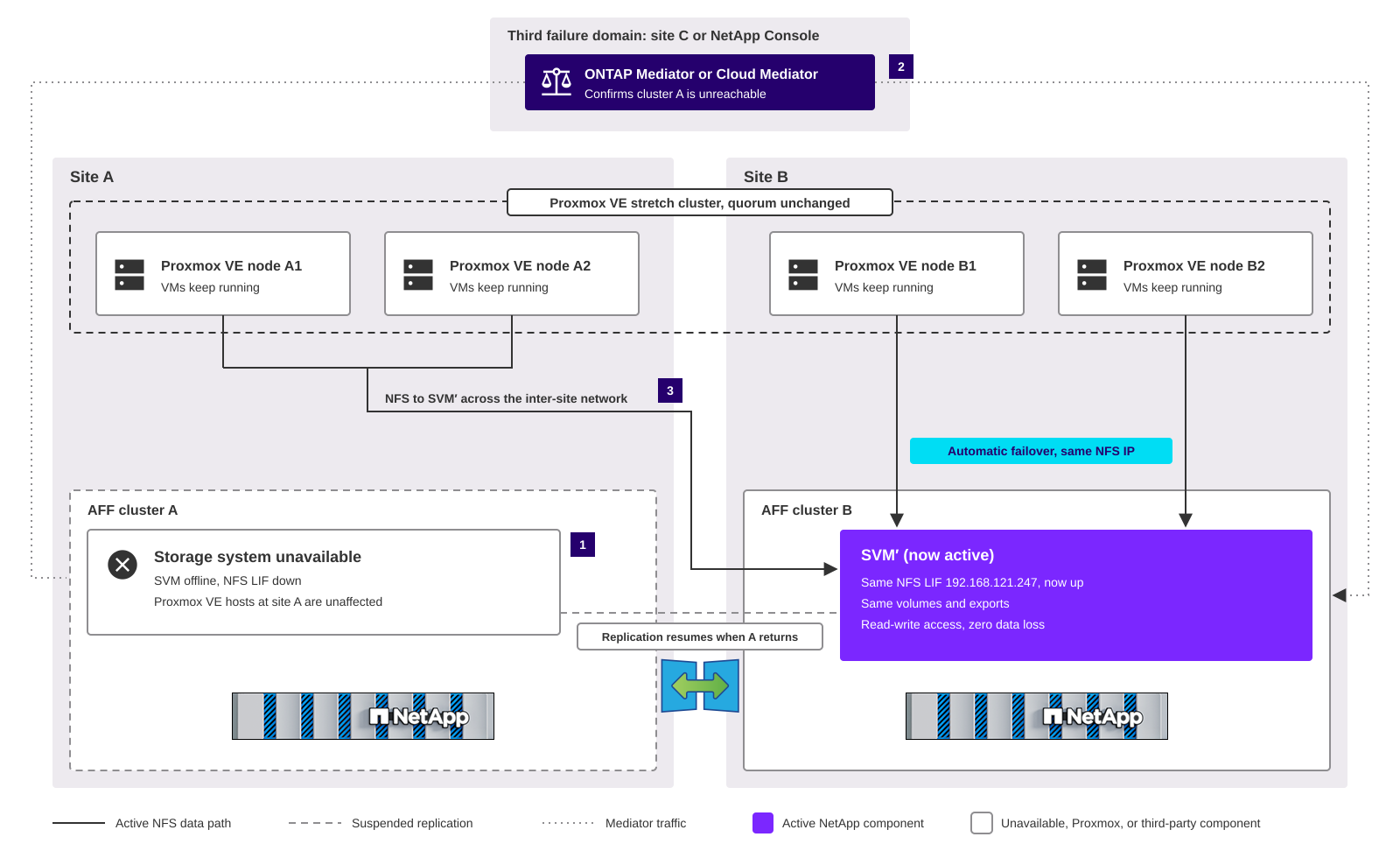
A storage system failure is the case that host-level HA alone can't handle, and the case where SnapMirror active sync adds the most value for service providers. The following diagram shows the state after AFF cluster A fails while every Proxmox VE node stays online, using NFS shared storage.
-
AFF cluster A becomes unavailable. The Proxmox VE nodes at site A keep running, so the cluster doesn't lose quorum and HA doesn't fence any node.
-
The mediator, ONTAP Mediator at site C or ONTAP Cloud Mediator in the NetApp Console, confirms that cluster A is unreachable, and ONTAP activates the secondary SVM on cluster B with the same NFS LIF address, volumes, and export policies.
-
All Proxmox VE nodes resume I/O on the same shared storage. Site B nodes reach cluster B locally, and site A nodes reach it across the inter-site network. VMs pause I/O during the failover and keep running without a restart.
When cluster A returns, replication resumes. Plan the failback to cluster A during a maintenance window so that site A VMs access local storage again.
Site failure
During a site failure, both the storage system and the Proxmox VE nodes at that site go offline. ONTAP fails over the shared storage to the surviving cluster, and Proxmox VE HA restarts the VMs from the failed site on the surviving nodes, as described in the table.
Choose between SnapMirror active sync and MetroCluster
NetApp MetroCluster configurations also deliver zero RPO and automatic recovery for a Proxmox VE stretch cluster. The two solutions differ in what they protect:
-
MetroCluster protects all workloads. MetroCluster combines array-based clustering with synchronous replication. It mirrors the data in every mirrored aggregate, the nonvolatile memory (NVRAM), and the configuration of every SVM to the partner site, so all shared storage on the cluster is protected without per-workload setup.
-
SnapMirror active sync protects a subset of workloads. You choose which SVMs or volumes to protect, and you can fail over each one independently. Unprotected workloads can share the same clusters.
Both solutions keep a full copy of the protected data at each site, need a witness in a third failure domain, and add replication load to the storage controllers. They differ in protection scope, failover granularity, and cluster design.
|
|
Before you deploy either solution, verify that your ONTAP version, MetroCluster or SnapMirror active sync configuration, and Proxmox VE version are listed together in the NetApp Interoperability Matrix Tool (IMT). |
MetroCluster architecture with Proxmox VE
The following diagram shows a Proxmox VE stretch cluster with a four-node MetroCluster IP configuration and NFS shared storage.
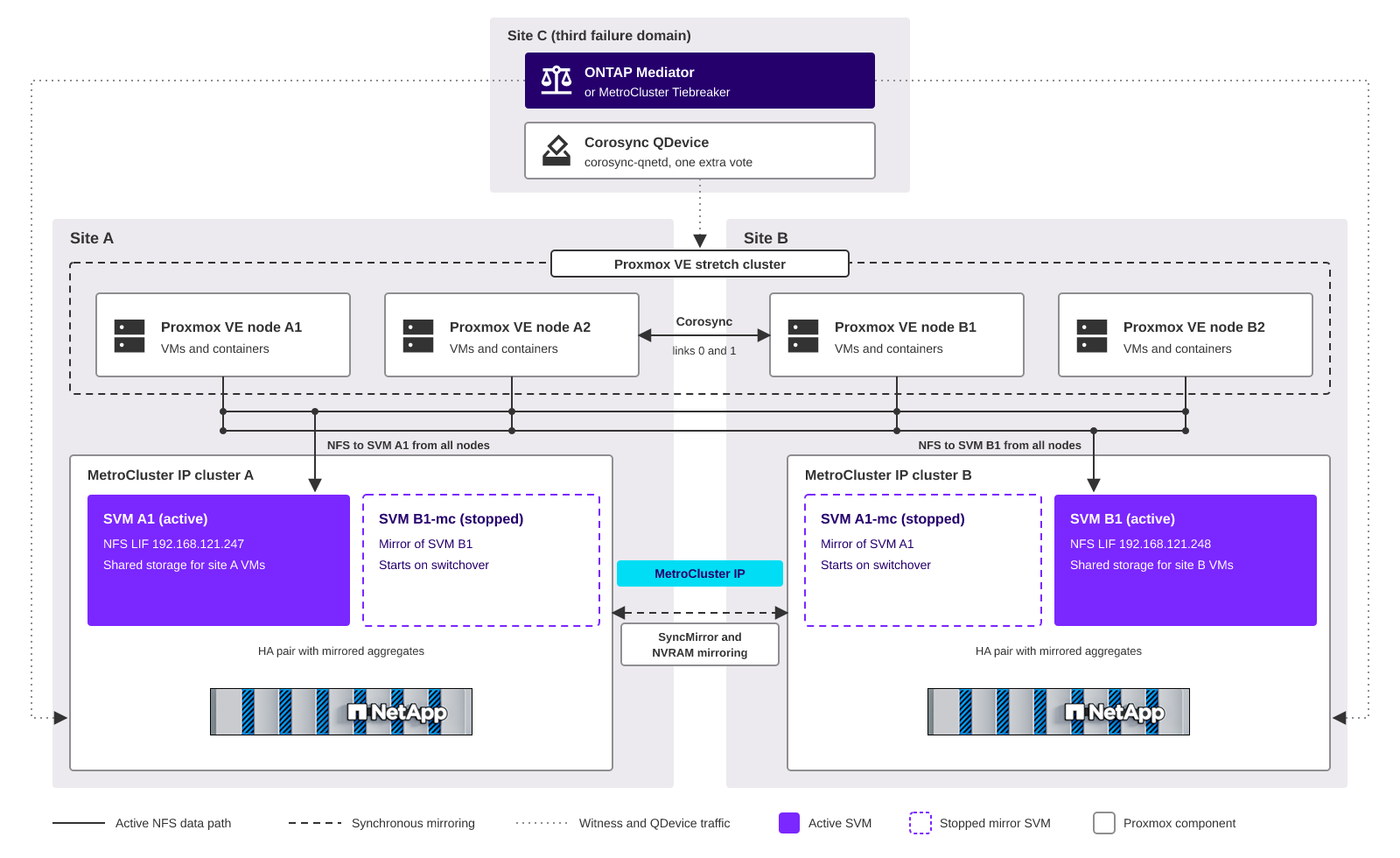
- MetroCluster IP clusters
-
Each site has an HA pair with mirrored aggregates. The MetroCluster IP back-end network mirrors data (SyncMirror) and NVRAM to the partner site synchronously.
- SVMs at both sites
-
Each site can serve its own SVMs. For each SVM, MetroCluster keeps a stopped mirror SVM with the
-mcsuffix at the partner site, with the same configuration and LIF addresses. - NFS access from all nodes
-
Every Proxmox VE node mounts the shared storage of both active SVMs, SVM A1 and SVM B1, so that HA can restart any VM on any node. Nodes at site B reach SVM A1, and nodes at site A reach SVM B1, across the inter-site network. This is the same access model as SnapMirror active sync.
- Switchover
-
If a site fails, ONTAP Mediator or MetroCluster Tiebreaker at site C enables an automatic switchover. The mirror SVMs at the surviving site start and serve all shared storage with the same NFS addresses, and Proxmox VE HA restarts the VMs from the failed site. A single controller failure is handled by a local HA takeover, without a switchover. After you repair the failed site, you heal the aggregates and switch back.
How MetroCluster responds to failures
The following table shows how a MetroCluster IP configuration and the Proxmox VE stretch cluster respond to the same failures as in How the solution responds to failures. In this example, SVM A1 is active at site A and SVM B1 is active at site B.
| Event | ONTAP behavior | Proxmox VE behavior |
|---|---|---|
Site A fails |
ONTAP Mediator or MetroCluster Tiebreaker confirms the failure, and ONTAP switches over site A. SVM A1-mc starts at site B with the same NFS LIF address. SVM B1 keeps serving data. |
Site B nodes and the QDevice keep quorum. HA fences the site A nodes and restarts their VMs on site B nodes. VMs that already ran on site B nodes keep running, and those on SVM A1 resume I/O after the switchover. |
MetroCluster IP cluster A fails, Proxmox VE nodes at site A keep running |
ONTAP Mediator or MetroCluster Tiebreaker confirms that cluster A is unreachable, and ONTAP switches over site A. SVM A1-mc starts at site B with the same NFS LIF address. |
No quorum change and no VM restart. VMs on SVM A1 resume I/O after the switchover, with site A nodes reaching site B across the inter-site network. |
One controller at site A fails |
The HA partner at site A takes over in a local HA takeover. No switchover occurs. |
No impact. VMs pause I/O briefly during the takeover. |
Site B fails |
ONTAP switches over site B. SVM B1-mc starts at site A with the same NFS LIF address. SVM A1 keeps serving data. |
Site A nodes and the QDevice keep quorum. HA restarts the site B VMs on site A nodes, where they access SVM B1 at site A. |
Inter-site link fails |
No switchover occurs, because both clusters are still running. Each site keeps serving its own SVMs, and mirroring to the partner site is suspended until the link returns. |
The QDevice gives its vote to the site A partition when the tie breaker is aligned with site A. Site B nodes lose quorum and self-fence. HA restarts VMs on SVM A1 on site A nodes. VMs on SVM B1 can't restart until the link returns, because site A nodes can't reach SVM B1. |
Site C fails |
Mirroring continues with zero data loss, but automatic switchover isn't possible until the witness is available. You can still switch over manually. |
The cluster keeps quorum with the votes of the four nodes. No VMs are affected. |
One Proxmox VE node fails |
No impact. |
HA restarts the VMs from that node on other nodes, preferring nodes at the same site. |
The inter-site link failure is the main difference from a design with one primary site. Whenever both sites host active SVMs, with MetroCluster or with two SnapMirror active sync SVMs in opposite directions, the corosync tie breaker can favor only one site. VMs whose active SVM is at the other site stay down until the link returns. To limit the impact, use redundant inter-site links on separate physical paths, and place the most critical VMs on the SVM at the site that the tie breaker favors.
Feature comparison
| Consideration | SnapMirror active sync for NAS | MetroCluster IP |
|---|---|---|
Protection scope |
Selected SVMs and volumes |
All mirrored aggregates and all SVMs in the configuration |
Failover granularity |
Each SVM independently |
The whole site, by switchover |
Unprotected workloads |
Run on unprotected SVMs in the same clusters |
Can use unmirrored aggregates, which go offline after a switchover until you bring them online |
Cluster design |
Two independent clusters, peered over an IP network |
One configuration of two partner clusters, with a dedicated MetroCluster IP back-end network |
Witness at site C |
ONTAP Mediator or ONTAP Cloud Mediator |
ONTAP Mediator or MetroCluster Tiebreaker |
Copies of protected data |
One at each site |
One at each site, in mirrored aggregates |
Replication path |
SnapMirror synchronous over intercluster LIFs |
SyncMirror and NVRAM mirroring over the MetroCluster IP back-end network |
NFS address at both sites |
Stretched layer 2 VLAN. VIP LIFs with BGP pending qualification |
Stretched layer 2 VLAN, or VIP LIFs with BGP |
Recovery after a site failure |
Fail back each SVM |
Heal the aggregates, and then switch back the site |
Selection guidance
-
Choose MetroCluster when all, or nearly all, workloads on the storage need zero RPO, for example when an enterprise runs only mission-critical VMs on the cluster, or a service provider offers the same availability tier to every tenant. You get one protection domain without per-workload configuration.
-
Choose SnapMirror active sync when only a subset of workloads needs zero RPO, for example a premium tier for some tenants, or when you need to fail over or test disaster recovery for one tenant or application at a time.
-
SnapMirror active sync for NAS isn't supported on a MetroCluster configuration. Use one solution for each pair of clusters.
-
The corosync, QDevice, and HA guidance in this solution applies to both. With MetroCluster, align the QDevice tie breaker with the site that keeps serving data when the inter-site link fails, and use HA node affinity rules to keep VMs at the same site as their active SVM.
-
MetroCluster IP also supports VIP LIFs with BGP for layer 3 networks between sites.
Corosync considerations for a Proxmox VE stretch cluster
Proxmox VE uses corosync for cluster membership and quorum. Corosync is more sensitive to the inter-site network than SnapMirror active sync, so plan the cluster network first.
Latency and network design
-
SnapMirror active sync requires an inter-cluster round-trip time (RTT) under 10 ms. Proxmox recommends a corosync latency under 5 ms between all nodes, so the corosync requirement sets the distance limit for the solution.
-
Corosync needs low, consistent latency rather than high bandwidth. Use a dedicated network for corosync, separate from storage and live migration traffic, so that storage bursts don't cause corosync timeouts.
-
Configure at least two corosync links (for example, link 0 and link 1) on separate physical paths between the sites. Corosync uses Kronosnet to switch links automatically if one path fails.
Quorum with a QDevice at a third site
Split the Proxmox VE nodes evenly between site A and site B, and add a QDevice at site C. With four nodes and a QDevice, the cluster has five votes and needs three for quorum, so either site can fail without losing quorum. The QDevice connects to the cluster over TCP port 5403 and doesn't have the low-latency requirement of corosync, so it can share site C with ONTAP Mediator. If you use ONTAP Cloud Mediator, you still need a third location for the QDevice, but it can be a small Linux host that doesn't also host a mediator.
Tie breaker alignment with the primary cluster
When the inter-site link fails but both sites can still reach site C, ONTAP keeps the primary cluster at site A serving data. The QDevice must give its vote to the same site. By default, the QDevice chooses the partition that contains the lowest node ID.
BEST PRACTICE: Create the Proxmox VE cluster on a site A node and join the other site A nodes before you join site B nodes, so that site A holds the lowest node IDs. If the primary storage moves to site B for an extended time, update the QDevice tie_breaker setting to a site B node ID.
If the QDevice favored site B instead, site A nodes would self-fence, and HA would restart VMs on site B nodes that can't reach the active storage at site A.
HA behavior and VM placement
-
Proxmox VE HA typically detects a failed node and recovers its VMs in about two minutes, including a 60-second watchdog fencing timeout. During a site failure, the SnapMirror active sync failover and the Proxmox VE HA recovery run in parallel.
-
Use HA node affinity rules with node priorities to place VMs on the nodes at the same site as their primary storage, and to let them fail over to the other site.
-
After a site failover, set the HA
failbackproperty to0for affected VMs until you fail the storage back. Otherwise, HA migrates VMs back to site A nodes as soon as they return, while the active storage is still at site B. -
Make sure the guest operating system disk timeouts are longer than the expected failover time, so that guests don't report I/O errors during a storage failover.
Integration with Storage Manager for Proxmox
Storage Manager for Proxmox (SMP) gives Proxmox VE administrators one interface to provision ONTAP shared storage and to back up, restore, and clone VMs by using ONTAP snapshots and FlexClone technology. SMP connects to the Proxmox VE cluster and to ONTAP through their APIs, so it doesn't need agents on the Proxmox VE nodes.
SMP and SnapMirror active sync protect against different kinds of failures. SnapMirror active sync keeps VMs running through a storage or site failure, but it replicates every write synchronously, including an accidental deletion, a failed guest update, or data encrypted by ransomware. SMP snapshots give you point-in-time copies to recover from those logical failures. Together, they provide continuous availability and fast operational recovery from the same ONTAP storage.
| Protection layer | Protects against | Recovery point | Managed with |
|---|---|---|---|
SnapMirror active sync |
Storage system failure and site failure |
Zero data loss |
ONTAP |
SMP backups (ONTAP snapshots) |
Accidental deletion, data corruption, failed updates, and ransomware |
Last scheduled or on-demand backup |
SMP |
SnapMirror asynchronous fan-out or Proxmox Backup Server |
Loss of both sites, and long-term retention |
Last replication or backup |
ONTAP or Proxmox Backup Server |
Backup and recovery
SMP creates crash-consistent or file-consistent backups as ONTAP snapshots of the storage volumes, on demand or by policy, and restores individual VMs, storage, or resource groups:
-
Use resource groups and backup policies to apply the same schedule and retention to the VMs of a tenant or an application.
-
Use file-consistent backups for VMs that run the QEMU guest agent, so the guest file systems are quiesced before ONTAP creates the snapshot.
-
SMP manages the storage that is active. After a SnapMirror active sync failover, run a discovery in SMP so that it maps the storage to cluster B before you run backup or restore operations.
-
For a third copy outside the two sites, or for longer retention, add a SnapMirror asynchronous fan-out relationship from the protected volumes, or use Proxmox Backup Server.
-
Tamperproof snapshots aren't supported with SnapMirror active sync, so don't enable snapshot locking in SMP for protected volumes.
VM cloning
SMP uses ONTAP FlexClone technology to create space-efficient VM clones for development, testing, and rapid provisioning. Clones that you create in protected storage consume replication bandwidth and capacity at both sites. Exclude clones and test storage that don't need business continuity from SnapMirror active sync protection.
SMP placement
-
Run the SMP VM as an HA resource on a SnapMirror active sync protected shared storage, so that SMP stays available after a storage or site failure.
-
Register the Proxmox VE cluster and both ONTAP clusters in SMP, so that SMP can reach the active storage at either site.
NFS shared storage with SnapMirror active sync for NAS
Beginning with ONTAP 9.19.1, SnapMirror active sync protects NAS workloads. The following considerations apply only to NFS shared storage. To deploy the solution with NFS storage, follow the NAS configuration workflow.
SVM-level protection and network identity
-
SnapMirror active sync for NAS protects an entire storage VM (SVM). You can protect all volumes in the SVM or exclude selected volumes. Only FlexVol volumes are supported, and the SVM can't contain LUNs.
-
The secondary SVM stays dormant, with its LIFs down, until a failover. ONTAP replicates the SVM configuration, including LIF IP addresses, export policies, and NFS settings, so the secondary SVM presents the same NFS endpoint after a failover.
-
Failover is non-disruptive for NFSv3 and later.
-
SnapMirror active sync for NAS is active/passive, so VMs on site B nodes read and write across the inter-site network to the primary SVM. For active workloads at both sites, use two SVMs with opposite replication directions, one primary at each site, and align each VM's node affinity rule with the site of its primary SVM.
-
SnapMirror active sync for NAS is supported on AFF A-Series and C-Series two-node clusters.
NFS client settings
Use NFSv3 or NFSv4.1 for the NFS storage. Keep the default hard mount behavior, and don't add the soft mount option, so that NFS I/O retries instead of failing during a failover.
Use multiple TCP connections to the storage for better performance and fault tolerance. Use either nConnect or session trunking, not both:
-
nConnect. Opens multiple TCP connections to a single NFS LIF address, for example
nconnect=4. nConnect works with NFSv3 and NFSv4.1 and with a single VIP LIF address, so it's the recommended option for SnapMirror active sync for NAS, including layer 3 networks. -
Session trunking. Groups multiple data LIFs into one NFSv4.1 session, for example
vers=4.1,trunkdiscovery,max_connect=16. Session trunking requires NFSv4.1 or later. Use it only when the protected SVM has multiple data LIFs that clients can reach at both sites, such as in a stretched layer 2 network. For details, see NFS trunking.
For the mount option commands and verification steps, see Configure NFS storage for Proxmox VE.
NFS storage provisioning with SMP
SMP provisions an ONTAP volume, creates or selects an export policy, and mounts the volume as NFS shared storage on the Proxmox VE nodes that you select. For storage in a protected SVM:
-
Provision the volume in the primary SVM, and select the NFS LIF, or the VIP LIF in a layer 3 network, as the preferred LIF. The secondary SVM uses the same address after a failover, so the storage definition stays valid.
-
Mount the storage on all Proxmox VE nodes at both sites so that HA can restart VMs on any node.
-
Make sure the export policy allows the Proxmox VE nodes at both sites. ONTAP replicates the export policy to the secondary SVM.
-
After provisioning, verify that the volume is included in SnapMirror active sync protection.
Layer 3 networks with VIP LIFs and BGP
SnapMirror active sync for NAS requires the same IP address on the primary and secondary SVMs. When the NFS VLAN is stretched between sites, the LIF IP address moves with the SVM. When the sites are connected by a routed layer 3 network, the subnet of a site A LIF doesn't exist at site B.

|
At the time of publication, NetApp hasn't documented VIP LIFs with BGP as a qualified configuration for SnapMirror active sync for NAS. Before you plan a layer 3 design, confirm current support with NetApp. Otherwise, stretch the NFS VLAN between the sites. MetroCluster IP configurations support VIP LIFs with BGP. |
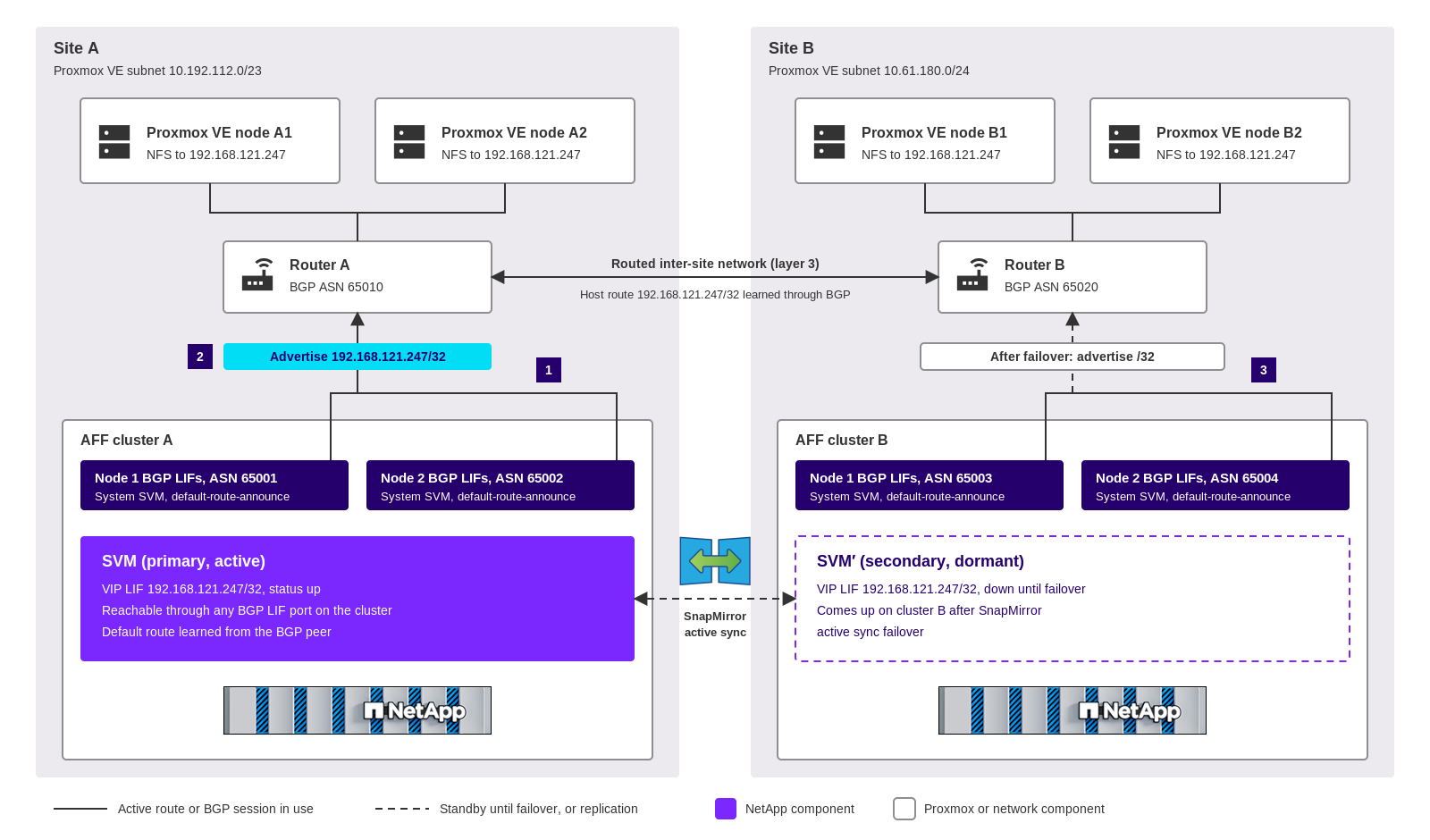
ONTAP virtual IP (VIP) LIFs address this problem. A VIP LIF doesn't belong to any subnet. ONTAP advertises the VIP address to the peer routers as a /32 host route by using Border Gateway Protocol (BGP), so the address can move between sites without a stretched VLAN.
-
Each node at both sites has BGP LIFs in the system SVM that peer with the routers at its site. BGP LIFs are node specific and aren't replicated, so you configure them on both clusters.
-
The primary SVM hosts the NFS VIP LIF. Cluster A advertises the /32 host route, and the Proxmox VE nodes at both sites reach the storage through the routed network.
-
After a SnapMirror active sync failover, the VIP LIF comes up on the secondary SVM, cluster B advertises the host route, and the routers converge on site B.
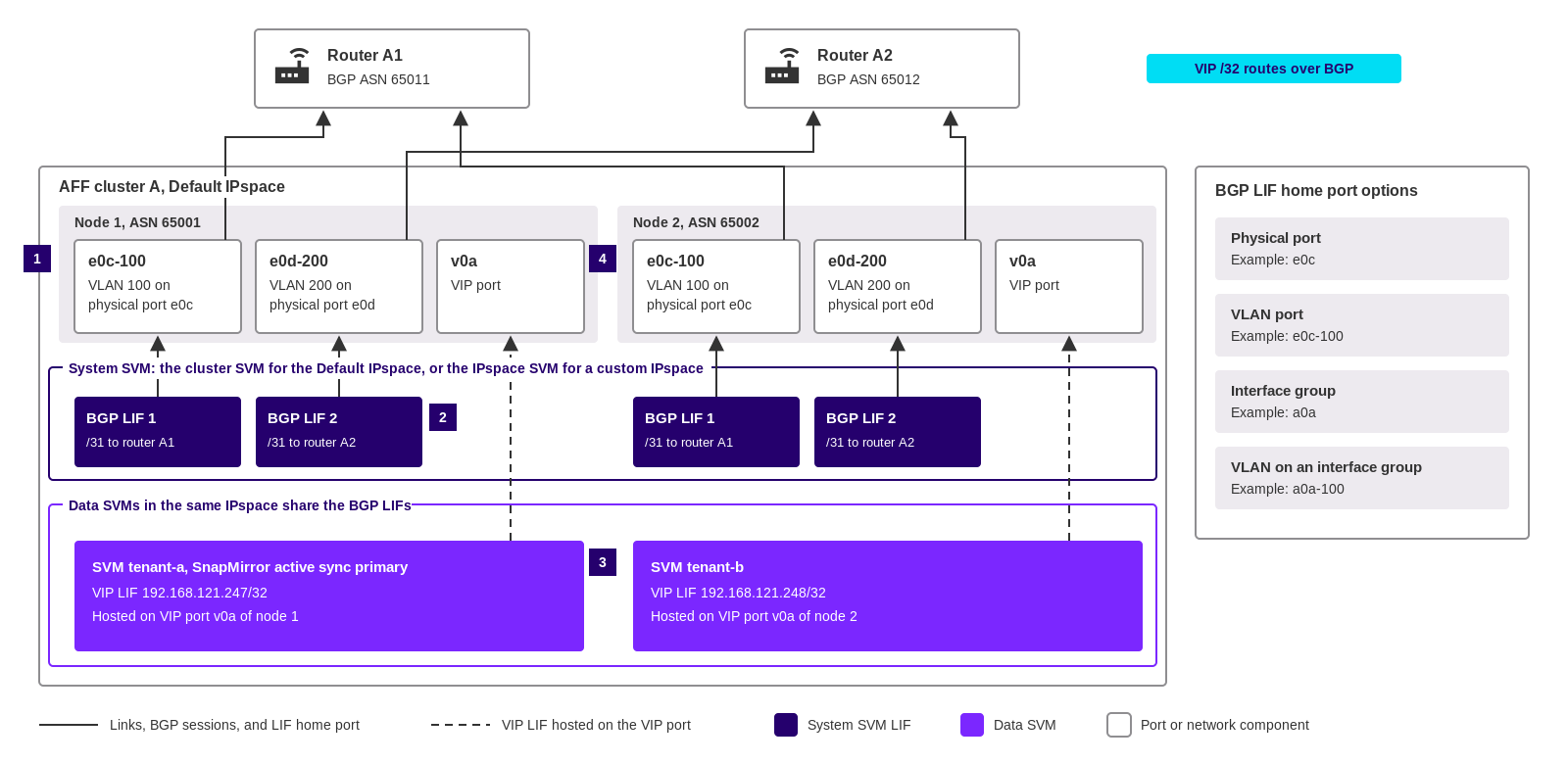
When you plan BGP in ONTAP for the first time, it helps to know which SVM owns each LIF. BGP LIFs belong to the system SVM of the IPspace, not to the data SVMs. One set of BGP LIFs on each cluster serves the VIP LIFs of every data SVM in that IPspace, so you don't create BGP LIFs for each tenant. The following diagram shows the LIF and port layout on one cluster, with BGP LIFs on VLAN ports.
-
Each node has two ports for BGP, in this example the VLAN ports
e0c-100ande0d-200. Each port connects directly to a different router. -
Each node has two BGP LIFs in the system SVM, one on each port, with a /31 subnet and a BGP peer group to one router. For the Default IPspace, the system SVM is the cluster SVM. For a custom IPspace, it's the SVM with the same name as the IPspace.
-
Data SVMs in the same IPspace host VIP LIFs and don't need BGP LIFs of their own. The BGP peer groups advertise the VIP routes for all SVMs in the IPspace.
-
ONTAP creates a VIP port, for example
v0a, on each node when you create the first BGP peer group. VIP LIFs are hosted on the VIP port and are reachable through every port on the node that hosts a BGP LIF in the IPspace.
The home port of a BGP LIF can be a physical port, a VLAN port, an interface group, or a VLAN on an interface group. An interface group isn't required. NetApp Technical Report TR-4949 recommends two BGP LIFs on two separate ports for each IPspace, each directly connected to a different first-hop router.
Keep the following guidelines in mind:
-
BGP LIFs don't fail over. Redundancy comes from two BGP LIFs per node, each peering with a different router. If a node loses all its BGP sessions for an SVM, ONTAP moves the VIP LIF to another node that has an active BGP session for that SVM.
-
Use external BGP (eBGP) with a unique private autonomous system number (ASN) for each ONTAP node and each router.
-
Use a /31 subnet (netmask 255.255.255.254) for each BGP LIF and its router. Assign the odd-numbered address to the BGP LIF and the even-numbered address to the router.
-
ONTAP doesn't process routes from the routers. Configure the routers to accept /32 host routes from ONTAP and not to send route updates to the cluster.
-
Proxmox VE nodes must not share a subnet with the VIP address. A redundant layer 3 router, for example with VRRP or HSRP, must be in the path between the nodes and the storage.
-
Configure BGP peer groups with
-use-peer-as-next-hop trueso that each cluster learns its default route from its local routers. Routes that point to a site A gateway aren't valid at site B after a failover. -
Enable multipath routing so that outgoing VIP traffic uses all available BGP LIF ports.
-
Lower the BGP hold time from the default of 180 seconds. TR-4949 recommends a hold time of 3 seconds. A router withdraws the route from a failed cluster only when the hold timer expires, and during a storage system failure the router at site A stays online.