ESXi host configuration and preparation checklist for ONTAP Select

 Suggest changes

 PDFs
PDFs
Prepare each ESXi hypervisor host where an ONTAP Select node is deployed. As you prepare the hosts, you carefully assess the deployment environment to make sure that the hosts are correctly configured and ready to support the deployment of an ONTAP Select cluster.

|
The ONTAP Select Deploy administration utility doesn't perform the required network and storage configuration of the hypervisor hosts. You must manually prepare each host before deploying an ONTAP Select cluster. |
Step 1: Prepare the ESXi hypervisor host
Verify the configuration for the ESXi host and the firewall ports.
-
Verify that each ESXi is configured with the following:
-
A pre-installed and supported hypervisor
-
A VMware vSphere license
-
-
Verify that the same vCenter server can manage all the hosts where an ONTAP Select node is deployed within the cluster.
-
Verify that the firewall ports are configured to allow access to vSphere. These ports must be open to support serial port connectivity to the ONTAP Select virtual machines.
RecommendedNetApp recommends that you open the following firewall ports to allow access to vSphere:
-
Ports 7200 – 7400 (both inbound and outbound traffic)
DefaultBy default, VMware allows access on the following ports:
-
Port 22 and ports 1024 – 65535 (inbound traffic)
-
Ports 0 – 65535 (outbound traffic)
For more information, see the Broadcom VMware vSphere documentation.
-
-
Familiarize yourself with the vCenter rights that are required. See VMware vCenter server for more information.
Step 2: Review the ONTAP Select cluster configuration
You can deploy ONTAP Select as either a multi-node cluster or a single-node cluster. In many cases, a multi-node cluster is preferable because of the additional storage capacity and high-availability (HA) capability.
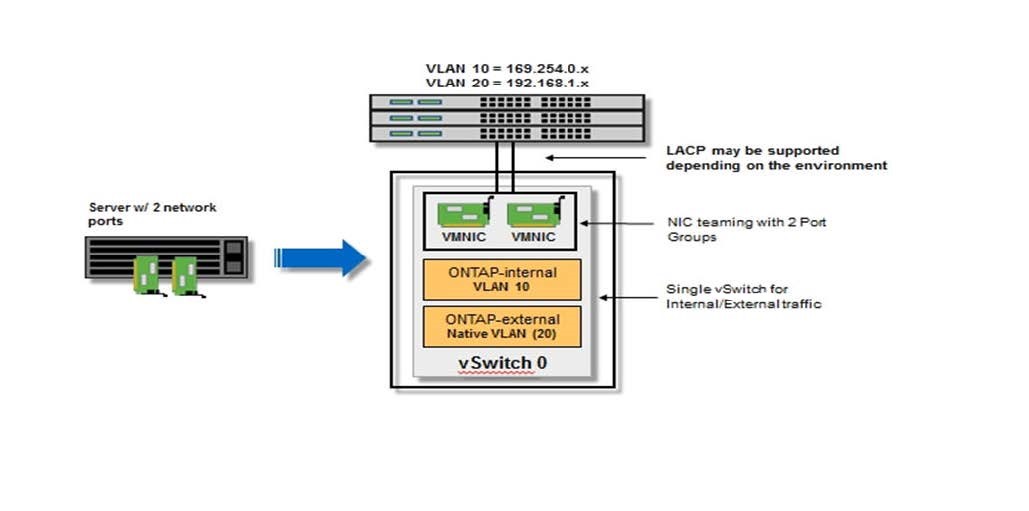
The following figures illustrate the ONTAP Select networks used with a single-node cluster and four-node cluster.
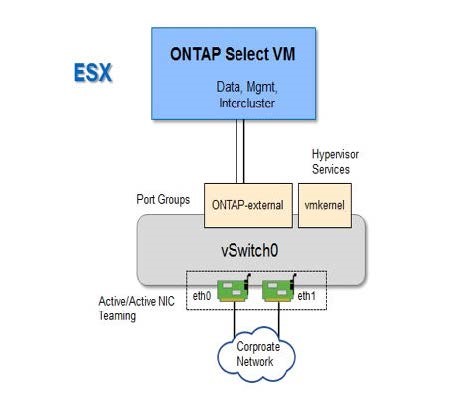
The following figure illustrates a single-node cluster. The external network carries client, management, and cross-cluster replication traffic (SnapMirror/SnapVault).
The following figure illustrates a four-node cluster showing two networks. The internal network enables communication among the nodes in support of the ONTAP cluster network services. The external network carries client, management, and cross-cluster replication traffic (SnapMirror/SnapVault).
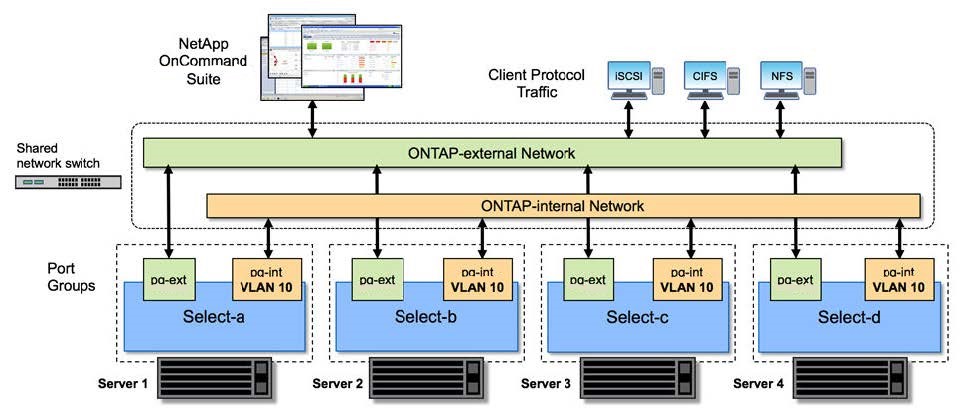
The following figure illustrates the typical network configuration for a single ONTAP Select virtual machine within a four-node cluster. There are two separate networks: ONTAP-internal and ONTAP-external.