


Fan-out protection in ONTAP tools


 Suggest changes

 PDFs
PDFs
Use fan-out protection to protect a consistency group across two destination ONTAP clusters. ONTAP tools maintains the synchronous relationship through the create, edit, and delete SnapMirror active sync protection workflows, and VMware Live Site Recovery maintains the asynchronous relationship through failover and reprotect workflows.

|
Fan-out protection is not supported for SVM users. Fan-out protection requires an Asynchronous relationship in addition to the AutomatedFailOverDuplex relationship, and ONTAP tools does not support creating Asynchronous protection for a storage backend added with SVM user credentials. |
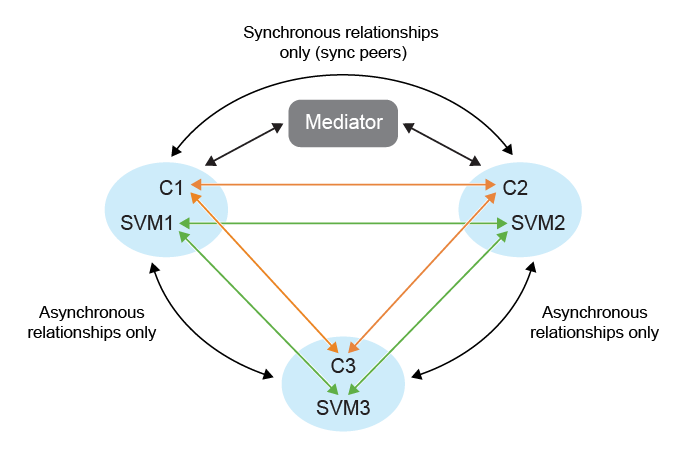
To set up fan-out protection, peer the three site clusters and SVMs.
The following diagram shows the fan-out protection configuration:
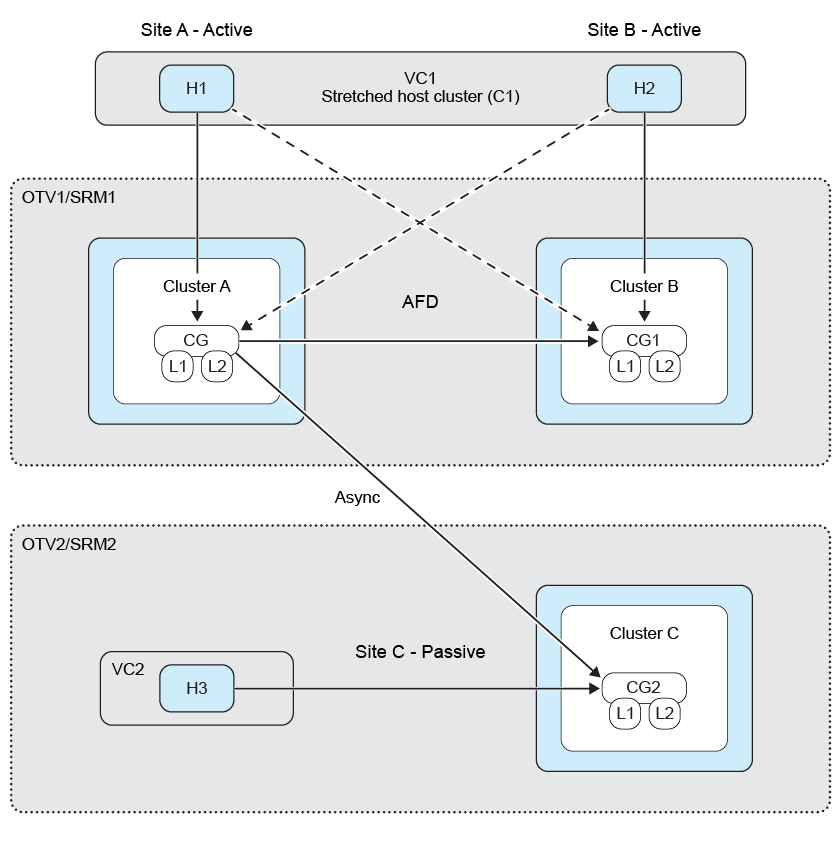
Example:
If:
-
Source consistency group is on cluster c1 and SVM svm1
-
First destination consistency group is on cluster c2 and SVM svm2 and
-
Second destination consistency group is on cluster c3 and SVM svm3
Then,
-
The cluster peering on source ONTAP cluster will be (C1, C2) and (C1, C3).
-
The cluster peering on first destination ONTAP cluster will be (C2, C1) and (C2, C3) and
-
The cluster peering on second destination ONTAP cluster will be (C3, C1) and (C3, C2).
-
SVM peering on source SVM will be (svm1, svm2) and (svm1, svm3).
-
SVM peering on first destination SVM will be (svm2, svm1) and (svm2, svm3) and
-
SVM peering on second destination SVM will be (svm3, svm1) and (svm3, svm2).
-
Select a new placeholder datastore. The placeholder datastore selection criteria for phased protection are:
-
Do not place the placeholder datastore in the host cluster you are protecting.
-
If you need to include the placeholder datastore in the host cluster, add it to the VMware Live Site Recovery appliance before setting up SnapMirror active sync protection. With this setup, you can leave the placeholder datastore out of protection.
For more information, refer to Select a placeholder datastore
-
-
Add datastores to the host cluster protection by following Protect datastores in a cluster. Add both asynchronous and synchronous policy types.