


Enhance private cloud experience with VMware Cloud Foundation and ONTAP


 Suggest changes

 PDFs
PDFs
NetApp ONTAP integrates with VMware Cloud Foundation (VCF) to deliver a unified storage solution supporting block, file and object protocols. The multi-tenancy capabilities of ONTAP allow organizations to consolidate workloads and simplify management, while providing enterprise-grade data protection and availability. This document provides an overview of VCF and how NetApp ONTAP can be used to enhance storage capabilities within a VCF environment.
Introduction
VCF enables organizations to deploy and manage a private cloud environment with ease. Out-of-the-box it provides VM, Kubernetes, Containers, & Networks as a service and enables to extend to offer other services as catalog items in a self service portal. By leveraging NetApp ONTAP as the storage solution within VCF, organizations can achieve greater flexibility, scalability, and efficiency in managing their workloads.
Introduction to NetApp ONTAP
NetApp ONTAP is a comprehensive data management software that delivers advanced storage features across a wide product line. ONTAP is available as software defined storage, as a first party service through the major cloud providers and as the storage OS for NetApp ASA (Disaggregated for Block Optimized), AFX (Disaggregated for unstructured data), AFF & FAS (Unified) platforms. ONTAP delivers high-performance and low-latency for a variety of use cases including VMware virtualization, without creating silos. Similar to how a VM was created on compute, ONTAP allows for the creation of storage virtual machines (SVMs) that can be used to create and manage storage resources. ONTAP provides a unified storage solution that supports multiple protocols, including NFS, SMB, iSCSI, FC, NVMe/TCP, NVMe/FC and NVMe/RDMA. This flexibility allows organizations to consolidate workloads and simplify management while providing enterprise-grade data protection and availability.
Introduction to VMware Cloud Foundation
VMware Cloud Foundation (VCF) enables organizations to create virtual private clouds where they can consume VMs, Kubernetes clusters, Containers, networks, and storage as a service whether it is for AI workloads, DevOps, or traditional VM-based workloads.
VCF is deployed to greenfield environments or to expand an existing vSphere environment to a full private cloud. A set of compute hosts form a vSphere cluster, a group of vSphere clusters form a VCF domain, and a group of VCF domains form a VCF instance. A fleet consists of one or more VCF instances. VCF private cloud environments are created using one or more fleets. Operation and Automation is handled at a fleet level, while the VCF instance is the unit of deployment.
A vSphere namespace is utilized to set resource limits for workloads. A vSphere Zone is a collection of vSphere clusters that can be used to provide high availability and disaster recovery capabilities for workloads running in the zone.
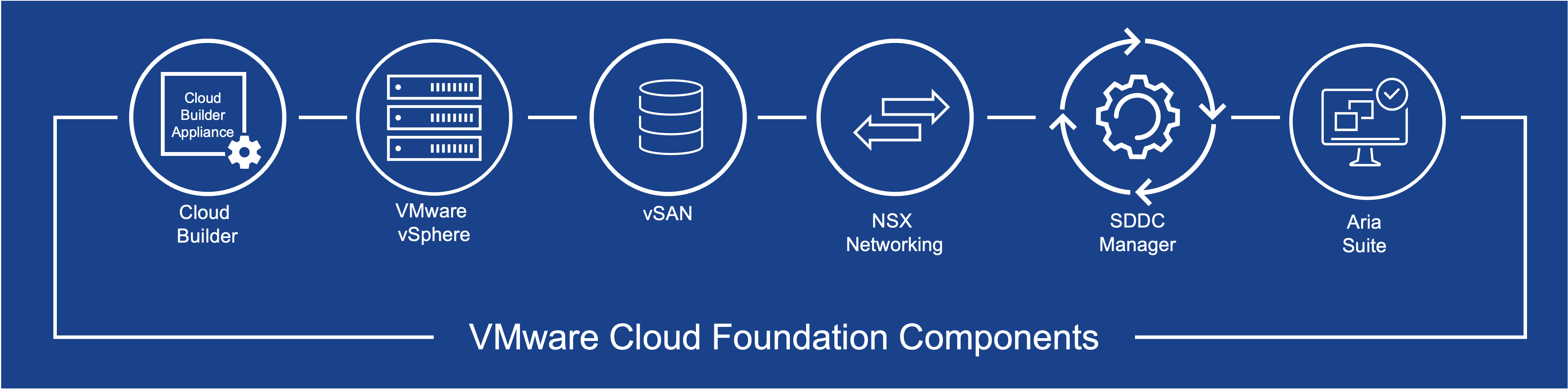
In VCF Automation, a region is a collection of vSphere zones from one or more VCF domains which shares the same NSX infrastructure. An Organization is a logical grouping of users and resources from one or more regions. The organization can be subdivided into multiple projects each with its own transit gateway and external connection. A project has one or more namespaces and can be used to provide isolation and resource allocation for workloads running in the project.
Namespaces are the fundamental unit for resource allocation within a project. Each namespace maps to a virtual private cloud (VPC) and can be used to provide isolation and resource allocation for workloads running in the namespace.
Namespaces are created with a dedicated VPC or shared VPC. A dedicated VPC is a VPC that is dedicated to a single namespace, while a shared VPC is a VPC that can be used by multiple namespaces. Subnets are created within a VPC where the workloads are deployed.
Component |
Contains |
Notes |
vSphere Cluster |
vSphere hosts |
A cluster is a collection of vSphere hosts that share the same resources and can be used to provide high availability and disaster recovery capabilities for workloads running in the cluster. |
VCF Domain |
vSphere cluster(s) |
A domain is a collection of vSphere clusters. It can be part of dedicated NSX instance or share an existing NSX instance with other domains. |
VCF Instance |
VCF domain(s) |
An instance is a collection of VCF domains. |
VCF Fleet |
VCF instance(s) |
A fleet is a collection of VCF instances managed centrally by the VCF Operations Manager. |
vSphere Zone |
vSphere cluster(s) |
A zone is a collection of vSphere clusters that can be used to provide high availability and disaster recovery capabilities for workloads running in the zone. |
VCF Automation Region |
vSphere zone(s) |
A region is a collection of vSphere zones from one or more VCF domains which shares the same NSX infrastructure. |
VCF Automation Organization |
VCF Automation Project(s) |
An organization maps to a NSX project. |
VCF Automation Project |
vSphere namespace(s) |
A project maps to NSX transit gateway and external connection. |
VCF Automation Namespace |
vSphere Zone(s) |
Each namespace maps to a virtual private cloud (VPC) and can be used to provide isolation and resource allocation for workloads running in the namespace. |
Virtual Private Cloud (VPC) |
Subnet(s) |
A VPC is a virtual network that can be used to provide isolation and resource allocation for workloads running in the VPC. A VPC can be dedicated to a single namespace or shared by multiple namespaces. |
Storage is consumed by Storage Policy Based Management (SPBM) policies that are defined in vCenter. SPBM can be created with a set of rules that define the storage requirements for a workload. The datastores are typically tagged and utilized to create storage policies that match the specific needs of different workloads.
Workloads that requires affinity and anti-affinity rules are managed by Infrastructure Policies which use vCenter compute policies to define the placement of workloads on specific hosts or clusters. Infrastructure policies can be used to ensure that workloads are placed on specific hosts or clusters based on their requirements.
VCF Domains
Domains are a foundational construct within VCF that enable the organization of resources into distinct, independent groupings. Domains help organize the infrastructure more effectively, ensuring resources are utilized efficiently. Each domain is deployed with its own compute, network and storage elements.
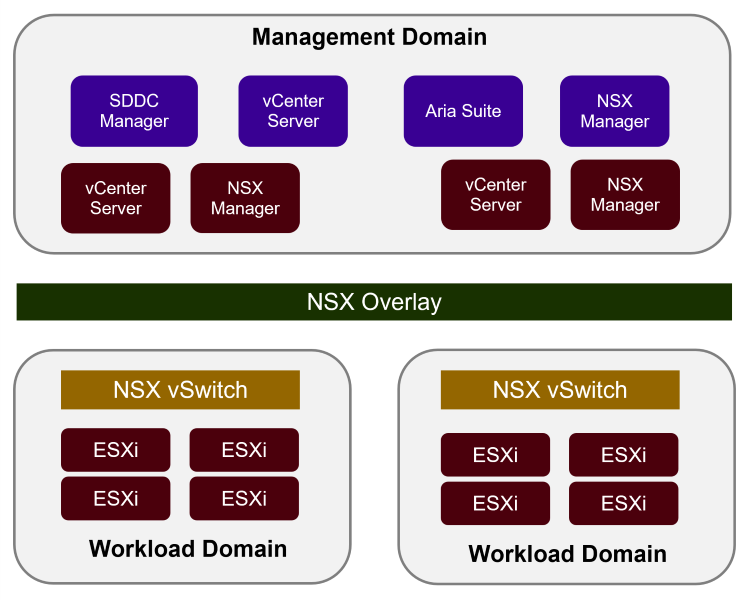
There are two primary types of domains with VCF:
-
Management Domain – The management domain includes components responsible for the core functions of the VCF environment. The components handle essential tasks such as resource provisioning, monitoring, maintenance and include 3rd party plug-in integrations such as NetApp ONTAP Tools for VMware. Management domains can be deployed using the VCF Installer Appliance to ensure best practices are followed, or an existing vCenter environment can be converted into a VCF management domain.
-
Workload Domain – Workload domains are designed to be pools of resources dedicated to a specific operational need, workload or organization. Workload domains are deployed easily via the OPS Manager, helping to automate a series of complex tasks. Up to 24 workload domains can be provisioned within a VCF environment, with each representing a unit of application-ready infrastructure. Each workload domain has its own NSX infrastructure or share an existing one depends on whether it is a single or multi-region deployment.
Storage with VCF
Central to the functionality of domains is the storage that they consume. While VCF includes CPU-core based vSAN capacity for hyper-converged use cases, it also supports a wide range of external storage solutions. This flexibility is crucial for enterprises that have significant investments in existing storage arrays or need to support protocols beyond what vSAN affords. VMware supports multiple storage types with VCF.
There are two primary types of storage with VCF:
-
Principal storage – This storage type is auto provisioned as part of day 0 deployment of a new VCF domain or as part of converge or import of an existing vCenter. VCF installer supports VSAN, VMFS on FC and NFS as part of greenfield deployment, while other supported storage types including VMFS on iSCSI, NVMe-oF can be made as principal storage as part of a converge or import of an existing vCenter. ONTAP Tools for VMware vSphere can be used only for converge or import of an existing vCenter to deploy principal storage for a VCF domain. Any datastore created as part of additional cluster deployment or as part of a domain expansion is considered principal storage. Principal storage is used to host the VCF management components, including vCenter, NSX Manager, and SDDC Manager, as well as the workloads running within the domain.
-
Supplemental storage – Supplemental storage are any datastore that is provisioned after the initial deployment of a VCF domain or converge or import of an existing vCenter environment. Supplemental storage can be created using ONTAP Tools for VMware vSphere to deploy datastores for a VCF domain. Supplemental storage are created to address additional capacity needs, performance requirements, or to support specific workloads that require different storage characteristics. Supplemental storage can also be created to create stretch clusters for high availability.
Support VCF Storage types
Domain Type |
Principal Storage |
Supplemental Storage |
Management Domain |
vSAN |
vVols (FC, iSCSI, or NFS) 1 |
Workload Domain |
vSAN |
vVols (FC, iSCSI, or NFS) 1 |

|
1 vVol support is deprecated in vSphere environments. 2 With Converge or import option |
Why ONTAP for VCF
In addition to use cases involving investment protection and multi-protocol support, there are many additional reasons to take advantage of external shared storage within a VCF workload domain. It may be assumed that storage provisioned for a workload domain is merely a repository to host VMs and container. However, organization needs often outgrow the capabilities of the licensed-capacity and require enterprise storage. Storage provided by ONTAP, allocated to domains within VCF, is easy to deploy and offers a future-proof shared storage solution.
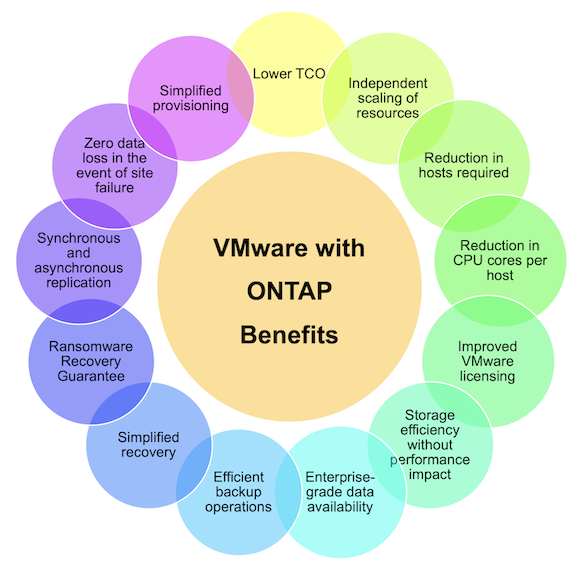
For more information regarding the top ONTAP Benefits for VMware VCF identified below see Why ONTAP for VMware.
-
Flexibility on day 1 and as you scale
-
Offload storage tasks to ONTAP
-
Best in class storage efficiency
-
Enterprise-grade data availability
-
Efficient backup and recovery operations
-
Wholistic business continuity capabilities
Additional information:
Summary
ONTAP provides a platform that addresses all workload requirements, offering customized block storage solutions and unified offerings to enable faster results for VMs and applications in a reliable and secure manner. ONTAP incorporates advanced data reduction and movement techniques to minimize the data center footprint, while ensuring enterprise-level availability to keep critical workloads online. Additionally, the AWS, Azure and Google support NetApp-powered external storage to enhance vSAN storage in VMware cloud-based clusters as part of their VMware-in-the-Cloud offerings. Overall, NetApp's superior capabilities make it a more effective choice for VMware Cloud Foundation deployments.
Documentation resources
For detailed information on NetApp offerings for VMware Cloud Foundation, refer to the following the following:
VMware Cloud Foundation Documentation
Four (4) part blog series on VCF with NetApp
VMware Cloud Foundation with NetApp All-Flash SAN Arrays
-
VCF with NetApp ASA arrays, Introduction and Technology Overview
-
Use ONTAP with FC as principal storage for management domains
-
Use ONTAP Tools to deploy iSCSI datastores in a VCF management domain
-
Use ONTAP tools to deploy NVMe-oF datastores as principal storage in a VCF management domain
-
Use ONTAP Tools to deploy supplemental FC datastores in a VCF management domain
-
Use ONTAP tools to deploy supplemental iSCSI datastores in a workload domain
-
Use ONTAP Tools to deploy vVols (iSCSI) datastores in a workload domain
VMware Cloud Foundation with NetApp All-Flash AFF Arrays
Links for the ASA are mostly applicable to AFF arrays, but the following links are specific to AFF arrays and their capabilities.
-
VCF with NetApp AFF arrays, Introduction and Technology Overview
-
Use ONTAP with NFSv3 as principal storage for management domains
-
Use ONTAP tools to deploy NFSv3/NFSv4.1 datastores in a VCF management domain
-
Use ONTAP with NFS as principal storage for workload domains
-
Use ONTAP tools to deploy NFSv3/NFSv4.1 datastores in a workload domain
-
Use ONTAP tools to deploy vVols (NFS) datastores in a workload domain
NetApp FlexPod solutions for VMware Cloud Foundation