


Performance SLO for Keystone

 Suggest changes

 PDFs
PDFs
Keystone STaaS offers a latency-based performance service level objective (SLO), targeting the 90th percentile latency per performance service level instance (PSLI) for unified (excluding the Value performance service level), block-optimized, and AFX storage. Learn how to check performance, which rules apply, and how to receive service credits if Keystone does not meet the latency goal for used capacity up to the burst limit, as specified in the Keystone order terms and conditions.
Metrics
-
Degraded performance: The amount of time, in minutes, per incident, during which the 90th percentile latency target is not met.
-
The 90th percentile latency is measured per volume, per performance service level instance, for all volumes within a Keystone Order. Latency is sampled every five minutes, and the 90th percentile value calculated over a 24-hour period is used as the daily measure, considering the following points:
-
The volumes that record at least five IOPS at the time of metrics collection are considered for a sample.
-
Volumes with greater than 30% write operations at the time of metrics collection are excluded from the sample.
-
For volumes that have FabricPool enabled, the latency incurred due to the transfer of data to and from the target (cold) storage is not counted.
-
Latency caused by the application, host, or customer network outside of the ONTAP cluster is not counted.
-
When using the advanced data protection add-on service, the target latency includes only IO operations to and from the local storage array.
-
During a 24-hour period, at least ten valid metrics should be available. If the condition is not met, the metrics will be discarded.
-
In FabricPool configurations, performance levels are applicable when all requested data blocks are on FabricPool source (hot) storage and the source storage is not in a SnapMirror Synchronous relationship.
-
-
Applicable only to NetApp AFF and AFX platforms only.
-
All minimum and maximum capacity and other limits per performance service level instance, as specified in the Keystone order, are applicable.
-
All performance service level instances require full and continuous enablement of the monitoring tool and AutoSupport (ASUP).
Service credits

|
SLAs and guarantees are available on a nomination basis. |
NetApp issues service credits for the degraded performance:
Performance threshold |
Service credit |
90th percentile latency > target latency |
3% for each calendar day of occurrence |
Service credit calculation
Service credits are determined using the following formula:
Service credits = (impacted capacity / total committed capacity) X capacity fees X affected days X credit percentage
Where:
-
impacted capacity: The amount of stored capacity affected.
-
total committed capacity: The committed capacity for the performance service level for the Keystone order.
-
capacity fees: The fees for the affected performance level as per the Keystone order.
-
affected days: The number of calendar days impacted.
-
credit percentage: The predetermined percentage for service credit.
Example
The following example shows how to calculate service credits:
Service level |
Impacted capacity |
Total committed capacity |
Capacity fees |
Affected calendar days |
Credit percentage |
Extreme |
10 Tib |
50 Tib |
$1000 |
2 |
3% |
Using the formula:
Service credits = ( 10 / 50 ) X 1000 x 2 x 0.03
Based on calculation, the service credits are $12.
Service credit request
If a breach of the SLA is detected, open a priority 3 (P3) support ticket with NetApp Keystone support.
-
The following details are required:
-
Keystone subscription number
-
Volumes and storage controller details
-
Site, time, date, and description of the issue
-
Calculated time duration of latency detection
-
Measurement tools and methods
-
Any other applicable document
-
-
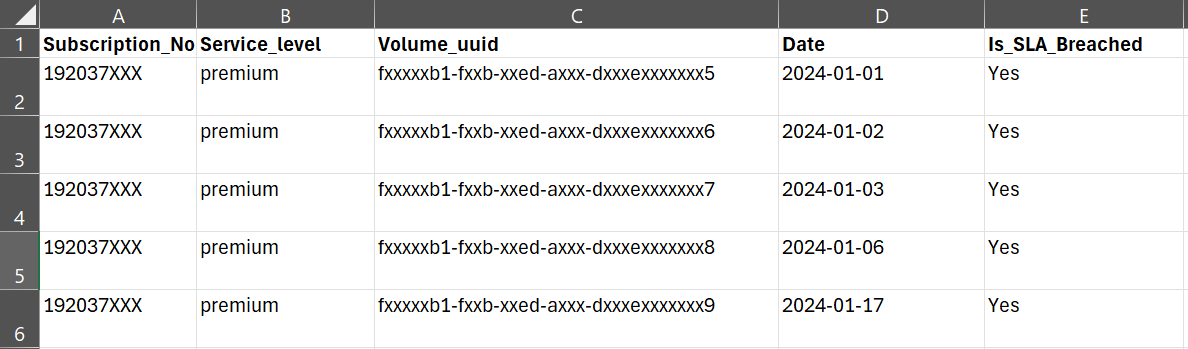
Provide the details in the Excel sheet as shown below for a P3 ticket opened with NetApp Keystone support.
|
|
|