


Replace the chassis in an AFF A800 system


 Suggest changes

 PDFs
PDFs
Replace the chassis in your AFF A800 system when a hardware failure requires it. The replacement process involves removing the controllers, moving the drives to the replacement chassis, removing the impaired chassis, installing the replacement chassis, and reinstalling the chassis components.
Step 1: Remove the controller modules from the old chassis
Remove the controller modules from the old chassis.
To replace the chassis, you must remove the controller modules from the old chassis.
-
If you are not already grounded, properly ground yourself.
-
Release the power cable retainers, and then unplug the cables from the power supplies.
-
Loosen the hook and loop strap binding the cables to the cable management device, and then unplug the system cables from the controller module, keeping track of where the cables were connected.
Leave the cables in the cable management device so that when you reinstall the cable management device, the cables are organized.
-
Remove the cable management device from the controller module and set it aside.
-
Press down on both of the locking latches, and then rotate both latches downward at the same time.
The controller module moves slightly out of the chassis.
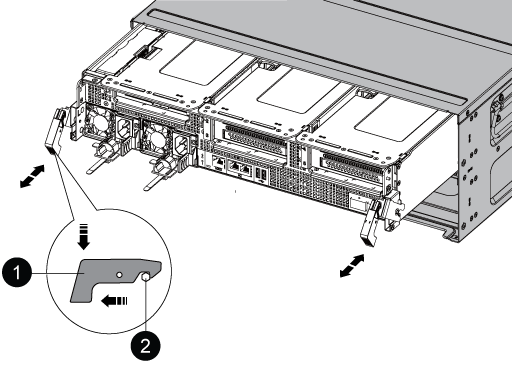

Locking latch

Locking pin
-
Slide the controller module out of the chassis.
Make sure that you support the bottom of the controller module as you slide it out of the chassis.
-
Set the controller module aside in a safe place, and repeat these steps for the other controller module in the chassis.
Step 2: Move drives to the new chassis
Move the drives from the old chassis to the new chassis.
-
Gently remove the bezel from the front of the system.
-
Remove the drives:
-
Press the release button at the top of the carrier face below the LEDs.
-
Pull the cam handle to its fully open position to unseat the drive from the midplane, and then gently slide the drive out of the chassis.
The drive should disengage from the chassis, allowing it to slide free of the chassis.

When removing a drive, always use two hands to support its weight.
Drives are fragile. Handle them as little as possible to prevent damage to them.
-
-
Align the drive from the old chassis with the same bay opening in the new chassis.
-
Gently push the drive into the chassis as far as it will go.
The cam handle engages and begins to rotate upward.
-
Firmly push the drive the rest of the way into the chassis, and then lock the cam handle by pushing it up and against the drive holder.
Be sure to close the cam handle slowly so that it aligns correctly with the front of the drive carrier. It clicks when it is secure.
-
Repeat the process for the remaining drives in the system.
Step 3: Replace a chassis from within the equipment rack or system cabinet
Replace the impaired chassis in the equipment rack or system cabinet with the new chassis.
-
Remove the screws from the chassis mount points.
-
With two people, slide the old chassis off the rack rails in a system cabinet or equipment rack, and then set it aside.
-
If you are not already grounded, properly ground yourself.
-
Using two people, install the replacement chassis into the equipment rack or system cabinet by guiding the chassis onto the rack rails in a system cabinet or equipment rack.
-
Slide the chassis all the way into the equipment rack or system cabinet.
-
Secure the front of the chassis to the equipment rack or system cabinet, using the screws you removed from the old chassis.
-
If you have not already done so, install the bezel.
Step 4: Install the controller modules into the new chassis
After you install the controller modules into the new chassis, boot the chassis.
For HA pairs with two controller modules in the same chassis, the sequence in which you install the controller modules is especially important because each module attempts to reboot as soon as you completely seat it in the chassis.
-
Align the end of the controller module with the opening in the chassis, and then gently push the controller module halfway into the system.
Do not completely insert the controller module in the chassis until instructed to do so. -
Recable the console to the controller module, and then reconnect the management port.
-
Complete the reinstallation of the controller module:
-
Firmly push the controller module into the chassis until it meets the midplane and is fully seated.
The locking latches rise when the controller module is fully seated.
Do not use excessive force when sliding the controller module into the chassis to avoid damaging the connectors. -
Rotate the locking latches upward, tilting them so that they clear the locking pins, and then lower them into the locked position.
-
Plug the power cords into the power supplies, reinstall the power cable locking collar, and then connect the power supplies to the power source.
The controller module begins to boot as soon as power is restored. Be prepared to interrupt the boot process.
-
If you have not already done so, reinstall the cable management device.
-
Interrupt the normal boot process by pressing
Ctrl-C.
-
-
Repeat the preceding steps to install the second controller into the new chassis.
After you have replaced the impaired AFF A800 chassis and reinstalled the components, you need to complete the chassis replacement