Learn about NetApp virus scanning with ONTAP Vscan


 Suggest changes

 PDFs

Vscan is an antivirus scanning solution that allows you to protect your data from being compromised by viruses or other malicious code. It combines partner-provided antivirus software with ONTAP features to give you the flexibility you need to manage file scanning.
How virus scanning works
Storage systems offload scanning operations to external servers hosting antivirus software from third-party vendors.
Based on the active scanning mode, ONTAP sends scan requests when clients access files over SMB (on-access) or access files in specific locations, on a schedule or immediately (on-demand).
-
You can use on-access scanning to check for viruses when clients open, read, rename, or close files over SMB. File operations are suspended until the external server reports the scan status of the file. If the file has already been scanned, ONTAP allows the file operation. Otherwise, it requests a scan from the server.
On-access scanning is not supported for NFS.
-
You can use on-demand scanning to check files for viruses immediately or on a schedule. We recommend that on-demand scans run only in off-peak hours to avoid overloading existing AV infrastructure, which is normally sized for on-access scanning. The external server updates the scan status of checked files, so that file-access latency is reduced over SMB. If there were file modifications or software version updates, it requests a new file scan from the external server.
You can use on-demand scanning for any path in the SVM namespace, even for volumes that are exported only through NFS.
You typically enable both on-access and on-demand scanning modes on an SVM. In either mode, the antivirus software takes remedial action on infected files based on your software settings.
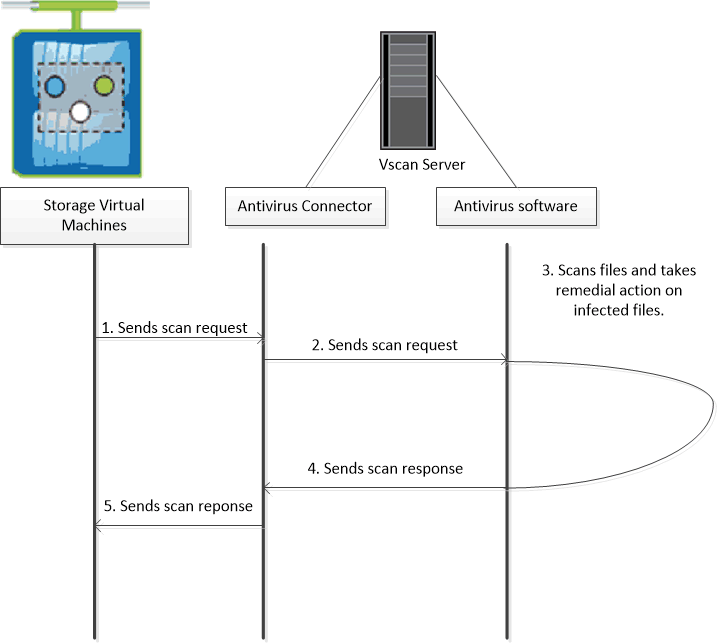
The ONTAP Antivirus Connector, provided by NetApp and installed on the external server, handles communication between the storage system and the antivirus software. Beginning with ONTAP 9.20.1, ONTAP supports an Internet Content Adaptation Protocol (ICAP)-based scanning path that eliminates the need for the Antivirus Connector. Each SVM uses either ICAP or Antivirus Connector, not both.

|
ICAP-based Vscan supports on-access scanning only. |
ICAP-based Vscan compared with the Antivirus Connector
The following table summarizes the differences between the Antivirus Connector and ICAP-based Vscan:
Feature |
Antivirus Connector |
ICAP-based Vscan |
|---|---|---|
Component |
ONTAP Antivirus Connector installed on a Windows server |
None required; ONTAP connects directly to the scan engine |
Communication protocol |
SMB Named Pipes and MS-RPC |
ICAP over TCP |
Infrastructure |
Dedicated Vscan connection manager |
FPolicy shared-memory notification pipeline |
Supported scan engine OS |
Windows only |
Windows and Linux |
Scalability |
Limited to 400 LIF connections per Antivirus Connector instance |
Leverages FPolicy connection pooling for higher scalability |
Discovery mechanism |
Polling-based discovery of SVMs and LIFs |
Event-driven connection management through FPolicy |
The sample below shows the Antivirus Connector communication method.